Remove Net Wrap Actuator
E54540-UN-01MAY06
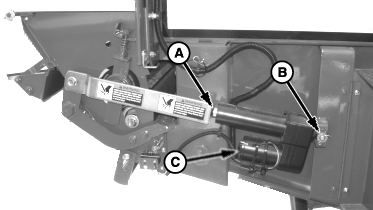
A - Pin
B - Pin
C - Actuator
-
NOTE: Use monitor-controller channel 019 when removing net wrap actuator. This allows EXTEND and RETRACT keys to control actuator position and remove load from actuator mounting pins.
Open net wrap cover.
-
Unlatch and fully open actuator door.
-
Turn tractor key to ON position. Do not start tractor engine.
-
With monitor-controller in NET mode, press and hold COUNTER key. Turn monitor-controller ON. CH 001 will appear in the digital display.
-
Continue to hold COUNTER key and press PLUS key to advance to CH 019. Release COUNTER key.
-
NOTE: Retracting the actuator will cause the mounting pins to bind.
Press and briefly hold EXTEND key to move actuator (C) to release load from mounting pins (A and B).
-
 CAUTION: To avoid personal injury from unexpected knife movement,
disconnect net wrap actuator wire connector or monitor-controller
power plug from power source when performing adjustment or working
in area.
CAUTION: To avoid personal injury from unexpected knife movement,
disconnect net wrap actuator wire connector or monitor-controller
power plug from power source when performing adjustment or working
in area.Turn monitor-controller OFF. Turn tractor key to OFF position. Remove key. Disconnect monitor-controller power plug from power source.
-
Remove tie strap from around actuator motor and disconnect actuator wire connector.
-
NOTE: Record location of washers on mounting pins used to aid in installation of actuator.
Remove mounting pins (A and B), washers, and actuator (C).
|
PP98408,0000FB0-19-20130207 |