Adjust Bale Diameter Sensor (Channel 005)
-
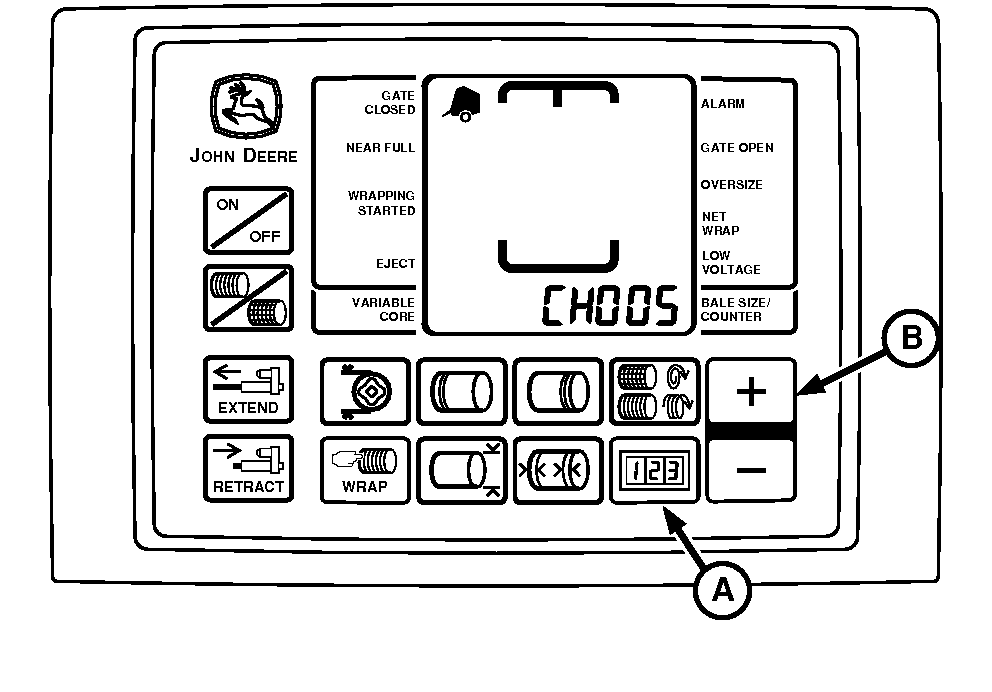
E57138-UN-12MAY09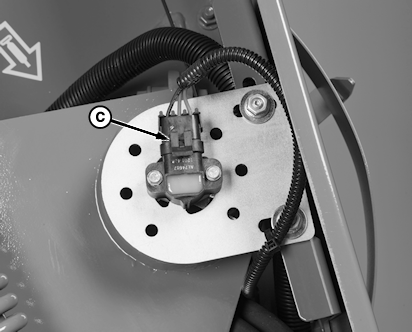
E67276-UN-10AUG12A - COUNTER Key
B - PLUS Key
C - Sensor
Start tractor engine. -
Using tractor selector valve, raise gate and belt tension arm all the way to the top.
-
Engage tractor parking brake and place transmission in Park.
-
Lock gate in open position.
-
Shut off tractor engine.
-
Turn tractor key to ON position. Do not start tractor engine.
-
Press and hold COUNTER key (A) while turning monitor-controller ON.
-
Continue to hold COUNTER key (A) and press PLUS key (B) until CH005 appears in digital display. Release COUNTER key (A) and view bale size sensor number.
-
Loosen mounting hardware and rotate sensor (C) fully clockwise. Rotate sensor counterclockwise until 173 is displayed and steady tone sounds.
-
NOTE: If 173 is exceeded while rotating sensor counterclockwise or while tightening screws, rotate sensor clockwise and repeat Steps 9 and 10 as necessary.
Tighten sensor mounting screws.
-
Turn monitor-controller OFF. Turn tractor key to OFF position.
-
Lower gate and belt tension arm using tractor selector valve.
|
PP98408,0000FC1-19-20130207 |