Test Liquid Crystal Display (LCD) Panel (Channel 020)
E52529-UN-10JUN08
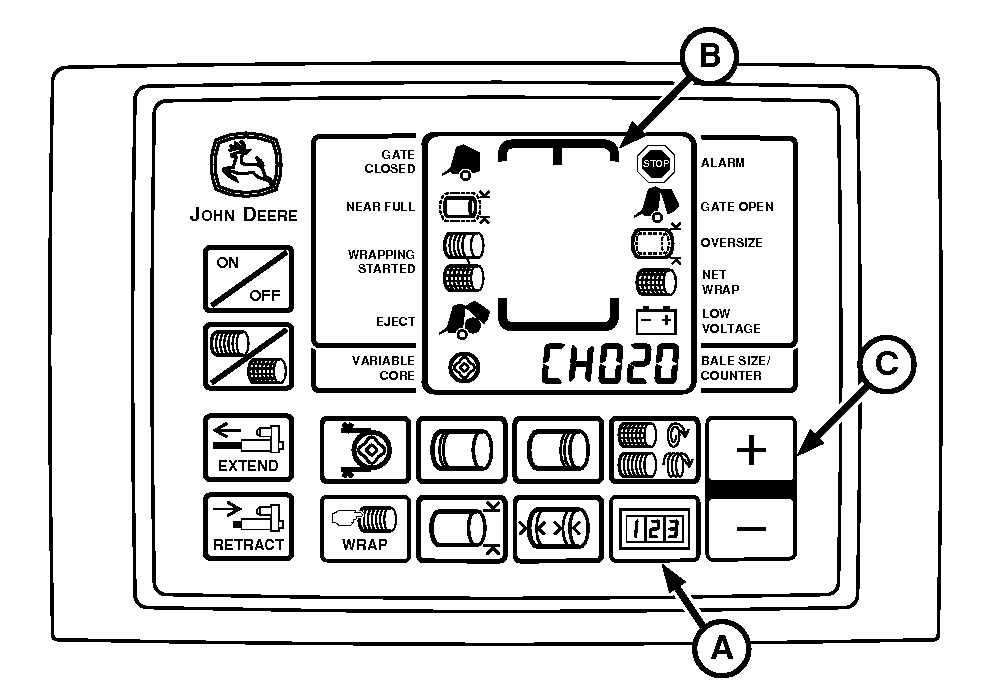
A - COUNTER Key
B - LCD Panel
C - PLUS Key
Use the following test procedure to check if a segment of the LCD panel has failed.-
Turn tractor key to ON position. Do not start tractor engine.
-
Press and hold COUNTER key (A) while Pressing TWINE or NET key to turn monitor-controller ON.
-
Continue to hold COUNTER key (A) and press PLUS key (C) until CH020 appears in digital display.
-
NOTE: Number of bale shape indicator bars displayed is 24 bars per side.
Release keys and view entire LCD panel (B). Make sure that all segments and indicators are displayed. If not, see your John Deere dealer.
-
Turn monitor-controller OFF. Turn tractor key to OFF position. Remove key.
|
PP98408,0000FC7-19-20130207 |