Check and Adjust Net Wrap Switch
-
 CAUTION:
TS268-UN-23AUG88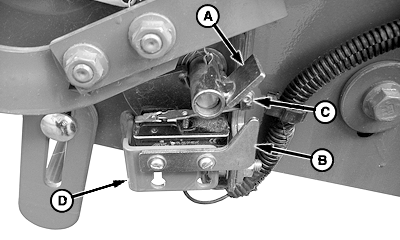
E57795-UN-03AUG09Style “A”
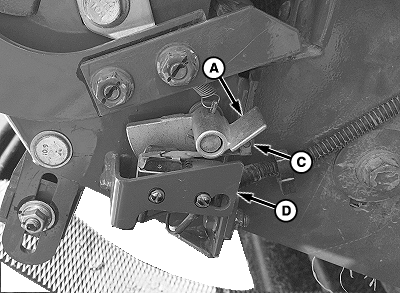
E79991-UN-22SEP15Style “B”
A - Switch Arm
B - Down Stop Plate
C - Actuator Tab
D - Bracket
Knife is sharp and net wrap cut-off arm can move with out warning. Keep hands clear of knife arm.Turn tractor key to ON position. Do not start tractor engine.
-
Turn monitor-controller ON. Ensure monitor-controller is in NET mode.
-
Open net wrap cover.
-
Clean area around switch.
-
NOTE: Style “A”—Verify actuator tab (C) overlaps down stop plate (B). Bend plate (B) or bracket (D) to obtain overlap.
Style “B”—Verify actuator tab (C) overlaps bracket (D). Bend bracket (D) to obtain overlap.
Verify monitor display and switch operation:
- Verify knife arm angle is down.
- Go to channel 012. Tone must come on.
- Rotate switch arm (A) down and tone must quit.
- Release switch arm (A) and tone must come on.
-
Turn tractor ignition OFF and remove key.
-
NOTE: If switch is replaced, connect black wire to common (rear) terminal and green wire to normally closed (front) terminal.
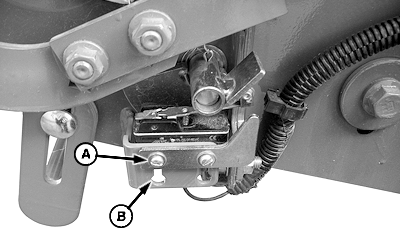
E57796-UN-03AUG09Adjustable Down Stop Plate Only—Style “A”
A - Screws (2 used)
B - Mounting Slots
Switch Adjustment:-
Loosen and position switch and stop plate screws (A) against top of switch mounting slots (B). Ensure that both screws are against top of slots.
-
Tighten screws until heads are just contacting washers. Turn screws 1/4—1/2 turn more to tighten securely.
-
Recheck monitor display and switch operation. (See TEST NET WRAP SWITCH—MONITOR-CONTROLLER ASSISTED TEST [CHANNEL 012] in this section.)
-
-
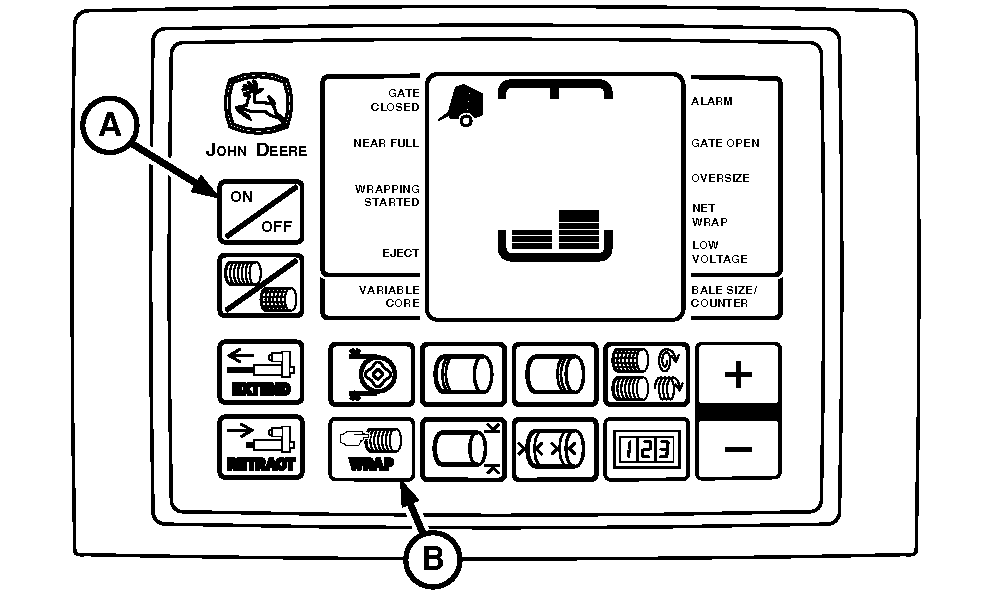
E52493-UN-24JUN03A - ON or OFF Key
B - WRAP Key
Close net wrap cover. -
Press WRAP key (B) to cycle net wrap actuator. Net wrap cut-off arm must be at home (downward) position.
IMPORTANT: If this procedure is not followed, net will be fed continuously during the next bale. The letter n will appear in monitor-controller display.
-
Turn monitor-controller OFF (A). Turn tractor key to OFF position. Remove key.
|
OUO6064,0001598-19-20150921 |