Tractor Convenience Outlet
John Deere 55 Series, 6000, 7000, or 8000 models
E66075-UN-19JUN12
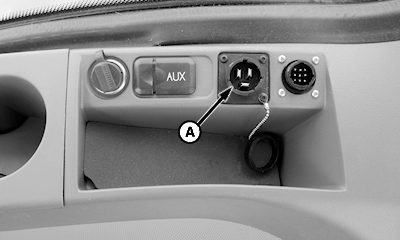
A - Convenience Outlet
Plug BaleTrak™ Pro into the standard convenience outlet (A) located on side console.Tractor models without a convenience power outlet
E39605-UN-27NOV95
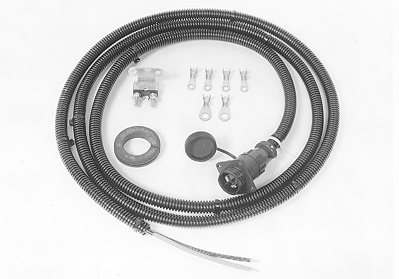
Order convenience outlet kit AE50549 from your John Deere dealer. Kit consists of 12 gauge wires and a circuit breaker. When installing kit, attach power and ground wires directly to battery terminal clamp bolts, only.
IMPORTANT: Monitor-controller is polarity sensitive. Red lead from monitor-controller power input MUST be installed on positive (+) side of a 12 V system. Failure to do so will cause monitor-controller to not function.
Other tractor models with a convenience power outlet
E52484-UN-24JUN03
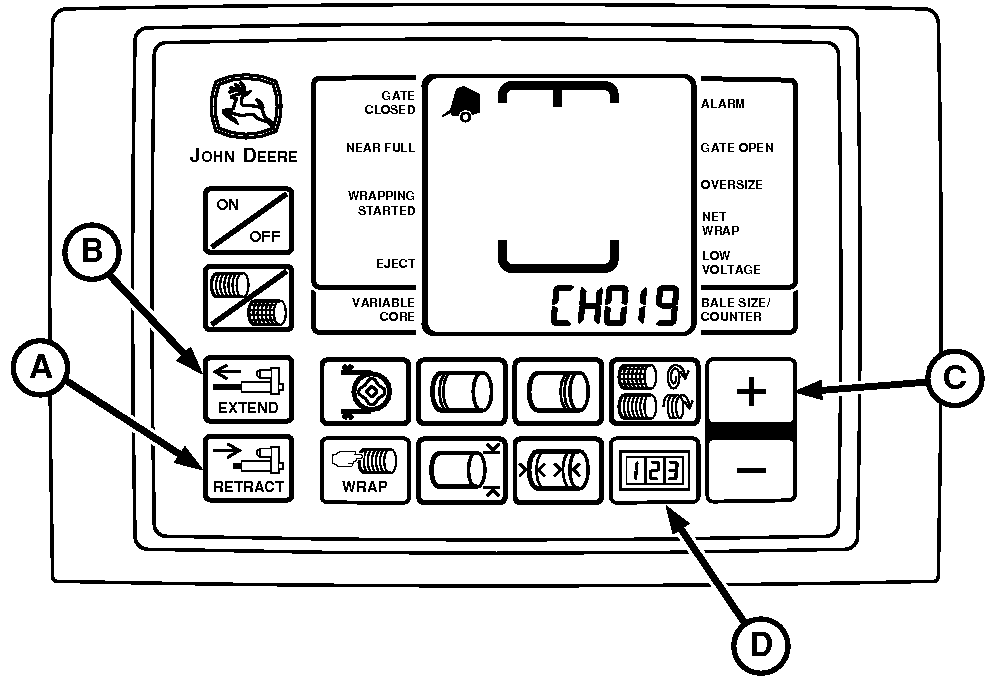
A - RETRACT Key
B - EXTEND Key
C - PLUS Key
D - COUNTER Key
Complete the following check to determine if the convenience power outlet provides adequate power for the BaleTrak™ Pro system.
With tractor engine running and monitor in twine mode:
-
Press and hold COUNTER key (D) while turning on monitor. Continue to hold COUNTER key and press PLUS key (C) until CH019 appears in the digital display.
-
Release COUNTER key. View voltage readout.
-
Using the EXTEND key (B), extend twine actuator slightly.
-
Push and hold RETRACT key (A) until actuator stalls out in cut-off position and note voltage displayed.
-
IMPORTANT: Monitor-controller is polarity sensitive. Red lead from monitor-controller power input MUST be installed on positive (+) side of a 12 V system.
NOTE: If a convenience outlet is needed, order convenience outlet (AE50549) from your John Deere dealer.
If voltage is less than 9.7, install convenience outlet kit. Attach power and ground wires directly to battery terminal clamp bolts, only.
|
BaleTrak is a trademark of Deere & Company |
PP98408,0000FE8-19-20130211 |