Activate BaleTrak™ Pro Monitor-Controller Alarms
IMPORTANT: Continuing to operate with a GATE OPEN or OVERSIZE alarm will result in baler damage.
E47506-UN-10JUN08
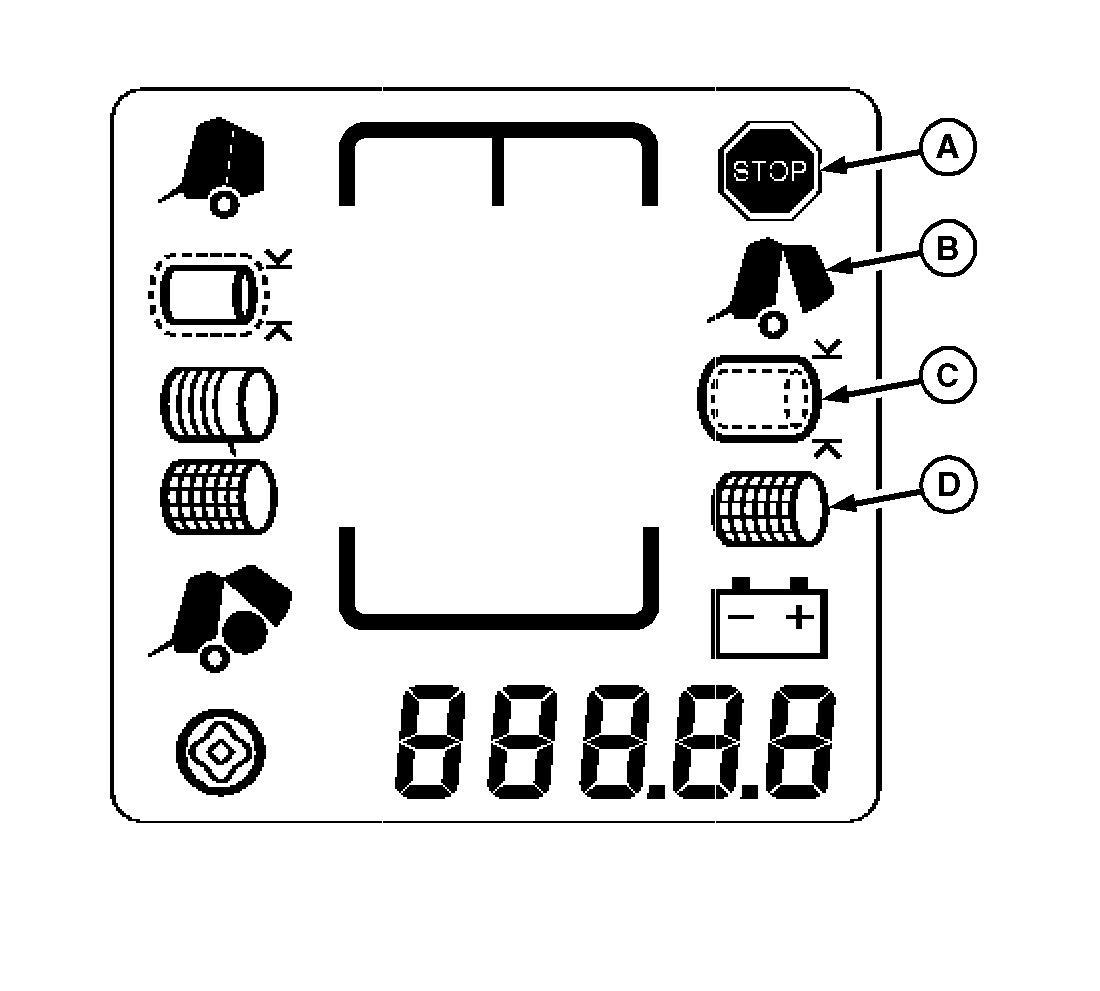
A - Stop Indicator
B - Gate Open Indicator
C - Oversize Bale Indicator
D - Net Wrap Indicator
Three conditions can activate the flashing STOP indicator (A) and alarm. Should the flashing STOP display and the alarm sound during normal operation, stop baling immediately. Take corrective action to silence alarm and cancel visual indicators.The following conditions will activate the flashing STOP indicator (A) and alarm:
-
GATE OPEN (B): One gate latch is open
and one is closed. Continuing to operate will twist gate and result
in machine damage.
-
OVERSIZE (C): Bale is above maximum
allowable diameter. Continuing to operate with oversize bale in chamber
can cause severe gate damage, roller breakage, and belt splice damage.
- NET WRAP (D): Net did not feed or knife did not cut net.
A flashing STOP indicator with no alarm can also appear at start-up if wiring to actuator is disconnected or damaged, or if monitor-controller fuse is blown.
|
PP98408,000101F-19-20130211 |