Twine End Wrap Distance
Set Mechanical Twine Guide For End Wrap Distance
NOTE: 469 and 469S; Equipped with left-hand twine guide only. (See UNDERSTAND TWINE WRAP TERMS AND SETTINGS in this section.)
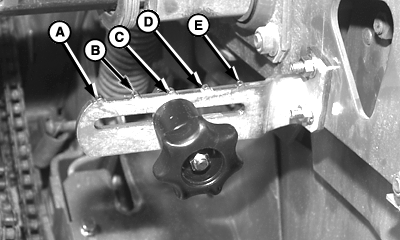
E47542-UN-06DEC99
Right-Hand Side Shown
A - Twine End Wrap Distance—89 mm (3-1/2 in.)
B - Twine End Wrap Distance—114 mm (4-1/2 in.)
C - Twine End Wrap Distance—140 mm (5-1/2 in.)
D - Twine End Wrap Distance—165 mm (6-1/2 in.)
E - Twine End Wrap Distance—190 mm (7-1/2 in.)
The twine guide controls twine wrap distance from left-hand end of bale. Twine wrap distance can be adjusted 89—190 mm (3-1/2—7-1/2 in.) at 25 mm (1 in.) increments.For most baling conditions, adjust twine guide to position (B). This setting will position twine end wraps approximately 114 mm (4-1/2 in.) from end of bale.
For dry, slick crops such as straw, coastal Bermuda grass, or flax, increase twine wrap distance to prevent twine from falling off bale.
For crops, such as alfalfa, that fill the bale ends well and Produce square shoulders, decrease twine end wrap distance to improve bale appearance and reduce bale spoilage.
To adjust guide:
-
Loosen knob.
-
Move knob as follows:
- Toward baler sidesheet to increase twine end wrap distance
- Away from baler sidesheet to decrease twine end wrap distance
-
Tighten knob.
Set Right-Hand and Left-Hand End Wrap Distance
-
NOTE: To ensure that twine placement is controlled by mechanical twine guide, adjust monitor-controller twine end wrap distance 1—3 cm (0.50—1.00 in.) less than mechanical twine guide setting. This adjustment will increase number of end wraps.
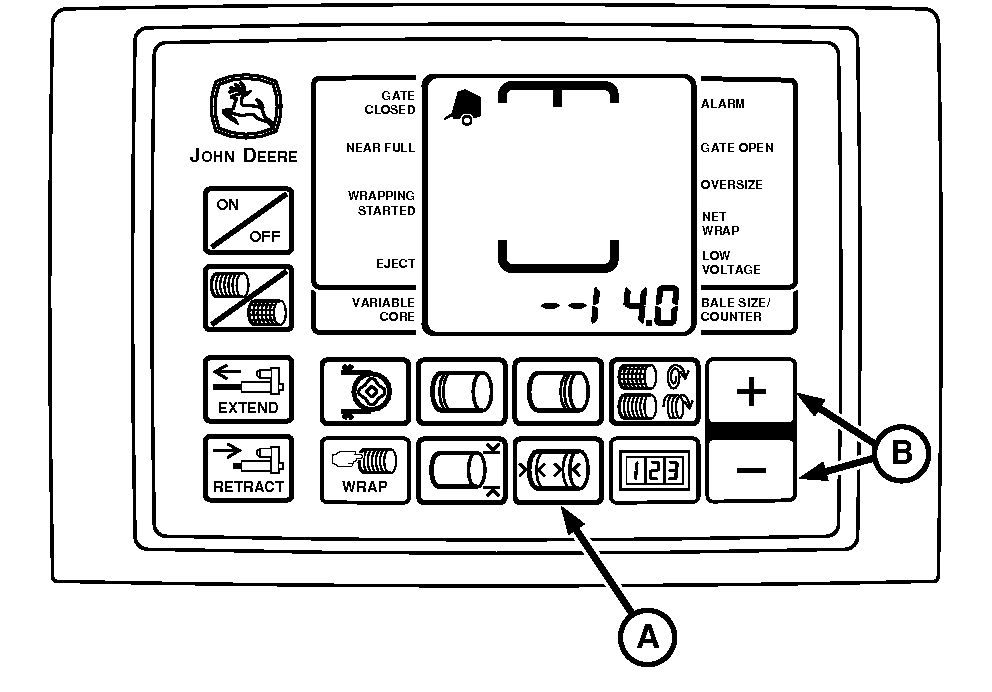
E52447-UN-29JUL03Right-Hand End Wraps Setting
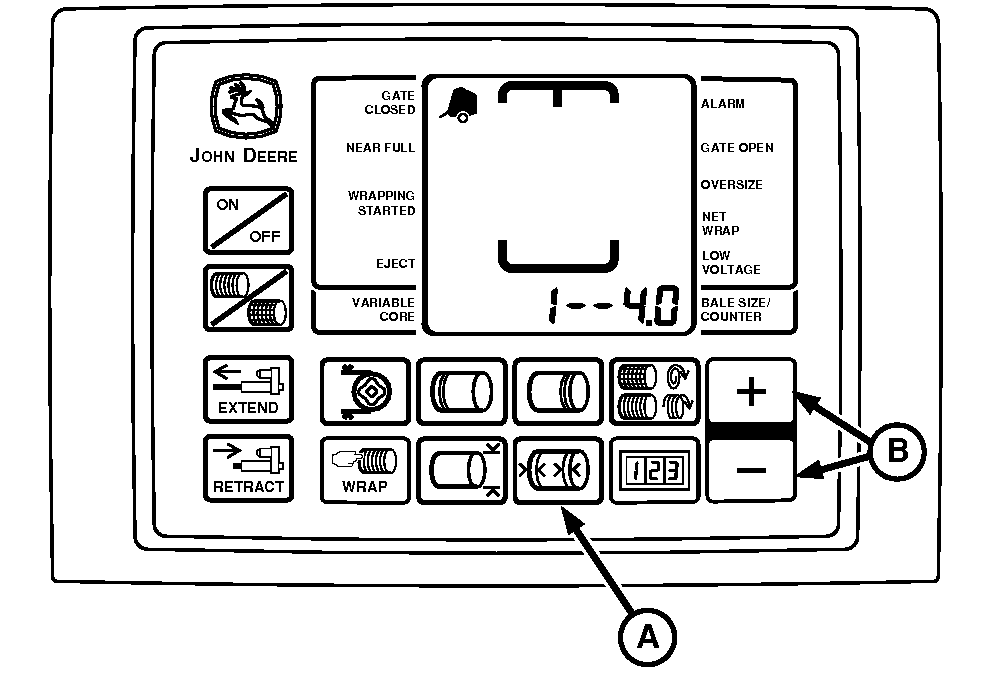
E52446-UN-10JUL03Left-Hand End Wraps Setting
A - Twine Symbol
B - Right-Hand and Left-Hand End Wrap Distance
Turn tractor key to ON position. Do not start tractor engine. Turn monitor-controller ON. -
Press right and left-hand END WRAP DISTANCE key (A). Right end wrap distance will be displayed as shown. Press Plus or MINUS keys (B) until desired distance 8—26 cm (3—10 in.) appears in digital display. Press END WRAP DISTANCE key a second time to set left end wrap distance. Display will be as shown. (End wrap distances are approximate.)
To place twine the same distance from the edge on both ends, a slightly different setting can be required for each end.
-
Turn monitor-controller OFF. Turn tractor key to OFF position. Remove key.
|
PP98408,000102A-19-20130211 |