Dry Straw Twine Wrap Program (Channel 002)
NOTE: For a list of customer channels (See BaleTrak™ Pro Monitor-Controller Channels in this section.)
To access channels (See BaleTrak™ Pro Monitor-Controller Operation in this section.)
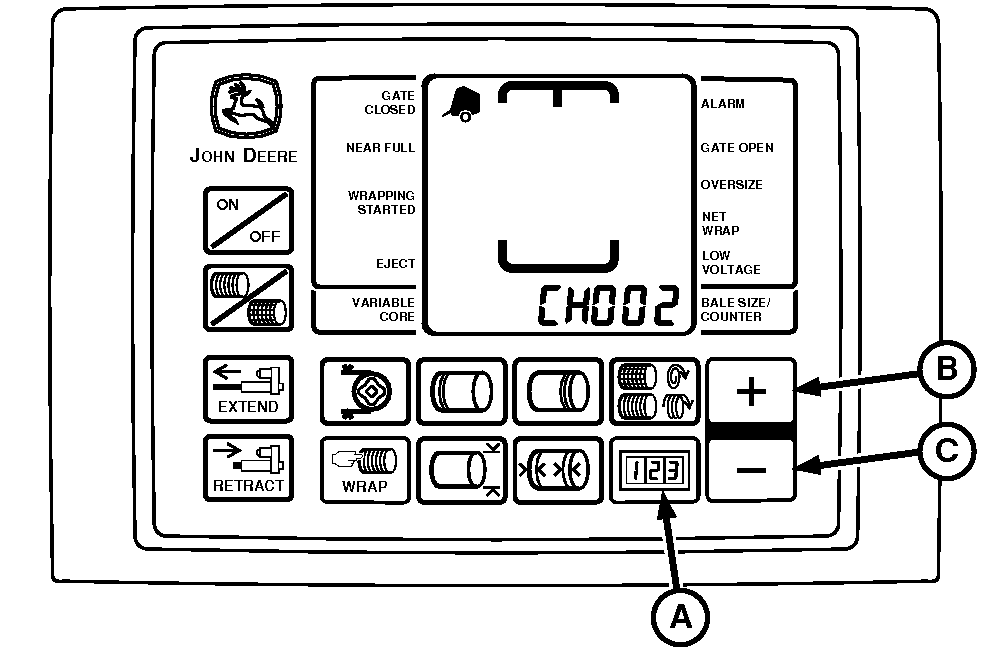
E52451-UN-18JUN03
A - COUNTER Key
B - PLUS Key
C - MINUS Key
When baling dry straw, it can be desirable to place twine across full width of bale to prevent straw from flaking off in the baler.The dry straw twine program provides for full speed twine arm movement from right to left, after the normal full speed starting pass from left to right. The twine arms will return to the right side, pause to place the set number of right-end wraps on the bale, and continue to apply twines as set in the monitor-controller.
To Access Program:
-
Turn tractor key to ON position. Do not start tractor engine.
-
Press and hold COUNTER key (A) while turning monitor-controller ON.
-
Continue to hold COUNTER key (A) and press PLUS key (B) until CH002 appears in digital display.
-
Release COUNTER key (A) and OFF must be displayed.
-
Press PLUS key (B) to turn on Program.
-
Turn monitor-controller OFF to enter setting into memory. This Program will stay active until CH002 is accessed again and the MINUS key (C) is used to return display to OFF.
-
Turn tractor key to OFF position. Remove key.
|
PP98408,0001034-19-20130211 |