Set Twine Re-Extension (Channel 003)
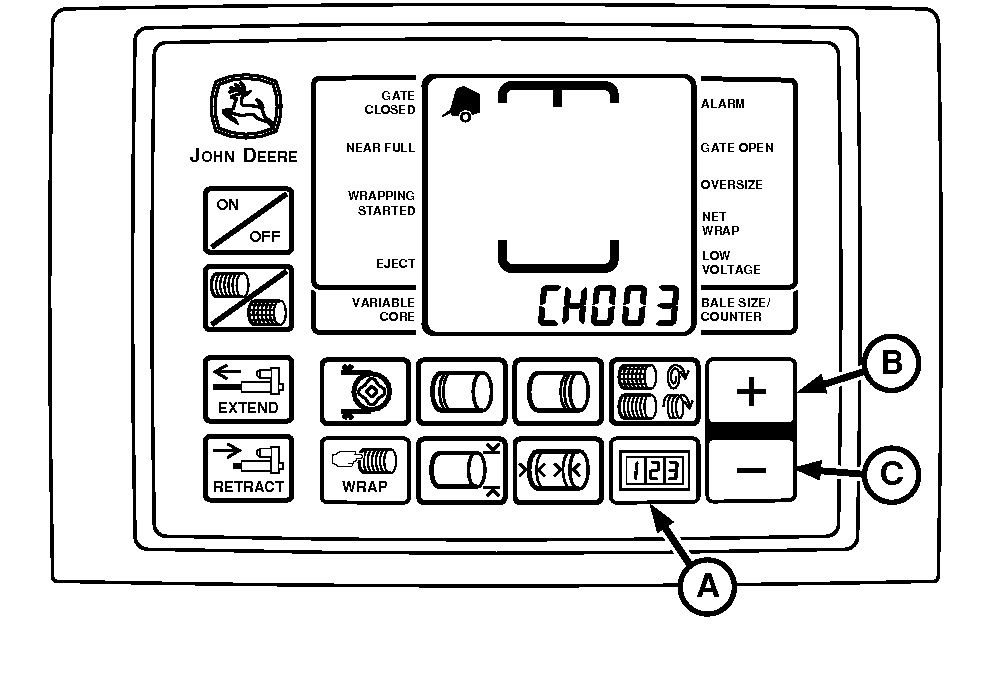
E52452-UN-18JUN03
A - COUNTER Key
B - PLUS Key
C - MINUS Key
Re-Extension is a feature that may help prevent twine unrolling. It places a wrap of twine back toward the middle of the bale from the left-hand end wrap location by the distance indicated by the setting. This is done after the set number of end wraps have been applied.
|
Setting |
Feature |
|---|---|
|
OFF |
OFF |
|
8 |
Approximately 20 cm (8 in.) of re-extension |
|
16 |
Approximately 40 cm (16 in.) of re-extension |
|
24 |
Approximately 60 cm (24 in.) of re-extension |
To Access Special Wrap Program:
-
Turn tractor key to ON position. Do not start tractor engine.
-
Press and hold COUNTER key (A). Turn monitor-controller ON.
-
Continue to hold COUNTER key (A) and press PLUS key (B) until CH003 appears in digital display.
-
Release COUNTER key (A) and view current setting (see chart).
- Press PLUS key (B) to increase setting.
- Press MINUS key to reduce setting.
-
Turn monitor-controller OFF to enter setting into memory.
-
Turn tractor key to OFF position. Remove key.
|
PP98408,0001035-19-20130211 |