Set Monitor-Controller Display, Metric or English Units (Channel 008)
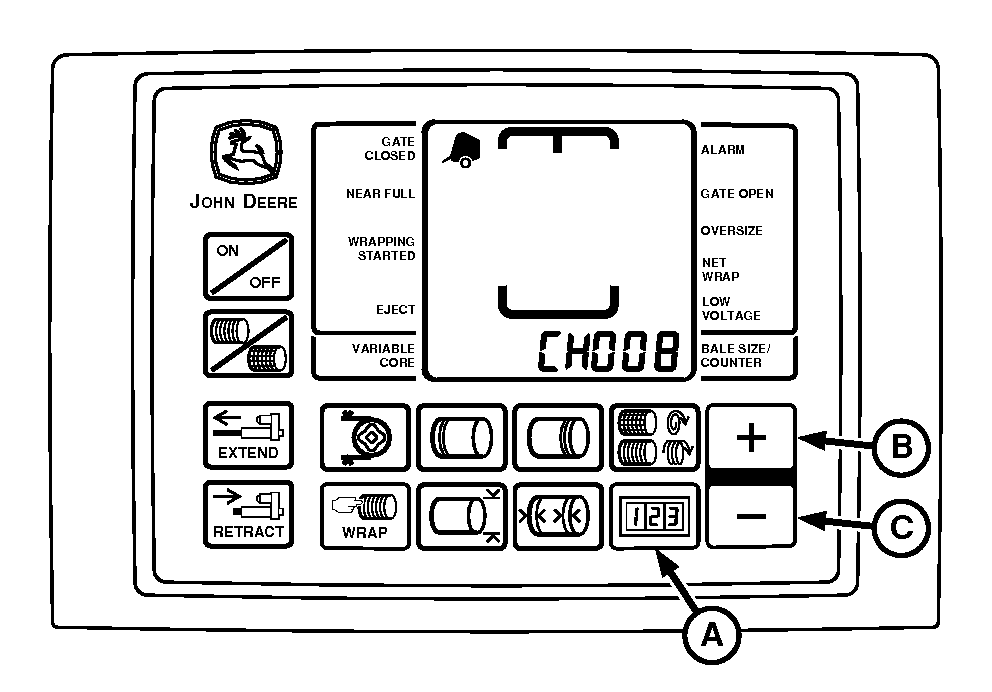
E52525-UN-26JUN03
A - COUNTER Key
B - PLUS Key
C - MINUS Key
NOTE: Monitor-controller is initially set to display in English units (inches; in.).
To Change Setting:
-
Turn tractor key to ON position. Do not start tractor engine.
-
Press and hold COUNTER key (A) while turning monitor-controller ON.
-
Continue to hold COUNTER key and press PLUS key (B) until CH008 appears in digital display.
-
Release COUNTER key and view current setting; either En for English (inches) or SI for metric (centimeters, cm).
-
Use PLUS key (B) and MINUS key (C) to change to desired setting.
-
Turn monitor-controller OFF to enter setting into memory.
-
Turn tractor key to OFF position. Remove key.
|
PP98408,000103A-19-20130211 |