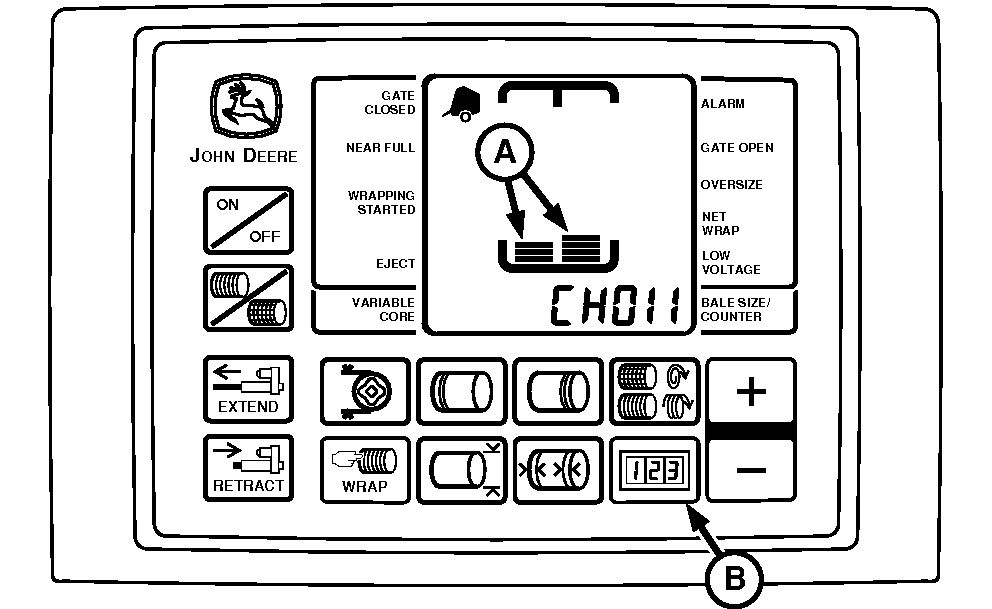
Set Bale Shape Sensitivity (Channel 011)
E52454-UN-18JUN03
A - Bale Shape Bars
B - COUNTER Key
The sensitivity of the bale shape bars (A) is factory set at 3 to dampen sensor signals. The reaction of bale shape bars to actual changes in the bale shape can be adjusted to be responsive or dampened.Decreasing the setting makes the bale shape bars less responsive (slower to react) to bale shape changes.
Increasing the setting makes the bale shape bars responsive (fast to react) to crop intake. It can be desirable to increase bale shape sensitivity when rapidly forming bales.
|
SETTING |
REACTION |
|---|---|
|
1 |
Slowest |
|
2 |
Slow |
|
3 |
Mid-Point (Initial Setting) |
|
4 |
Fast |
|
5 |
Fastest |
To Adjust Bale Shape Sensitivity:
-
Turn tractor key to ON position. Do not start tractor engine.
-
Press and hold COUNTER key (B) while turning monitor-controller ON.
-
Continue to hold COUNTER key and press PLUS key until CH011 appears in digital display. Release COUNTER key and view current sensitivity setting (1—5).
-
Use PLUS key to increase setting, making indicators more responsive. Use MINUS key to reduce setting, making indicators less responsive.
-
Turn monitor-controller OFF to enter setting into memory.
-
Turn tractor key to OFF position. Remove key.
|
PP98408,000103C-19-20130211 |