Test Twine or Net Wrap Actuator Current (Channel 018)
IMPORTANT: Current overload protection to twine actuator is bypassed when using channel 018. Extended use of channel 018 can cause actuator damage.
NOTE: Channel 018 allows operator use of EXTEND key (B) and RETRACT key (C) to position actuator for service.
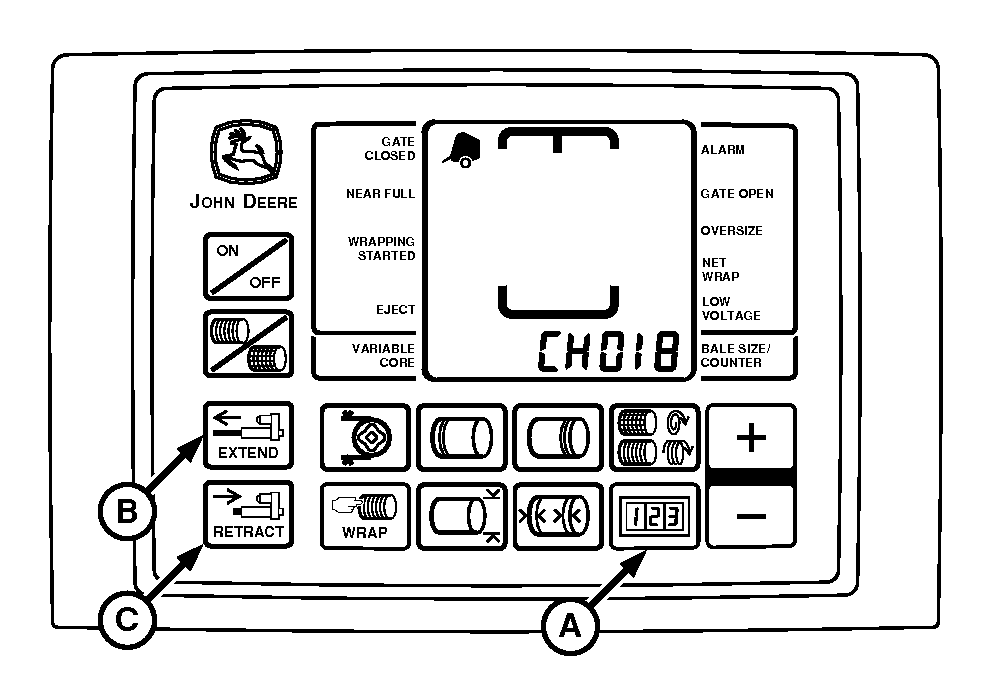
E52520-UN-26JUN03
A - COUNTER Key
B - EXTEND Key
C - RETRACT Key
This test is used to determine the working condition of the actuator through its entire range of operation.To Test Actuator (Motor and Linkage):
-
IMPORTANT: Remove roll of net wrap material from baler if testing net actuator voltage. Otherwise, if PTO is engaged with net actuator extended, net will feed into empty baler and can cause damage to pickup or rotary feed system.
If testing net and wrap actuator current, remove roll of net wrap material from baler.
-
Turn tractor key to ON position. Do not start tractor engine.
-
Press and hold COUNTER key (A) while turning monitor-controller ON.
-
Continue to hold COUNTER key (A) and press PLUS key until CH018 appears in digital display.
-
Release COUNTER key; digital display will change to show actuator static current flow reading of 0 to 1.
-
Use EXTEND key (B) and RETRACT key (C) to operate actuator in both directions. Display must show a current flow reading between 1 and 8 while actuator motor is operating during mid stroke (no load).
- Below normal readings indicate low tractor voltage, or poor or corroded harness connections
- Above normal readings indicate binding linkage or partially shorted motor windings
- Current spike reading indicates mechanical obstruction to linkage
-
Continue to operate actuator to fully retracted position. Display must show stall (load) current reading between 22 and 30.
- Below normal reading indicates bad or corroded harness connections
- Above normal reading indicates partially shorted motor windings or actuator binding
-
Press RETRACT key (C) to move actuator to home position.
-
Turn monitor-controller OFF. Turn tractor key to OFF position and remove key.
|
PP98408,00010E0-19-20130211 |