Test Net Wrap Actuator Current (Channel 018)
NOTE: Channel 018 allows operator use of EXTEND and RETRACT keys to position net actuator for service.
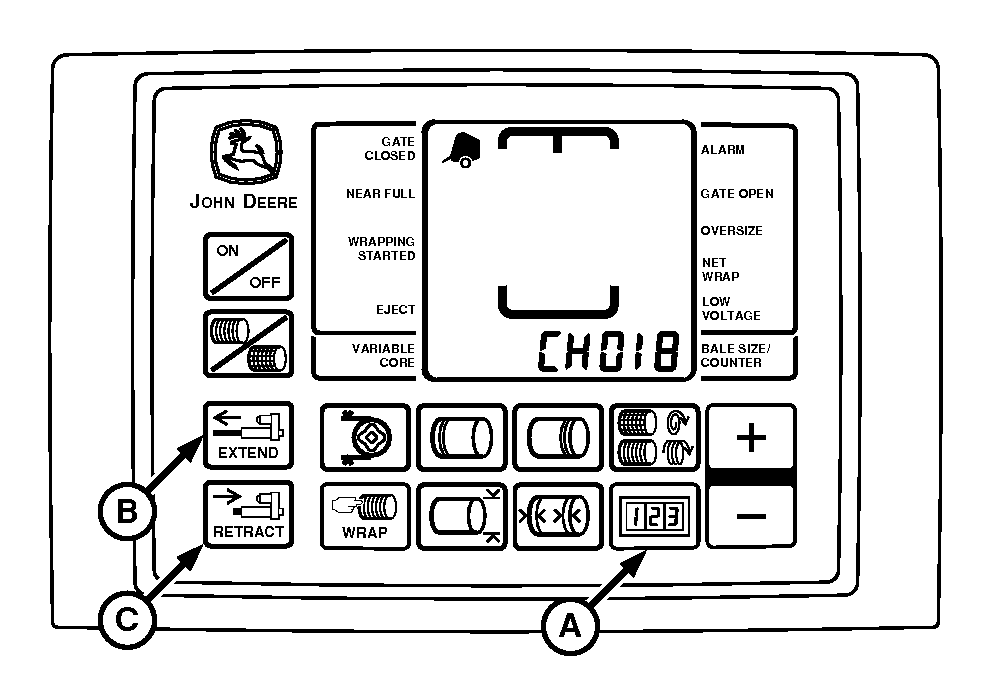
E52520-UN-26JUN03
A - COUNTER Key
B - EXTEND Key
C - RETRACT Key
This test is used to determine the working condition of the actuator through its entire range of operation.To test actuator (motor and linkage):
-
Turn tractor key to ON position. Do not start tractor engine.
-
With monitor-controller in NET mode, press and hold COUNTER key (A) while turning monitor-controller ON.
-
Continue to hold COUNTER key and press PLUS key until CH 018 appears in digital display.
-
Release COUNTER key; digital display will change to show actuator static current flow reading of 0—1.
-
Use EXTEND and RETRACT keys (B) and (C) to operate actuator in both directions. Display must show a current flow reading between 1—8 while actuator motor is operating during mid stroke (no load).
- Below normal readings indicate low tractor voltage, or poor or corroded harness connections
- Above normal readings indicate binding linkage or partially shorted motor windings
- Current spike reading indicates mechanical obstruction to linkage
-
NOTE: Net wrap actuator is at full stroke position when actuator is fully extended.
Continue to operate actuator to full stroke position. Display must show stall (load) current reading between 22—30.
- Below normal reading indicates bad or corroded harness connections
- Above normal reading indicates partially shorted motor windings or actuator binding
-
Press EXTEND or RETRACT keys to move counterknife to home position.
-
Turn monitor-controller OFF. Turn tractor key to OFF position. Remove key.
|
PP98408,0001107-19-20130211 |