Windrower Setup Menu
W110 Setup Menu
Press and HOLD the Program and Select switches - at the same time - to enter PROGRAM MODE.
Line 1 of the display will be - WINDROWER SETUP?
Line 2 displays - NO/YES as the option.
Use the SELECT switch to move through the menu screens.
Use the left/right arrow switches to make selections.

E68814-UN-23OCT12
E68813-UN-23OCT12
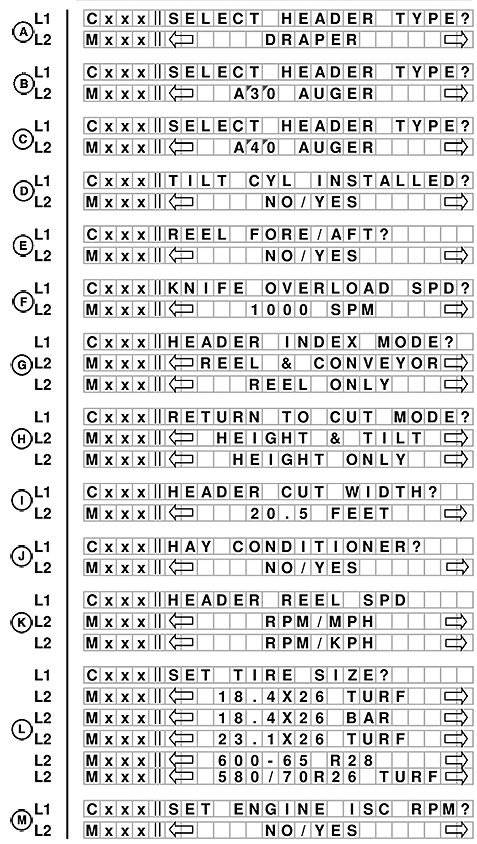
A. Line 1 - SELECT HEADER TYPE?. Line 2 displays the selected header and will be flashing. DRAPER is the factory default.
B. Line 1 - SELECT HEADER TYPE?. Line 2 displays A30, AUGER. This header is not applicable to the W110. Push SELECT to move to the next selection.
NOTE: All John Deere headers should choose the A40 option.
C. Line 1 - SELECT HEADER TYPE?. Line 2 displays A40 AUGER which represents John Deere A Series Augers.
If A40 or DRAPER are selected, reel speed should be enabled, with expansion module installed.
D. Line 1 - TILT CYL INSTALLED?. Line 2 displays NO/YES option. TILT selection needs to be available even if expansion module is not installed.
E. Line 1 - REEL FORE/AFT?. Line 2 displays NO/YES option.
F. Line 1 - KNIFE OVERLOAD SPD?. Line 2 displays the SPM.
G. Line 1 - HEADER INDEX MODE?. Line 2 displays REEL & DRAPER or REEL ONLY.
H. Line 1 - RETURN TO CUT MODE?. Line 2 displays HEIGHT & TILT or HEIGHT ONLY.
If HEADER TILT sensor is not installed (no expansion module installed), the Return To Cut mode should default to HEIGHT only.
I. Line 1 - HEADER CUT WIDTH?. Line 2 displays the cut width in feet or meter. Use the arrow keys to set the header cut width.
J. Line 1 - HAY CONDITIONER?. Line 2 displays NO/YES option.
DRAPER HEADER ONLY. Default will be flashing. Use arrow keys to select.
K. Line 1 - AUGER HDR REEL SPD. Line 2 - displays RPM/MPH or RPM/KPH.
L. Line 1 - SET TIRE SIZE?. Line 2 displays tire options available.
Use the turn signal arrow keys to change values.
M. Line 1 - SET ENGINE ISC RPM?. Line 2 displays NO/YES option. If NO is selected, menu moves to SET CONTROL LOCKS?.
W110 Engine Intermediate Speed Control (ISC)
E68807-UN-23OCT12
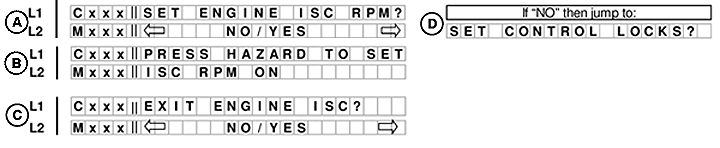
A. Line 1 - SET ENGINE ISC RPM?. Line 2 displays NO/YES option.
If NO is selected (D) menu moves to SET CONTROL LOCKS?.
B. Line 1 - PRESS HAZARD TO SET. Line 2 displays ISC RPM ON.
C. Line 1 - EXIT ENGINE ISC? Line 2 displays NO/YES option.
W150 Setup Menu
E69170-UN-14NOV12
Line 1 of the display will be - WINDROWER SETUP?
Line 2 displays - NO/YES as the option.
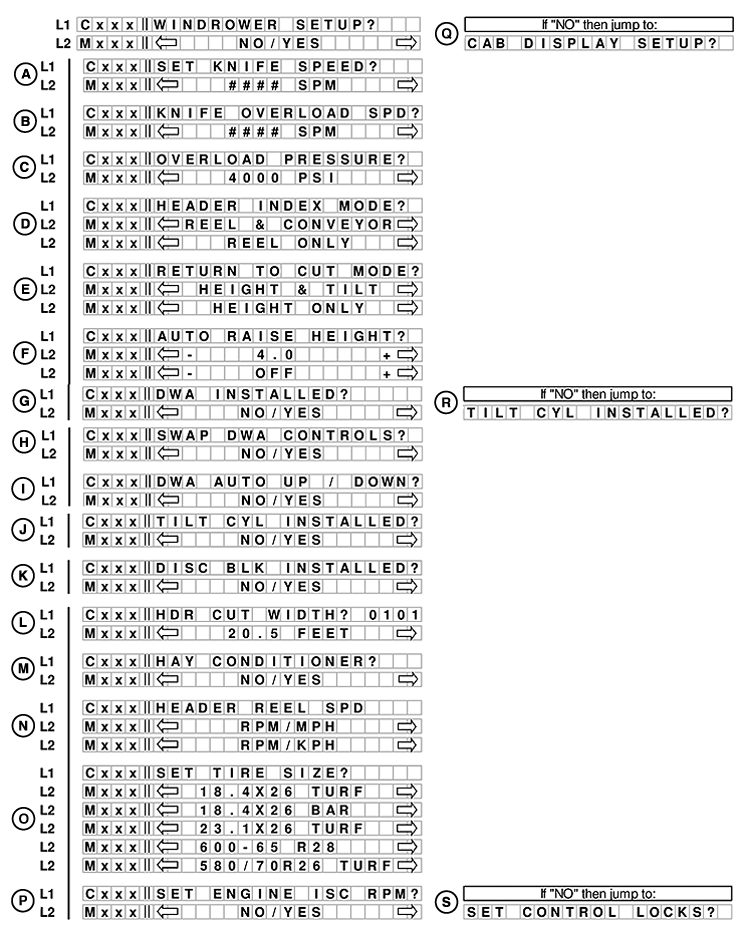
If NO is selected from WINDROWER SETUP? menu moves to CAB DISPLAY SETUP? (R).
Use the SELECT switch to move through the menu screens.
Use the left/right arrow switches to make selections.
A. Line 1 - SET KNIFE SPEED?. Line 2 displays #### SPM.
B. Line 1 - KNIFE OVERLOAD SPD?. Line 2 displays #### SPM. -500 to -100 range offset from set point. -300 is default.
C. Line 1 - OVERLOAD PRESSURE?. Line 2 displays 4000 PSI.
D. Line 1 - HEADER INDEX MODE?. Line 2 displays REEL & CONVEYOR and REEL ONLY. For draper header only. 40A headers have reel only.
E. Line 1 - RETURN TO CUT MODE?. Line 2 displays the HEIGHT & TILT and HEIGHT ONLY.
F. Line 1 - AUTO RAISE HEIGHT?. Line 2 displays 4.0 and OFF. Auto raise setting can be changed from 4.0 minimum to 9.5 maximum in 0.5 increments. 10 = OFF disables the auto raise function.
G. Line 1 - DWA INSTALLED?. Line 2 displays NO/YES option.
If NO is selected from DWA INSTALLED? menu moves to TILT CYL INSTALLED? (R).
If YES is selected from DWA INSTALLED? menu moves to:
H. Line 1 - SWAP DWA CONTROLS?. Line 2 displays NO/YES option. Swaps the GSL reel fore/aft with the DWA console controls.
If NO is selected from SWAP DWA CONTROLS? menu moves to TILT CYL INSTALLED?.
I. Line 1 - DWA AUTO UP / DOWN?. Line 2 displays NO/YES option. Enables the express up and down feature with the header RTC.
If NO is selected from DWA AUTO UP / DOWN? menu moves to TILT CYL INSTALLED?.
J. Line 1 - TILT CYL INSTALLED. Line 2 - displays NO/YES option.
K. Line 1 - DISC BLK INSTALLED?. Line 2 displays NO/YES option.
Use the turn signal arrow keys to change values.
L. Line 1 - HDR CUT WIDTH? )0101. Line 2 displays 20.5 FEET (cut width). Use the arrow keys to set the header cut width. Header ID appears at the RHS.
M. Line 1 - HAY CONDITIONER?. Line 2 displays NO/YES option.
N. Line 1 - HEADER REEL SPD. Line 2 displays RPM/MPH or RPM/KPH.
O. Line 1 - SET TIRE SIZE?. Line 2 displays tire options available.
Use the left/right arrow keys to change values.
P. Line 1 - SET ENGINE ISC RPM?
If NO is selected from SET ENGINE ISC RPM? menu moves to SET CONTROL LOCKS? (S).
W150 Engine Intermediate Speed Control (ISC)
E68822-UN-25OCT12
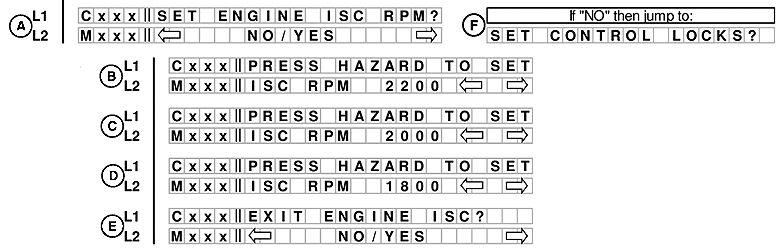
A. Line 1 - SET ENGINE ISC RPM?. Line 2 displays NO/YES option.
If NO is selected from SET ENGINE ISC RPM? menu moves to SET CONTROL LOCKS? (F).
B. Line 1 - PRESS HAZARD TO SET. Line 2 displays ISC RPM 2200.
C. Line 1 - PRESS HAZARD TO SET. Line 2 displays ISC RPM 2000.
D. Line 1 - PRESS HAZARD TO SET. Line 2 displays ISC RPM 1800.
E. Line 1 - EXIT ENGINE ISC?. Line 2 displays NO/YES option.
|
PP98408,0000BC2-19-20121115 |