GSL Header Controls
The Ground Speed Lever (GSL) has switches designed in the handle to allow finger tip control of header functions.
All switches are momentary type.
A decal that identifies the switch function is located on the right side cab post above the operator console.
These switches control the following and are explained in this section:
W110 and W150
-
E61002-UN-13MAR12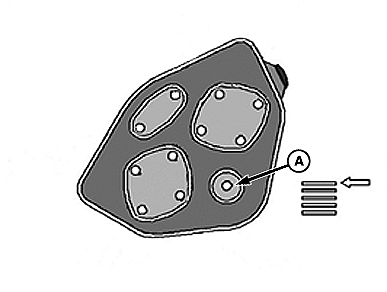
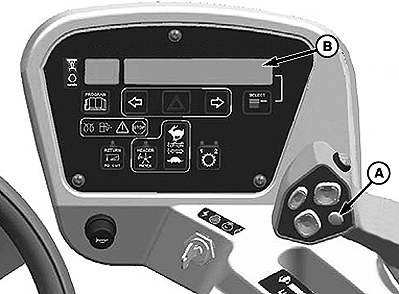
E61001-UN-13MAR12A - Display Selector Switch
B - Cab Display Module Upper Line
Display Selector SwitchPress the display selector switch (A) on the GSL to view the CDM top line (B).
-
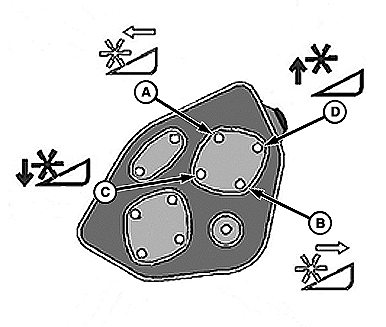
E61003-UN-15MAR12W110 Reel Function Switches
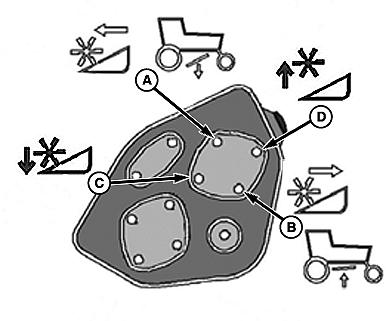
E61004-UN-15MAR12W150 Reel Function Switches
A - Reel Forward - (DWA Down W150)
B - Reel Aft - (DWA Up W150)
C - Reel Down
D - Reel Up
Reel Position SwitchesPress and hold the switch to move reel. Reel position switches function only on draper headers.
Release switch at desired position.
DWA functions and positions for the W150 are detailed in the Operation Section of this manual.
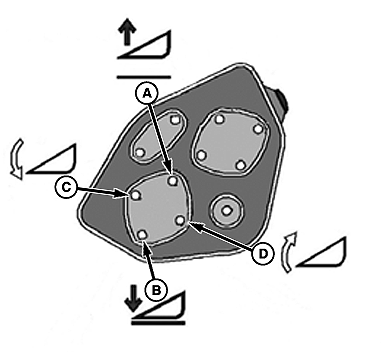
E61005-UN-15MAR12
A - Header Up
B - Header Down
C - Header Tilt Down
D - Header Tilt Up
Header Position SwitchesPress and hold the switch to move header.
Release switch at desired position.
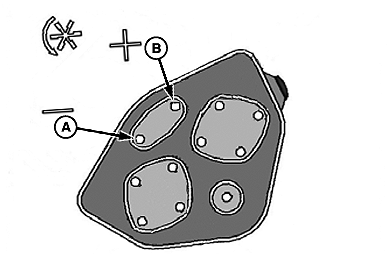
E61007-UN-15MAR12
A - Slow
B - Fast
Reel Speed SwitchesPress and hold the switch to change reel speed.
Release switch at desired speed.
|
RC48509,0000435-19-20120814 |