Cooler Service And Cleaning
Clean the coolers and surrounding areas of dirt, debris and buildup daily. The radiator, A/C condenser, hydraulic oil cooler and charge air cooler should be a part of everyday routine maintenance.
Clean the area around the engine at this same time to eliminate build-up from crop debris and chaff.
-
 CAUTION: To prevent injury, never service windrower while it
is running. Engine must be off and key removed.
CAUTION: To prevent injury, never service windrower while it
is running. Engine must be off and key removed.Turn off engine and remove key.
-
Raise engine hood completely.
-
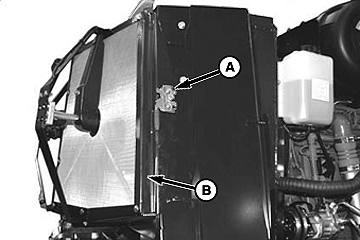
E63289-UN-24APR12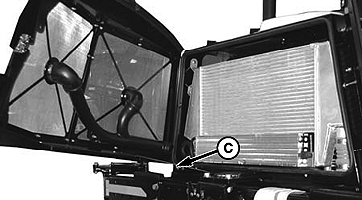
E63290-UN-24APR12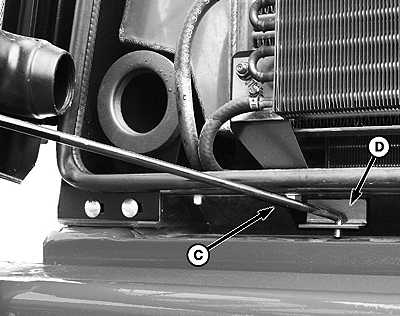
E65110-UN-20JUN12A - Door Latch
B - Air Screen
C - Door Latch Rod
D - Door Latch
Push latch (A) and open screen assembly access door (B). Secure with rod (C) stored inside the screen door. -
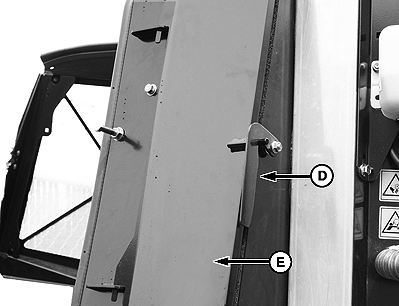
E63570-UN-20JUN12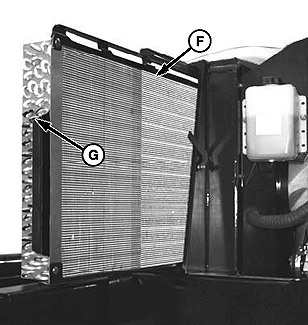
E63571-UN-24APR12D - Door Lever
E - Access Door
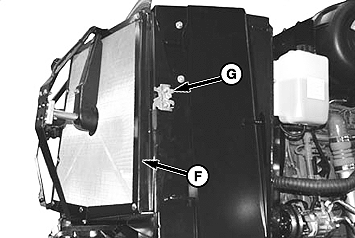
F - Oil And A/C Cooler
G - Handle
Lift lever (D) and pull open access door (E). -
Slide out the oil cooler, A/C condenser assembly (F) with handle (G).
-
IMPORTANT: When using high pressure air or water, be careful of fin damage to coolers. Use a fin comb to straighten bent fins. Bent fins will decrease cooler performance.
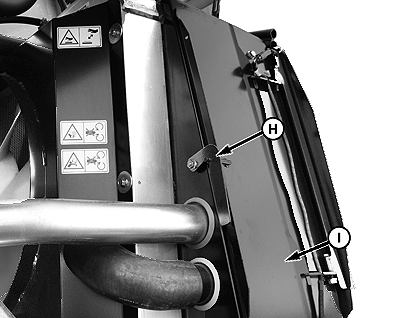
E63572-UN-20JUN12H - Latch
I - Left Side Cooling Shroud
Lift latch (H) and open access door (I) at left side of cooling box. -
E63573-UN-20JUN12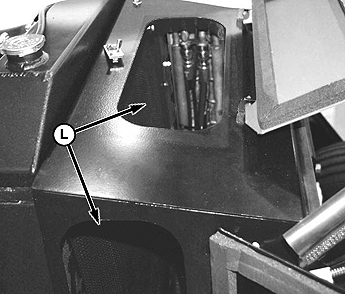
E63574-UN-24APR12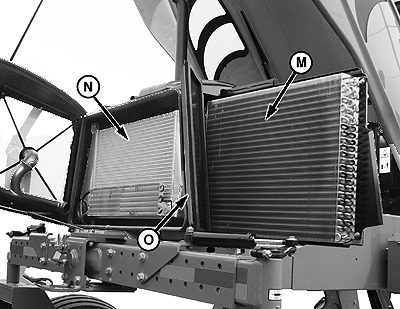
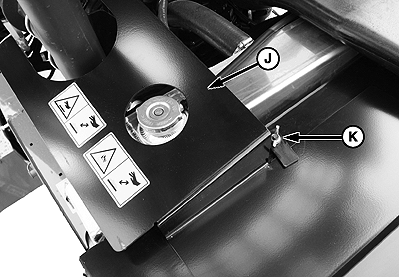
E63575-UN-20JUN12J - Access Door
K - Access Door Wing Nut
L - Radiator Access
M - Oil and A/C Cooler
N - Charge Air Cooler
O - Cooling Box
Remove wing-nut (K) and open access door (J) at top of cooling box. -
CAUTION: Wear eye protection and preferably full face protection
when using compressed air.
Clean radiator through access holes (L) n cooling box with compressed air.
-
Clean oil cooler, A/C condenser (M), charge air cooler (N) and cooling box (O) with compressed air.
-
Inspect all lines and coolers for evidence of leaks and damage.
-
After cleaning, reverse these steps to close and secure coolers.
Cooling Box Screen
E63881-UN-07MAY12
E63880-UN-07MAY12
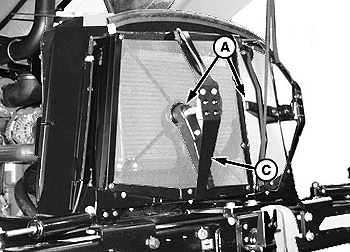
A - Rotors
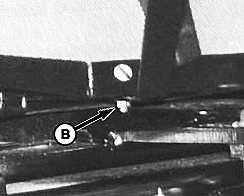
B - Retaining Nut
The cooling box screen is equipped with an automatic cleaning device that vacuums the screen by means of two rotors. They only operate when the engine is running. The rotors are electrically driven, and the suction is provided by the engine cooling fan.It the screen is not being cleaned by the rotors they may be plugged.
If rotors (A) are plugged, clean screen as follows:
-
Park the windrower on a firm, level surface.
-
Stop engine and remove key.
-
Raise engine compartment hood fully.
-
Remove retaining nut (B) at the center bottom of cooler box.
-
E63882-UN-07MAY12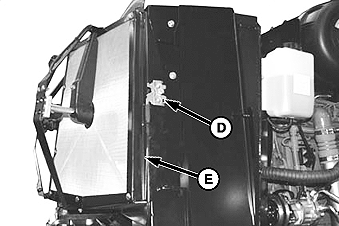
E63883-UN-07MAY12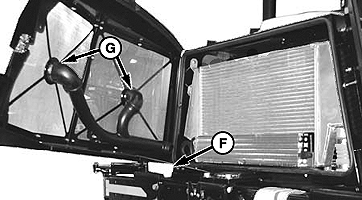
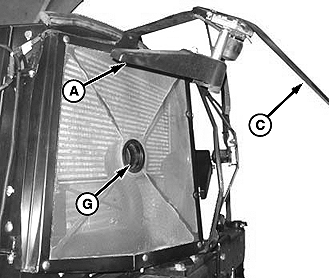
E63884-UN-07MAY12C - Rotor Assembly
D - Screen Assembly Latch
E - Screen Access Door
F - Rod
G - Air Ducts
Pivot rotor assembly (C) away from screen. -
Blow out debris from rotors (A) with compressed air.
IMPORTANT: Always wear eye protection and preferably full face coverage before using compressed air.
-
Push screen assembly latch (D) and open screen assembly access door. Secure with rod (F) stored inside screen door (E).
-
If air ducts (G) are plugged blow out debris with compressed air.
-
Clean screen with compressed air.
-
Reposition rotor assembly (C) and secure with bolt and nut (B).
-
Close screen access door (E) and engage latch (D).
Rotor to Screen Clearance and Adjustment
E63885-UN-07MAY12
E63886-UN-07MAY12
E63887-UN-07MAY12
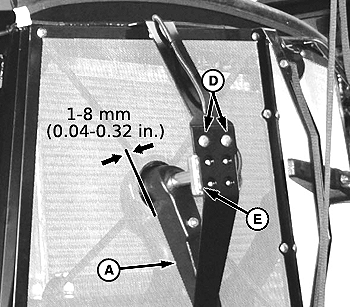
A - Rotor Trailing Edge
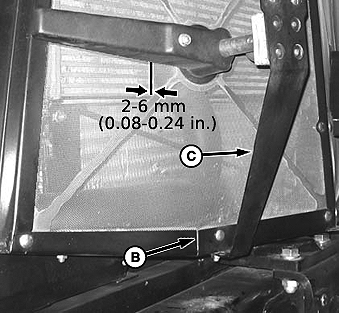
B - Retaining Nut
C - Motor Support
D - Motor Mount Bolts
E - Motor/Duct Assembly
F - Screen Access Door
G - Screen Assembly Latch
Check rotor clearance between trailing edge of rotor (A) and the screen. It should be 1 - 8 mm (.04 - .32 in.) at all locations when rotating.If necessary, adjust clearance as follows:
-
Loosen retaining nut (B) on motor support (C).
-
Move support in or out until duct is 2-6 mm (0.08-0.24 in.) from screen near the center.
-
Re-tighten nut (B).
-
Loosen the two motor mount bolts (D).
-
Move motor / duct assembly (E) to obtain 1-8 mm (0.04-0.32 in.) gap to screen at full rotation of the duct.
-
Re-tighten nuts (D) on motor mount.
-
Close screen access door (F) and engage latch (G).
-
Lower engine compartment hood.
|
RC48509,000057D-19-20120814 |