Cab Display Setup
W110 and W150
The Cab Display Setup Menu function the same for both windrowers.
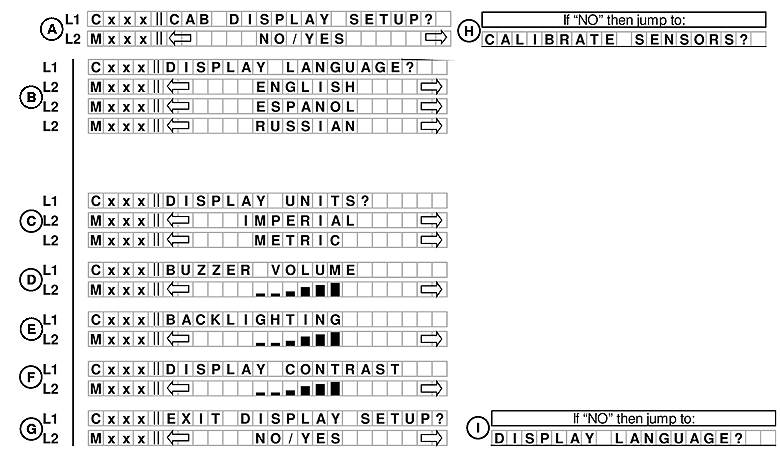
E68817-UN-24OCT12
A. Line 1 - CAB DISPLAY SETUP?. Line 2 displays NO/YES option.
If NO is selected from CAB DISPLAY SETUP? menu moves to CALIBRATE SENSORS? (H).
B. Line 1 - DISPLAY LANGUAGE?. Line 2 displays optional languages available.
C. Line 1 - DISPLAY UNITS?. Line 2 displays IMPERIAL or METRIC for options.
D. Line 1 - BUZZER VOLUME. Line 2 displays volume bars.
E. Line 1 - BACKLIGHTING. Line 2 displays backlight bars.
F. Line 1 - DISPLAY CONTRAST. Line 2 displays contrast bars.
G. Line 1 - EXIT DISPLAY SETUP?. Line 2 displays NO/YES option.
If NO is selected from EXIT DISPLAY SETUP? menu moves back to DISPLAY LANGUAGE? (I).

E68819-UN-24OCT12
If YES is selected from EXIT DISPLAY SETUP? (G) and engine is not running menu will move to DIAGNOSTIC MODE? (K).
If engine is running and YES is selected, the menu moves to CALIBRATE SENSORS? (J).
|
RC48509,00006A7-19-20121030 |