Calibrate Sensors
W110
Calibrating sensors menu will only be available when engine is running.
The operator may select any of the items requiring calibration or STOP & EXIT the menu.
When a function is activated, the display will indicate the function being calibrated. HOLD will flash until the system has completed reading in the signal with the header fully raised.
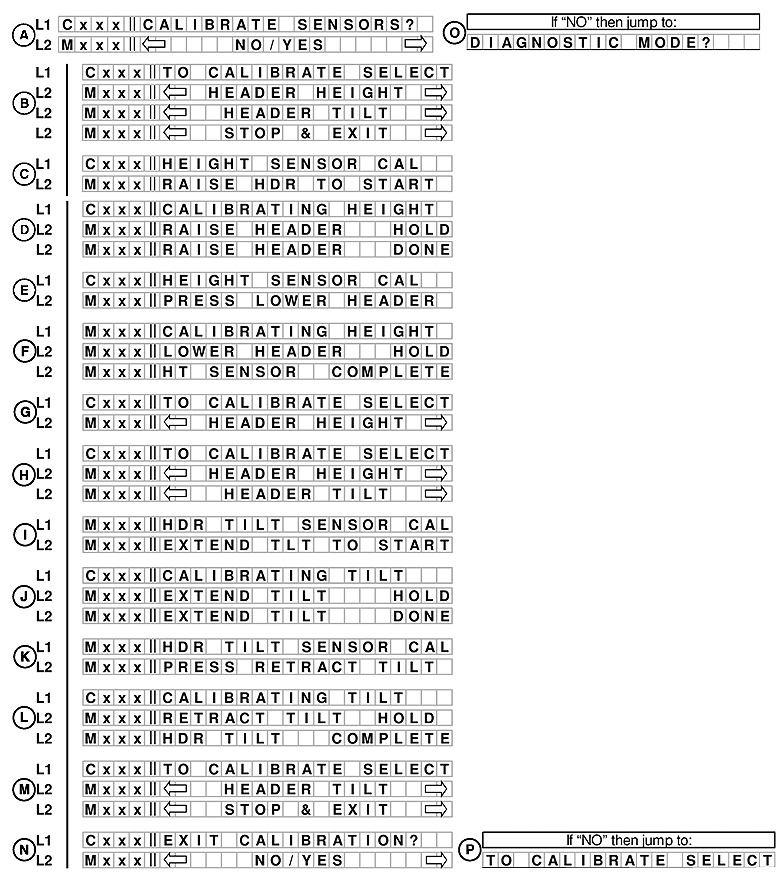
E68820-UN-24OCT12
A. Line 1 - CALIBRATE SENSORS?. Line 2 displays NO/YES option.
If NO is selected from CALIBRATE SENSORS? menu moves to DIAGNOSTIC MODE? menu (O).
B. Line 1 - TO CALIBRATE SELECT. Line 2 displays HEADER HEIGHT, HEADER TILT and STOP & EXIT.
C. Line 1 - HEIGHT SENSOR CAL. Line 2 displays RAISE HDR TO START.
D. Line 1 - CALIBRATING HEIGHT. Line 2 displays RAISE HEADER HOLD and RAISE HEADER DONE.
E. Line 1 - HEIGHT SENSOR CAL. Line 2 displays PRESS LOWER HEADER.
F. Line 1 - CALIBRATING HEIGHT. Line 2 displays LOWER HEADER HOLD and HT SENSOR COMPLETE.
G. Line 1 - TO CALIBRATE SELECT. Line 2 displays HEADER HEIGHT.
H. Line 1 - TO CALIBRATE SELECT. Line 2 displays HEADER HEIGHT and HEADER TILT.
I. Line 1 - HDR TILT SENSOR CAL. Line 2 displays EXTEND TLT TO START.
J. Line 1 - CALIBRATING TILT. Line 2 displays EXTEND TILT HOLD and EXTEND TILT DONE.
K. Line 1 - HDR TILT SENSOR CAL. Line 2 displays PRESS RETRACT TILT.
L. Line 1 - CALIBRATING TILT. Line 2 displays RETRACT TILT HOLD and HDR TILT COMPLETE.
M. Line 1 - TO CALIBRATE SELECT. Line 2 displays HEADER TILT an STOP & EXIT.
N. Line 1 - EXIT CALIBRATION?. Line 2 displays NO/YES option.
If NO is selected from EXIT CALIBRATION? menu moves back TO CALIBRATE SELECT.
W150
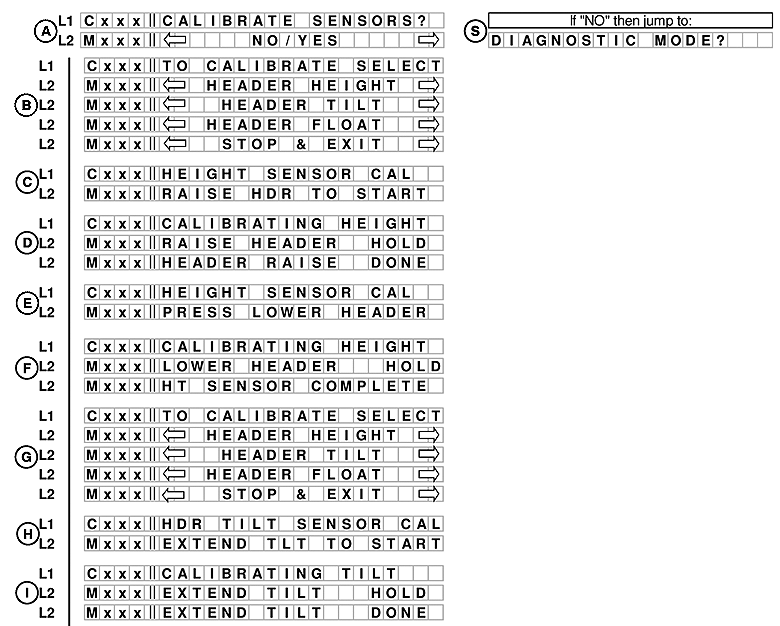
E68825-UN-25OCT12
The operator may select any of the items requiring calibration or STOP & EXIT the menu.
When a function is activated, the display will indicate the function being calibrated. HOLD will flash until the system has completed reading in the signal with the header fully raised.
A. Line 1 - CALIBRATE SENSORS?. Line 2 displays NO/YES option.
NOTE: If engine is off menu will not allow calibration.
If NO is selected from CALIBRATE SENSORS? menu moves to DIAGNOSTIC MODE? menu (S).
B. Line 1 - TO CALIBRATE SELECT. Line 2 displays HEADER HEIGHT, HEADER TILT, HEADER FLOAT and STOP & EXIT.
The operator may select any of the three items requiring calibration, or exit the CALIBRATION menu by using the turn signal switches to cycle through the options. Pressing SELECT will take the operator to the calibration menu for that particular sensor.
C. Line 1 - HEIGHT SENSOR CAL. Line 2 displays RAISE HDR TO START.
The display will indicate the sensor being calibrated. The operator will be prompted to raise the header and HOLD will flash until the system has completed reading in the signal with the header fully raised. HOLD will change to DONE with buzzer.
D. Line 1 - CALIBRATING HEIGHT. Line 2 displays RAISE HEADER HOLD and RAISE HEADER DONE.
E. Line 1 - HEIGHT SENSOR CAL. Line 2 displays PRESS LOWER HEADER.
F. Line 1 - CALIBRATING HEIGHT. Line 2 displays LOWER HEADER HOLD and HT SENSOR COMPLETE.
When the header raise is done, the CDM will prompt the user to lower the header. COMPLETE, with buzzer, will flash on the screen for 2 seconds when the calibration is finished.
G. Line 1 - TO CALIBRATE SELECT. Line 2 displays HEADER HEIGHT, HEADER TILT, HEADER FLOAT and STOP & EXIT.
The operator can select any of the three items requiring calibration, or exit the CALIBRATION menu, by using the turn signal switches to cycle through the options. Pressing SELECT will take the operator to the calibration menu for that particular sensor.
H. Line 1 - HDR TILT SENSOR CAL. Line 2 displays EXTEND TLT TO START.
I. Line 1 - CALIBRATING TILT. Line 2 displays EXTEND TILT HOLD and EXTEND TILT DONE.
The display will indicate the sensor being calibrated. The operator will be prompted to extend the header tilt and HOLD will flash until the system has completed reading in the signal with the header tilt fully extended. HOLD will change to DONE, with buzzer.
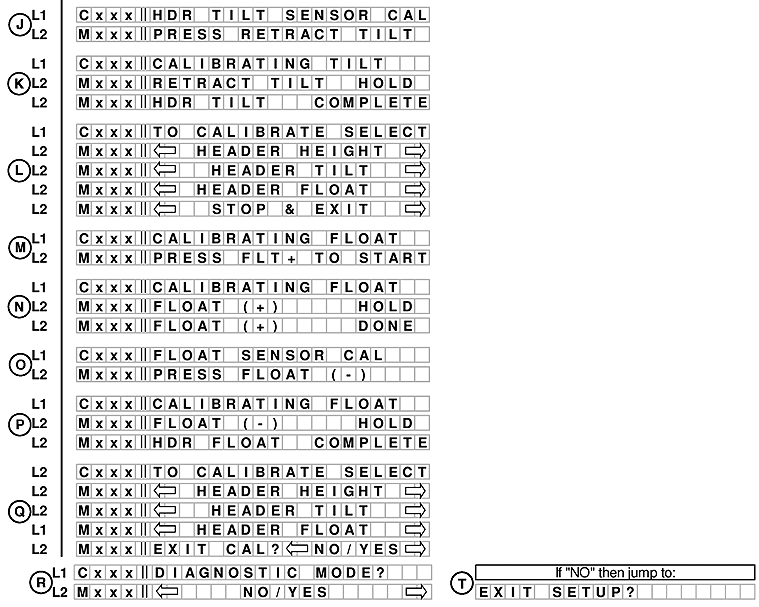
E68826-UN-25OCT12
When the header tilt extend is done, the CDM will prompt the user to press the header tilt retract. COMPLETE, with buzzer, will flash on the screen for 2 seconds when the calibration is complete.
K. Line 1 - CALIBRATING TILT. Line 2 displays RETRACT TILT HOLD and HDR TILT COMPLETE.
L. Line 1 - TO CALIBRATE SELECT. Line 2 displays HEADER HEIGHT, HEADER TILT, HEADER FLOAT and STOP & EXIT.
The operator can select any of the three items requiring calibration or exit the CALIBRATION menu by using the turn signal switches to cycle through the options. Pressing SELECT will take the operator to the calibration menu for that particular sensor.
M. Line 1 - CALIBRATING FLOAT. Line 2 displays PRESS FLT+ TO START.
The display will indicate the sensor being calibrated. The operator will be prompted to press the float (+) and HOLD will flash until the system has completed reading in the signal with the header float fully extended. HOLD will change to DONE, with buzzer.
N. Line 1 - CALIBRATING FLOAT. Line 2 displays FLOAT (+) HOLD and FLOAT (+) DONE.
O. Line 1 - FLOAT SENSOR CAL. Line 2 displays PRESS FLOAT (-).
P. Line 1 CALIBRATING FLOAT. Line 2 displays FLOAT (-) HOLD and HDR FLOAT COMPLETE.
Q. Line 1 TO CALIBRATE SELECT. Line 2 displays HEADER HEIGHT, HEADER TILT, HEADER FLOAT, and EXIT CAL? NO/YES option.
If YES is selected from EXIT CAL? menu moves to DIAGNOSTIC MODE?
If NO is selected from EXIT CAL? menu moves to EXIT SETUP? (T).
|
RC48509,00006A8-19-20121030 |