Enable - Disable Sensors
W110
The operator may enable or disable sensors as necessary. Example: Operator may choose to disable a malfunctioning sensor to eliminate false or erratic readings.
E68809-UN-22OCT12
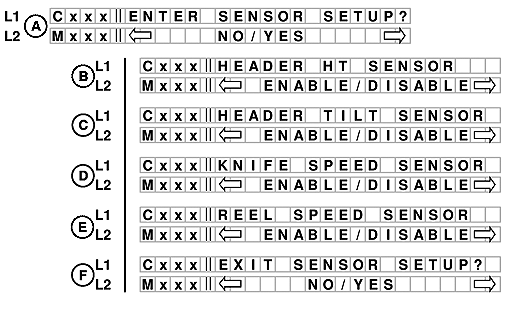
W110 SENSOR SETUP SCREENS
A. Line 1 - ENTER SENSOR SETUP?
Select YES to move to sensor selections. If NO is selected, menu moves to READ SENSOR INPUTS?
B. Line 1 - HEADER HT SENSOR. Line 2 will display ENABLE/DISABLE as the option.
C. Line 1 - HEADER TILT SENSOR. Line 2 will display ENABLE/DISABLE as the option.
D. Line 1 - KNIFE SPEED SENSOR. Line 2 will display ENABLE/DISABLE as the option.
E. Line 1 - REEL SPEED SENSOR. Line 2 will display ENABLE/DISABLE as the option.
F. Line 1 - EXIT SENSOR SETUP?. Line 2 will display NO/YES as the option.
If NO is selected from EXIT SENSOR SETUP, menu moves to HEADER HT SENSOR (B).
W150
E68808-UN-22OCT12
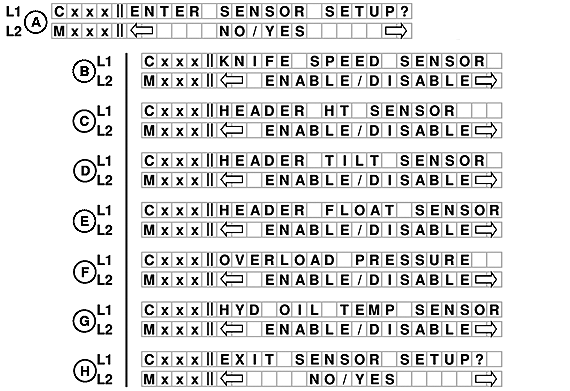
W150 SENSOR SETUP SCREENS
A. Line 1 - ENTER SENSOR SETUP?
Select YES to move to sensor selections. If NO is selected, menus moves to READ SENSOR INPUTS?
B. Line 1 - KNIFE SPEED SENSOR. Line 2 will display ENABLE/DISABLE as the option.
C. Line 1 - HEADER HT SENSOR. Line 2 will display ENABLE/DISABLE as the option.
D. Line 1 - HEADER TILT SENSOR. Line 2 will display ENABLE/DISABLE as the option.
E. Line 1 - HEADER FLOAT SENSOR. Line 2 will display ENABLE/DISABLE as the option.
F. Line 1 - OVERLOAD PRESSURE. Line 2 will display ENABLE/DISABLE as the option.
G. Line 1 - HYD OIL TEMP SENSOR. Line 2 will display ENABLE/DISABLE as the option.
H. Line 1 - EXIT SENSOR SETUP? Line 2 will display NO/Yes as the option.
If NO is selected from EXIT SENSOR SETUP, menu moves to KNIFE SPEED SENSOR (B).
|
RC48509,00006AA-19-20121030 |