Activate Functions
W110
For diagnostic purposes each header function can be activated by using the arrow keys on the CDM. When SELECT is pressed the program will go to the next function that can be activated.
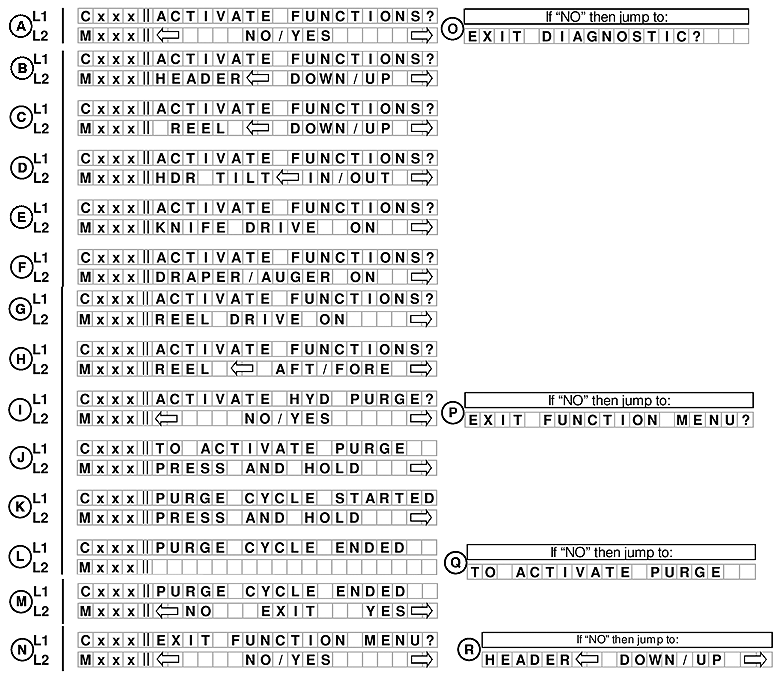
E68818-UN-24OCT12
A. Line 1 - ACTIVATE FUNCTIONS?. Line 2 displays NO/YES option.
If NO is selected from ACTIVATE FUNCTIONS? menu moves to EXIT DIAGNOSTIC? (O).
B. Line 1 - ACTIVATE FUNCTIONS?. Line 2 displays HEADER DOWN/UP option.
C. Line 1 - ACTIVATE FUNCTIONS?. Line 2 displays REEL DOWN/UP option.
D. Line 1 - ACTIVATE FUNCTIONS?.Line 2 displays HEADER TILT IN/OUT option.
E. Line 1 - ACTIVATE FUNCTIONS?. Line 2 displays KNIFE DRIVE ON.
F.Line 1 - ACTIVATE FUNCTIONS?.Line 2 displays DRAPER/AUGER ON.
G. Line 1 - ACTIVATE FUNCTIONS?.Line 2 displays REEL DRIVE ON.
H. Line 1 - ACTIVATE FUNCTIONS?. Line 2 displays REEL AFT/FORE.
Not applicable to the W150.
I. Line 1 - ACTIVATE HYD PURGE?. Line 2 displays NO/YES option.
This allows the operator to purge the air from a new, changed pump system or a machine shipped in container.
If NO is selected from ACTIVATE HYD PURGE? menu moves to EXIT FUNCTION MENU? (P).
J. Line 1 - TO ACTIVATE HYD PURGE. Line 2 displays PRESS AND HOLD.
K. Line 1 - PURGE CYCLE STARTED. Line 2 displays PRESS AND HOLD.
Pressing and holding the right arrow key activates a predetermined timed purge cycle. Releasing pressure on the sewitch or a completed cycle (timed out) will jump to the PURGE CYCLE ENDED menu selection.
If NO is selected from PURGE CYCLE ENDED menu moves back TO ACTIVATE PURGE (Q).
L. Line 1 - PURGE CYCLE ENDED. Line 2 displays is blank.
If NO is selected from PURGE CYCLE ENDED menu moves TO ACTIVATE PURGE (Q).
M. Line 1 - PURGE CYCLE ENDED. Line 2 displays NO EXIT YES.
If NO is selected from PURGE CYCLE ENDED menu moves to TO ACTIVATE PURGE(R).
N. Line 1 - EXIT FUNCTION MENU?. Line 2 displays NO/YES option.
If NO is selected from EXIT FUNCTION MENU? then menu moves to HEADER DOWN/UP..
A. Line 1 - ACTIVATE FUNCTIONS?. Line 2 displays NO/YES option.
If NO is selected menu moves to EXIT DIAGNOSTIC? (O).
W150
For diagnostic purposed each header function can be activated by using the arrow keys on the CDM. When SELECT is pressed the program will go to the next function that can be activated.
If a disk header is detected then the momenclature should read: DISC DRIVE instead of KNIFE DRIVE. Disc drive is not applicable to the W150 windrower.
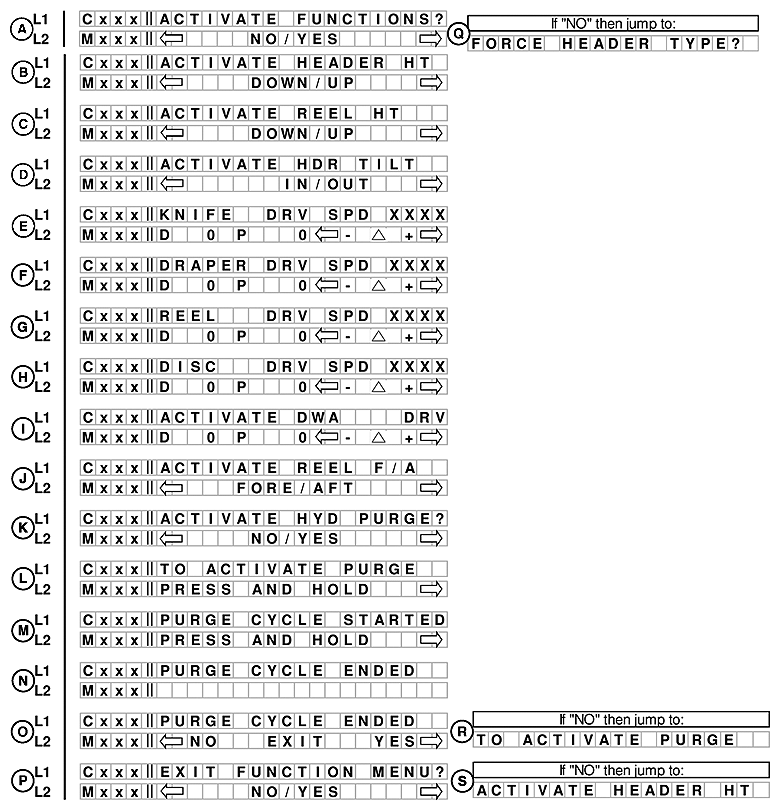
E68828-UN-25OCT12
A. Line 1 - ACTIVATE FUNCTIONS?. Line 2 displays NO/YES option.
If NO is selected from ACTIVATE FUNCTIONS? menu moves to FORCE HEADER TYPE? (Q).
B. Line 1 - ACTIVATE HEADER HT. Line 2 displays DOWN/UP option.
C. Line 1 - ACTIVATE REEL HT. Line 2 displays DOWN/UP option.
D. Line 1 - ACTIVATE HDR TILT. Line 2 displays IN/OUT option.
E. Line 1 - KNIFE DRV SPD XXXX. Line 2 displays D O P O - Δ +.
F. Line 1 - DRAPER DRV SPD XXXX. Line 2 displays D O P O - Δ +.
PWM OPERATION: If the HAZARD switch is pressed instead of the TURN SIGNAL switch the GSL will operate the PWM valve (HAZARD switch must be held) and the PWM value will reset to zero when released.
G. Line 1 - REEL DRV SPD XXXX. Line 2 displays D O P O - Δ +.
H. Line 1 - DISC DRV SPD XXXX. Line 2 displays D O P O - Δ +.
Not applicable to the W150.
I. Line 1 - ACTIVATE DWA DRV. Line 2 displays D O P O - Δ +.
The DWA menu selection should only be available if the DWA INSTALLED? is set to YES.
If NO is selected from ACTIVATE HYD PURGE? menu moves to EXIT FUNCTION MENU? (P).
ACTIVATE HYD PURGE - This allows operator to purge air from a new, changed or containerized pump system.
Pressing and holding the right hand arrow button activates a predetermined timed purge cycle.
Releasing pressure on the switch or a completed cycle (timed out) will move to the PURGE CYCLE ENDED menu selection.
J. Line 1 - ACTIVATE REEL: F/A. Line 2 displays FORE/AFT option.
K. Line 1 - ACTIVATE HYD PURGE?. Line 2 displays NO/YES option.
This allows the operator to purge the air from a new, changed pump system or a machine shipped in container.
L. Line 1 - TO ACTIVATE HYD PURGE. Line 2 displays PRESS AND HOLD.
M. Line 1 - PURGE CYCLE STARTED. Line 2 displays PRESS AND HOLD.
Pressing and holding the right arrow key activates a predetermined timed purge cycle. Releasing pressure on the sewitch or a completed cycle (timed out) will jump to the PURGE CYCLE ENDED menu selection.
If NO is selected from PURGE CYCLE ENDED menu moves back TO ACTIVATE PURGE (Q).
N. Line 1 - PURGE CYCLE ENDED. Line 2 displays is blank.
O. Line 1 - PURGE CYCLE ENDED. Line 2 displays NO EXIT YES.
If NO is selected from PURGE CYCLE ENDED menu moves to TO ACTIVATE PURGE(R).
P. Line 1 - EXIT FUNCTION MENU?. Line 2 displays NO/YES option.
If NO is selected from EXIT FUNCTION MENU? then menu moves to ACTIVATE HEADER HT.
|
RC48509,00006AC-19-20121030 |