Force Header Type
This menu allows the operator to select or force a header ID configuration if a NO HEADER ID is being read by the control system. The header type will revert back to NO HEADER every time the ignition is cycled.
When SELECT is pressed the program goes to the EXIT HEADER TYPE? menu selection.
E68932-UN-26OCT12
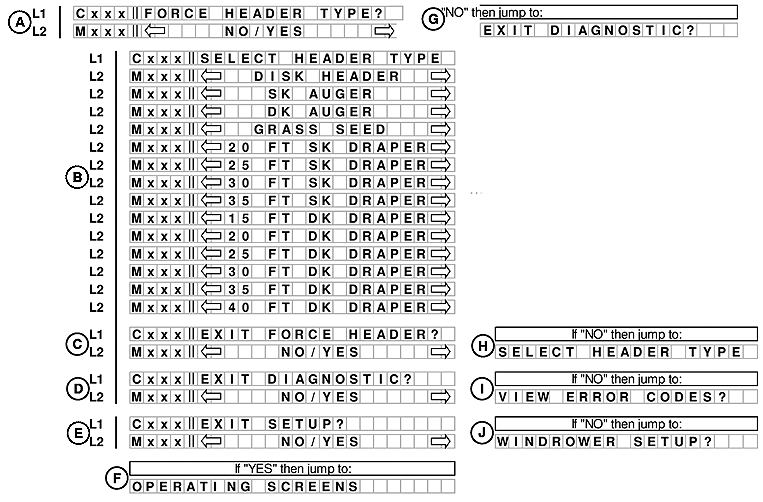
A.Line 1 - FORCE HEADER TYPE?. Line 2 displays NO/YES option.
If NO is selected from FORCE HEADER TYPE? menu moves to EXIT DIAGNOSTIC? (G).
B. Line - 1 SELECT HEADER TYPE. Line 2 displays the options.
NOTE: DISK HEADER, GRASS SEED, SK AUGER and 20 FT SK DRAPER are not applicable to the W150 Windrower.
B. Selections are:
- DK AUGER
- 25 FT SK DRAPER
- 30 FT SK DRAPER
- 35 FT SK DRAPER
- 15 FT DK DRAPER
- 20 FT DK DRAPER
- 25 FT DK DRAPER
- 30 FT DK DRAPER
- 35 FT DK DRAPER
- 40 FT DK DRAPER
C. Line 1 - EXIT FORCE HEADER?. Line 2 displays NO/YES option.
If NO is selected from EXIT FORCE HEADER? menu moves to SELECT HEADER TYPE (H).
D. Line 1 - EXIT DIAGNOSTIC?. Line 2 displays NO/YES option.
If NO is selected from EXIT DIAGNOSTIC? menu moves to VIEW ERROR CODES? (I).
E. Line 1 - EXIT SETUP?. Line 2 displays NO/YES option.
If NO is selected from EXIT SETUP? menu moves to WINDROWER SETUP? (J).
If YES is selected from EXIT SETUP? menu moves to OPERATING SCREENS (F).
|
RC48509,00006AD-19-20121030 |