Baler Basic Display Description
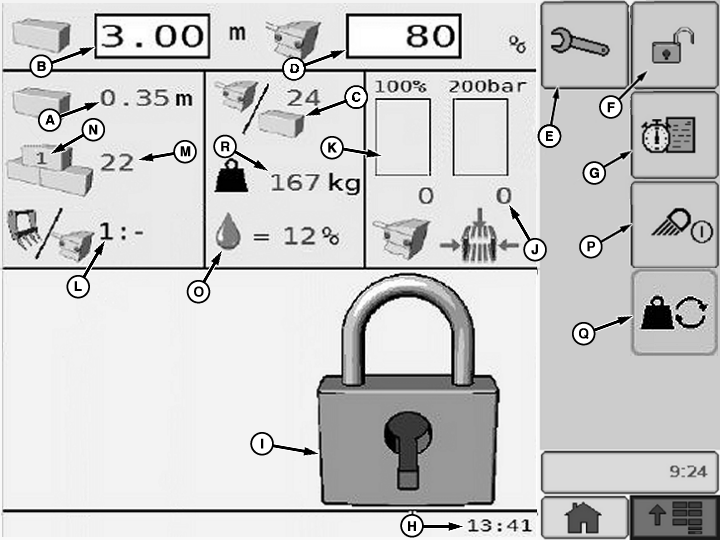
E81598-UN-05OCT16
A - Actual Bale Length
B - Set Bale Length
C - Plungerhead Stroke Per Bale
D - Set Bale Chamber Pressure
E - User Function Access Button
F - Operating Display Access Button
G - Field Record Access Button
H - Actual Time
I - System Lock Symbol
J - Actual Bale Chamber Pressure
K - Actual Plungerhead Load
L - Feeder Fork - Plungerhead Ratio
M - Number Of Bales Made
N - Active Field Counter
O - Bale Moisture Level
P - Work Light On-Off Button
Q - Bale Weighing System Button
R - Bale Weight
Basic Display page allows operator to control and monitor main baler functions during field operation. On this page, values or settings cannot be entered or changed. If necessary, user settings, operating mode, or specific function activations can be reached as follows:
-
Press User Function button (E) to
access user function page (see User Function Page in this section).
User functions are only available when corresponding options
are installed on baler and activated in the Dealer menu (see Dealer
Menu Page in this section).
-
Press Operating Display access button
(F) to place system into operating mode (see Operating Mode Page in
this section).
Under this mode, machine operation settings are accessible.
-
Press Field Record access button (G)
to access field records page (see Field Record Page in this section).
Use Field record page to store work statistics, for example,
per field or per customer.
- Press Work Light On-Off button (P) to turn baler work lights on or off.
- Press Bale Weighing System button (Q) to toggle between actual bale weight of the current bale, weight of last bale, and bale weight average.
|
OUO6064,00018F4-19-20161020 |