User Function Page
E80022-UN-28SEP15
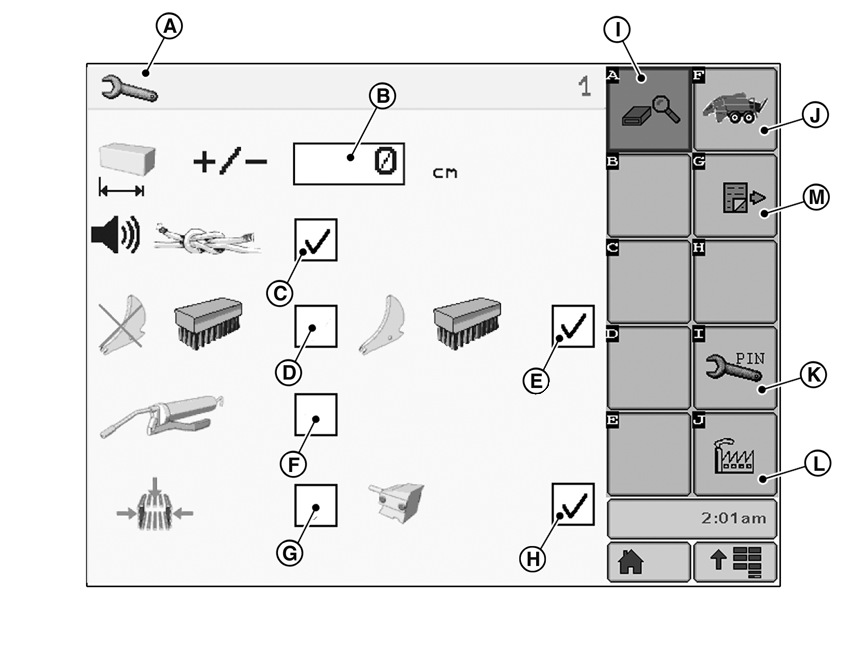
A - User Function Page
B - Bale Length Correction
C - Binding Alarm
D - Knife Guide Cleaning
E - Knife Cleaning
F - Automatic Greasing System
G - Density Pressure
H - Machine Load
I - Diagnostics Button
J - Basic Display Button
K - Dealer Menu Page Button
L - Service Menu Page Button
M - Next Page Button
User functions are only available when corresponding options are installed on baler and activated in the Dealer menu (see Dealer Menu Page in this section).Depending on the baler model, the following functions or options are available:
- Bale length correction (B)
- Beep at the start of binding process—Binding Alarm (C)
- Knife guide cleaning (D)—if equipped
- Knife cleaning (E)—if equipped
- Automatic greasing system (F)
- Density pressure (G)
- Machine load (H)
Press diagnostics button (I) to display component information pages for diagnostic purposes (see Diagnostic Menu Page in this section).
Press basic display button (J) to go back to basic display (see Baler Basic Display Description in this section).
Press dealer menu button (K) to access dealer menu pages (see Dealer Menu Page in this section).
Press service menu button (L) to access service menu pages (see Service Menu Page in this section).
Dealer menu and service menu page access require a code PIN. Contact your John Deere dealer.
Depending on the function/option box checked, next page button (M) appears. To reach User Function Page 2, press next page button.
ZX206198-UN-03NOV13
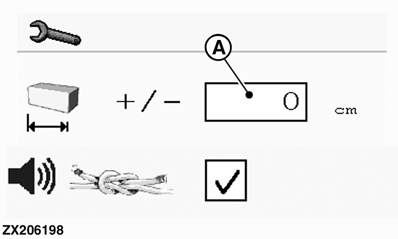
A - Bale Length Correction
Bale Length Correction:Bale length sensor gives pulses for a certain bale growth and measures actual bale length.
If actual electronic bale length differs from set bale length (see Operating Mode Page in this section), bale growth per pulse can be corrected.
Bale length correction (A) setting range is -25 to + 25 cm (-10 to + 10 in).
- Measure a number of bales and calculate average length.
- Compare average length with set bale length.
-
If necessary, change bale length correction (A) value to value
of calculated difference.
For example: If actual bale length is 2.6 m (8.5 ft),
and set bale length is 2.4 m (7.9 ft), then change bale length correction
to + 20 cm (+8 in).
ZX206201-UN-03NOV13
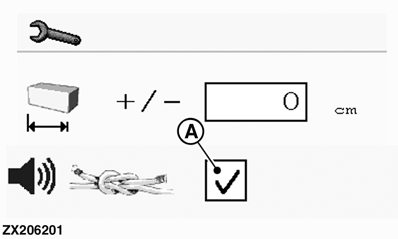
A - Binding Alarm
Binding Alarm:Check binding alarm box (A) to activate emission of a double beep at start of the binding cycle.
ZX206199-UN-03NOV13
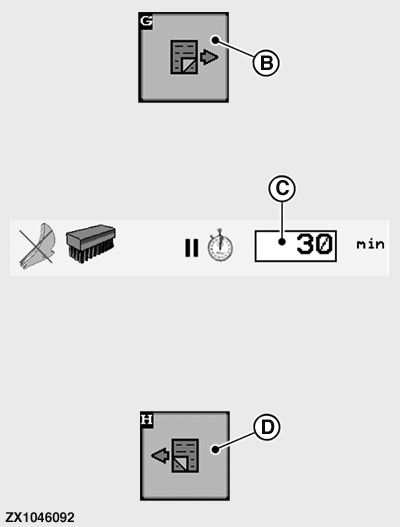
ZX1046092-UN-07JAN12
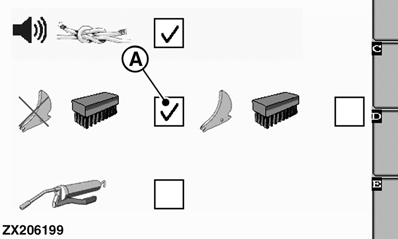
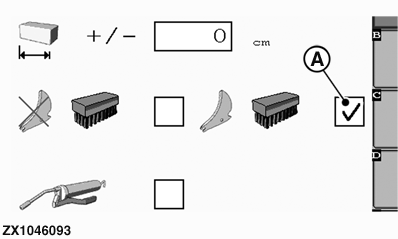
A - Knife Guide Cleaning
B - Next Page Button
C - Cleaning Interval Setting
D - Previous Page Button
Knife Guide Cleaning—If Equipped:When knives are not used (locked in lower position) for long periods, knife guide slots become dirty. Clean knife guide slots regularly.
Cleaning process takes place by engaging knives momentarily into cutting and then retracting.
Time between cleanings is adjustable.
To adjust cleaning interval, proceed as follows:
- Check Knife Guide Cleaning box (A).
- Press Next Page button (B) to access User Function Page 2.
-
If necessary, change cleaning interval setting (C) to desired
value 0—99 minutes.
Default setting is 30 minutes.
- Press Previous Page button (D) to go back to User Function Page 1.
ZX1046093-UN-07JAN12
ZX1046094-UN-07JAN12
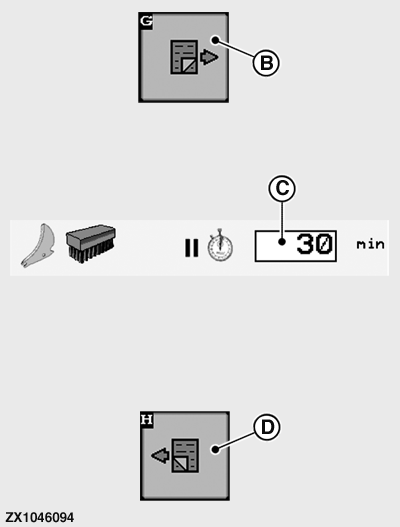
A - Knife Cleaning
B - Next Page Button
C - Cleaning Interval Setting
D - Previous Page Button
Knife Cleaning—If Equipped:When knives are used (locked in upper position) for long periods, knives become dirty. Clean knives regularly.
Cleaning process takes place by retracting knives momentarily into rest position and then extending.
Time between cleanings is adjustable.
To adjust cleaning interval, proceed as follows:
- Check knife cleaning box (A).
- Press next page button (B) to access User Function Page 2.
-
If necessary, change cleaning interval setting (C) to desired
value 0—99 minutes.
Default setting is 30 minutes.
- Press previous page button (D) to go back to User Function Page 1.
ZX1046095-UN-07JAN12
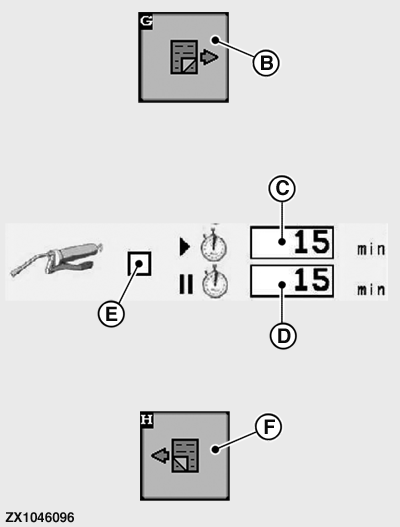
ZX1046096-UN-07JAN12
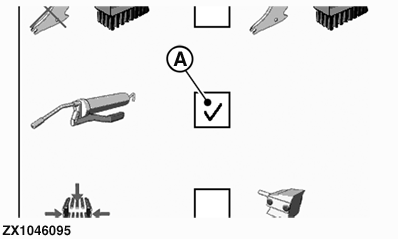
A - Automatic Greasing System
B - Next Page Button
C - Lubrication Time
D - Lubrication Pause Time
E - Run Pump Selection Box
F - Previous Page Button
Automatic Greasing System:Lubrication time (C) cannot be modified. Default setting is 15 minutes.
To activate and adjust automatic greasing system, proceed as follows:
- Check automatic greasing system box (A).
- Press next page button (B) to access User Function Page 2.
-
Press lubrication pause time input box (D), then enter desired
value 0—60 minutes.
Default setting is 15 minutes.
- Check pump selection box (E) to run pump for troubleshooting or for bleeding the circuit after grease refilling.
-
Press previous page button (F) to go back to User Function Page
1.
By leaving User Function Page 2, pump selection box (E) is automatically deactivated and pump stops running.
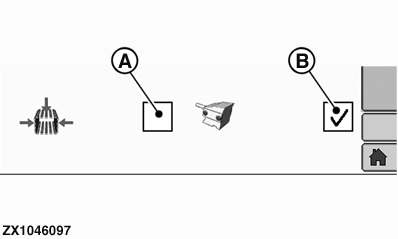
ZX1046097-UN-07JAN12
A - Bale Chamber Pressure
B - Machine Load
Bale Chamber Pressure or Machine Load:During baling, it is possible to use one of two methods to control Density Regulation (see Operating the Baler section).
- Check bale chamber pressure box (A) to activate this setting on operating mode display (see Operating Mode Page in this section).
- Check machine load box (B) to activate this setting on operating mode display (see Operating Mode Page in this section).
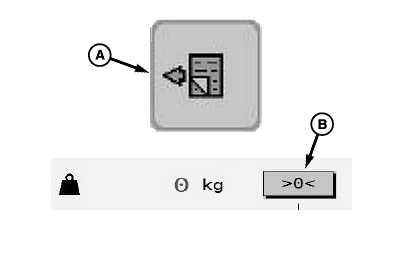
E81602-UN-05OCT16
A - Next Page Button
B - Platform Zeroing Button
Bale Weighing System and Platform Zeroing:The weighing platform needs a zeroing when the actual weight of the empty weighing platform is not zero.
- Press next page button (A) to access User Function Page 2.
- Press platform zeroing button (B) to zero out the platform weight.
|
OUO6064,00018F6-19-20161020 |