Field Record Page
E81603-UN-05OCT16
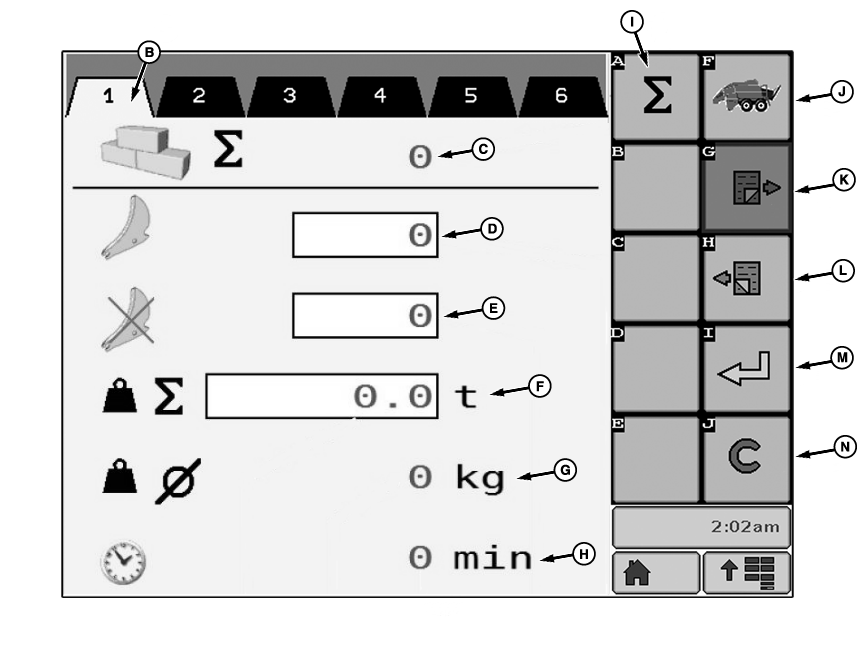
A - Active Field Record
B - Field Record Tab
C - Counter—Total Number of Bales
D - Counter—Bale Made with Knives Engaged
E - Counter—Bale Made with Knives Retracted
F - Total Weight of the Bales of the Field (excluding the bales in the chamber)
G - Average Weight of the Bales of the Field
H - Counter—Total Baling Time
I - Total Bale Counter Access Button
J - Basic Display Return Button
K - Next Page Button
L - Previous Page Button
M - Activate Button
N - Cancel Button (Reset)
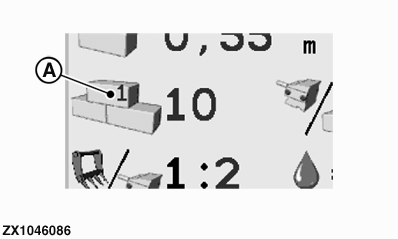
Field record page can be used to store work statistics, for example, per field or per customer. Active field record number (A) is displayed on Basic and Operation Displays.
ZX1046086-UN-07JAN12
Up to 40 field record tabs (B) are available. Each field record tab (B) contains the following counters:
- Bales made, knives not activated (E)
- Bales made, knives activated (D)
- Total number of bales made (C)
- Total baling time in minutes (H)
On each field record tab, bale counters (C, D, and E) can be manually changed or reset to 0.
- Press relevant input field (C, D, and E) to be changed, then enter a new counter value.
-
This action cannot be undone.
Press cancel button (N) to reset counters (C, D, and E) to 0. - Press basic display return button (J) to go back to Basic Display (see Basic Display in this section).
- Press next page button (K) or previous page button (L) to select the desired tab (B) to display.
- Press activate button (M) to set the desired tab (B) as the active field record number (A) displayed on Basic and Operation Displays.
- Press total bale counter button (I) to access resettable and non-resettable total bale counters.
ZX1046085-UN-07JAN12
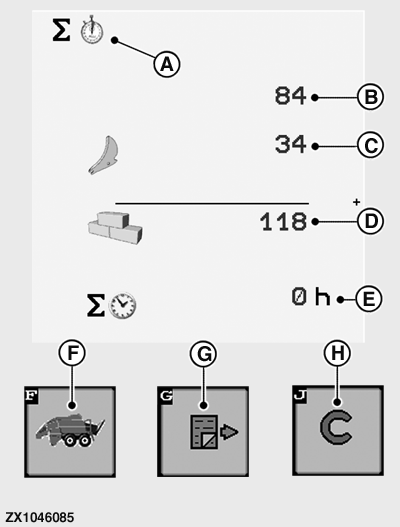
A - Resettable Bale Counter
B - Counter—Bale Made with Knives Retracted
C - Counter—Bale Made with Knives Engaged
D - Counter—Total Number of Bales
E - Counter—Total Baling Time
F - Basic Display Return Button
G - Next Page Button
H - Cancel Button (Reset)
Resettable Total Bale Counters:Resettable Total Bale counter (A) displays:
- Total bale made counter, knives not activated (B)
- Total bale made counter, knives activated (C)
- Total number of bales made counter (D)
- Total baling time counter in hours (E)
Press basic display return button (F) to go back to Basic Display (see Basic Display in this section).
Press cancel button (H) to reset all counter values.
This action cannot be undone.
Press next page button (G) to access non-resettable total bale counters page.
ZX1046087-UN-07JAN12
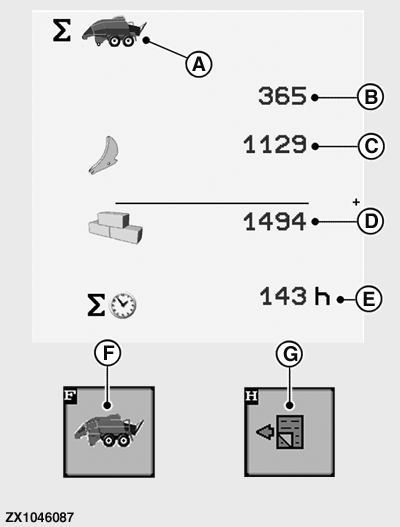
A - Non-Resettable Bale Counter
B - Counter—Bale Made with Knives Retracted
C - Counter—Bale Made with Knives Engaged
D - Counter—Total Number of Bales
E - Counter—Total Baling Time
F - Basic Display Return Button
G - Previous Page Button
Non-Resettable Total Bale Counters:Non-resettable Total Bale counter (A) displays:
- Total bale made counter, knives not activated (B)
- Total bale made counter, knives activated (C)
- Total number of bales made counter (D)
- Total baling time counter in hours (E)
Press basic display return button (F) to go back to basic display (see Basic Display in this section).
Press previous page button (G) to go back to resettable total bale counters page.
|
OUO6064,00018F7-19-20161021 |