Diagnostic Menu Page
E77595-UN-24NOV14
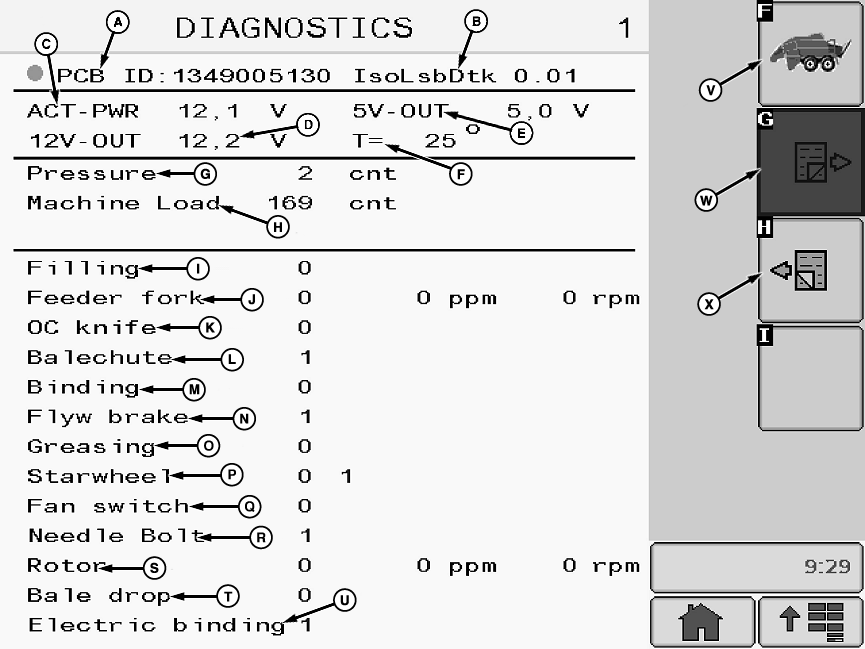
Diagnostics Page 1
A - PCB ID
B - Software Version
C - ACT-PWR
D - 12V-Out
E - 5V-Out
F - T=
G - Pressure
H - Machine Load
I - Filling
J - Feeding Fork
K - OC knife
L - Bale Chute
M - Binding
N - Flywheel Brake
O - Grease Sensor
P - Wheel
Q - Fan Switch
R - Needle Bolt
S - Rotor
T - Bale Drop
U - Electric Binding
V - Basic Display Button
W - Next Page Button
X - Previous Page Button
Main Control SystemDiagnostic Menu Pages display information that helps to troubleshoot the baler, such as:
- Software version
- Read out functions
- Event - error logs
Use Diagnostic Menu Page when contacting your John Deere dealer.
Read out functions are meant for use especially by an authorized service technician.
ppm = pulses per minute
rpm = rotations per minute
cnt = count
The following readings are available:
- PCB ID (A): Printed circuit board number
- Software Version (B): Displays current software version in use
- ACT-PWR (C): Voltage for the hydraulic valve
- 12V-out (D): Voltage for analog and digital 12 V sensors
- 5V-out (E): Voltage for analog 5 V sensors
- T= (F): Temperature inside the control unit housing
- Pressure (G): Actual value of the bale chamber pressure sensor
- Machine Load (H): Actual value of the plungerhead load sensor
- Filling (I): 0= no signal, 1= signal
- Feeding fork (J): 0= no signal, 1= signal
- OC knife (Precutter) (K): 0= no signal, 1= signal
- Bale chute (L): 0= no signal, 1= signal
- Binding (M): 0= no signal, 1= signal
- Flywheel brake (N): 0= no signal, 1= signal
- Grease sensor (O): 0= no signal, 1= signal
- Wheel (P): 0= no signal, 1= signal
- Fan switch (Q): 0= no signal, 1= signal
- Needle bolt (R): 0= no signal, 1= signal
- Rotor (S): 0= no signal, 1= signal
- Bale drop (T): 0= no signal, 1= signal
- Electric binding (U): 0= no signal, 1= signal
Press basic display button (V) to go back to Basic Display (see Basic Display in this section).
Press next page button (W) to access next diagnostics page.
Press previous page button (X) to go back to previous diagnostics page.
E81604-UN-05OCT16
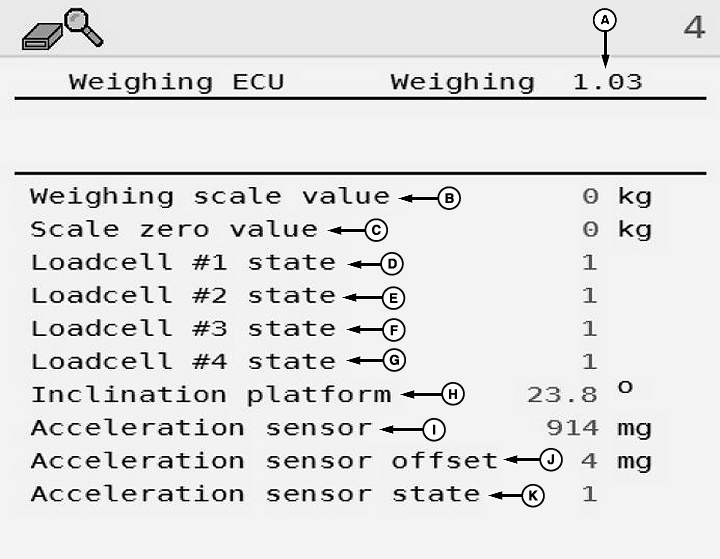
A - Software Version
B - Weighing Scale Value
C - Scale Zero Value
D - Load Cell 1 State
E - Load Cell 2 State
F - Load Cell 3 State
G - Load Cell 4 State
H - Inclination Platform
I - Acceleration Sensor
J - Acceleration Sensor Offset
K - Acceleration Sensor State
Weighing ECUThe following readings are available:
- Software Version (A): Displays current software version in use.
- Weighing Scale Value (B: The actual weight on the weighing platform.
- Scale Zero Value (C): The weight of the weighing platform when empty, normally between 110 kg and 120 kg.
- Load Cell 1 State (D): The actual state of the load cell, 1 is OK and 0 is fail.
- Load Cell 2 State (E): The actual state of the load cell, 2 is OK and 0 is fail.
- Load Cell 3 State (F): The actual state of the load cell, 3 is OK and 0 is fail.
- Load Cell 4 State (G): The actual state of the load cell, 4 is OK and 0 is fail.
- Inclination Platform (H): The inclination of the weighing platform.
- Acceleration Sensor (I): The actual acceleration sensor value in mg.
- Acceleration Sensor Offset (J): The compensation in mg of the acceleration sensor.
- Acceleration Sensor State (K): The actual state of the acceleration sensor, 1 is OK and 0 is fail.
E77596-UN-24NOV14
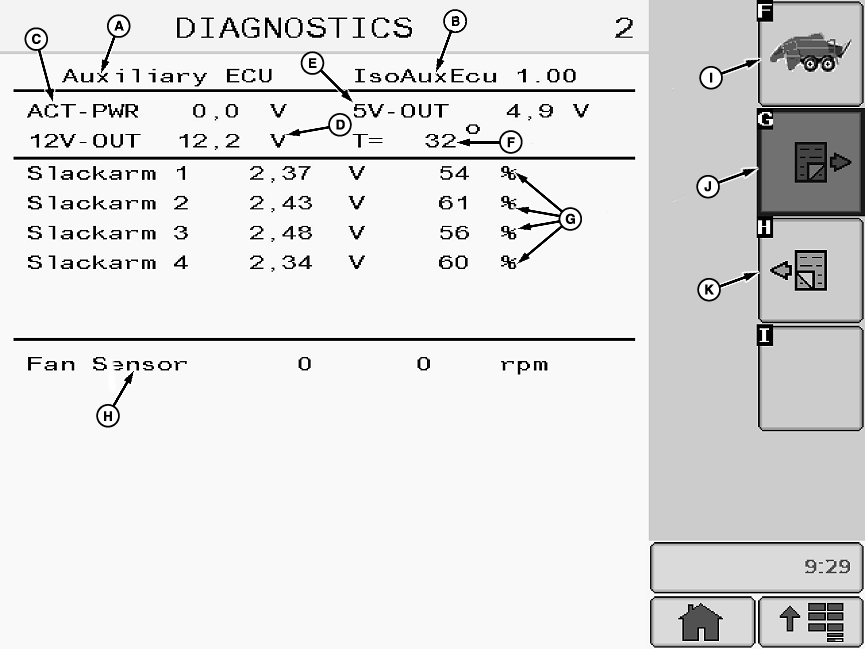
Diagnostics Page 2
A - System Name
B - Software Version
C - ACT-PWR
D - 12 V—Out
E - 5 V—Out
F - T=
G - Slack Arm Readings
H - Fan Sensor
I - Basic Display Button
J - Next Page Button
K - Previous Page Button
Secondary Control SystemThe following readings are available from the secondary system:
- System Name (A): Auxiliary system
- Software Version (B): Displays current software version in use
- ACT-PWR (C): Voltage to the hydraulic valve
- 12V-out (D): Voltage for 12 V sensors
- 5V-out (E): Voltage for analog 5 V sensors
- T= (F): Temperature inside the control unit housing
- Slack Arm Readings (G): Voltage shown is the output from each slack arm sensor. Twine tension is shown as a percentage. Percentages range from zero to 100. Zero indicates maximum twine tension and 100 indicates no twine tension.
- Fan Sensor (H): 0= no signal, 1= signal
Press basic display button (I) to go back to Basic Display (see Basic Display in this section).
Press next page button (J) to go to next diagnostics page.
Press previous page button (K) to go to previous diagnostics page.
E77597-UN-24NOV14
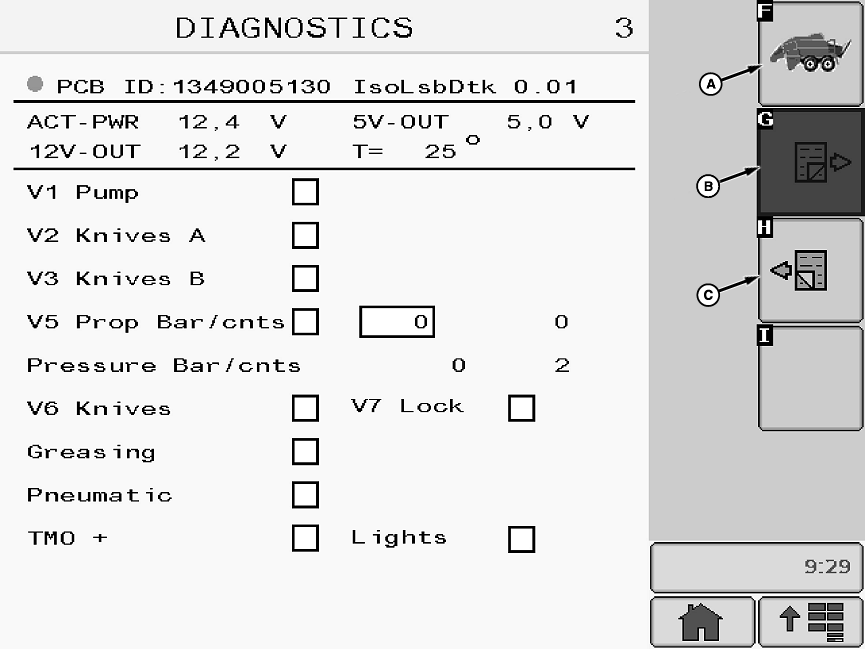
Diagnostics Page 3
A - Basic Display Button
B - Next Page Button
C - Previous Page Button
Diagnostics Page 3:Error - event logs are meant for use especially by an authorized service technician. Contact your John Deere dealer.
Press basic display button (A) to go back to Basic Display (see Basic Display in this section).
Press next page button (B) to go to next diagnostics page.
Press previous page button (C) to go to previous diagnostics page.
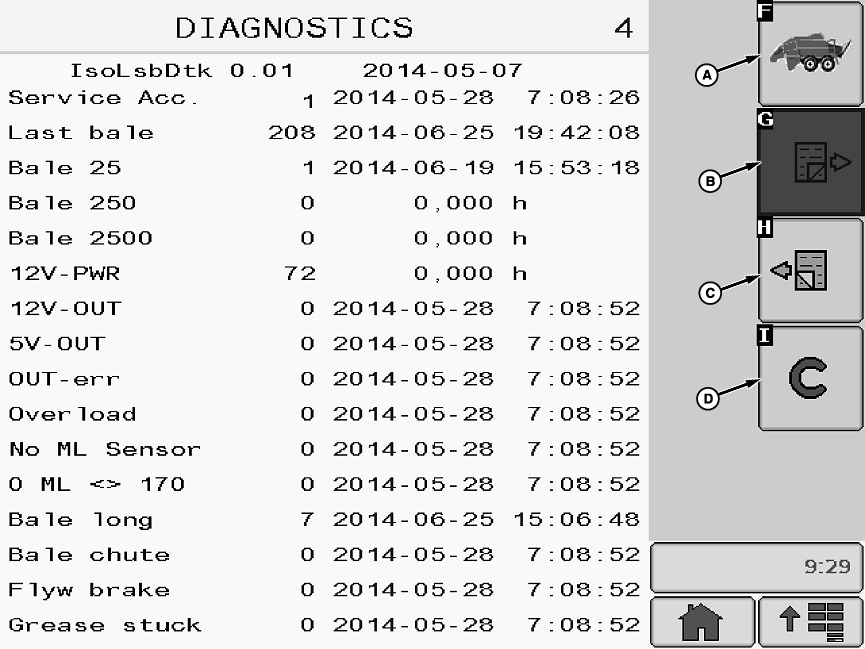
E77598-UN-24NOV14
Diagnostics Page 4
A - Basic Display Button
B - Next Page Button
C - Previous Page Button
D - Cancel Button
Event Log Displays:Screen four shown. Screens 5, 6, and 7 are similar.
Error - event logs are meant for use especially by an authorized service technician. Contact your John Deere dealer.
Press basic display button (A) to go back to Basic Display (see Basic Display in this section).
Press next page button (B) to go to next diagnostics page.
Press previous page button (C) to go to previous diagnostics page.
Press cancel button (D) to erase information stored in event logs.
|
OUO6064,00018F8-19-20161021 |