Warning Screens
The monitor supports caution and warning messages to inform about certain behaviors or error conditions in the system. Warning screens allow the operator to monitor system operational problems.
WARNING:
A WARNING covers the full screen and is used to inform about critical malfunctions in the system which requires the full attention of the operator. The screen is designed as follows:
-
E65002-UN-21JUN12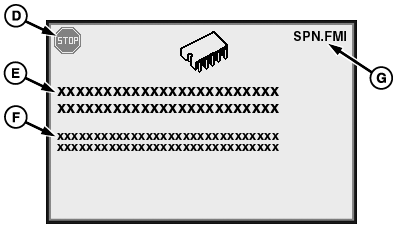
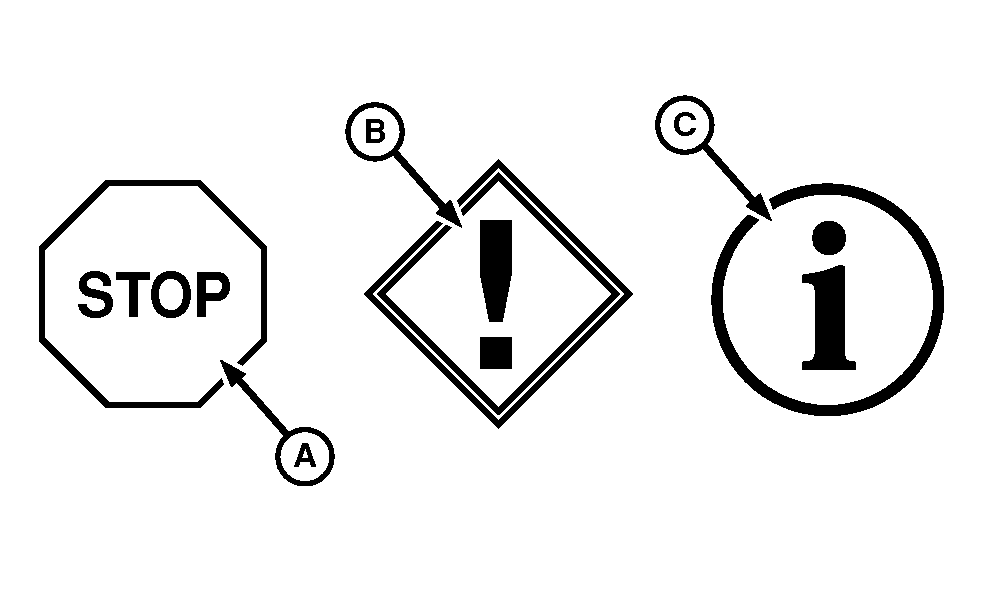
E65003-UN-21JUN12A - Stop System Icon
B - Service Alert Icon
C - Information Icon
D - Warning Icon
E - Keyword Strings
F - Text Strings
G - Diagnostic Trouble Code (DTC)
Icon (D) and the associated tone define the importance of the warning:- Icon (A) indicates that the machine has detected a serious malfunction which requires immediate action or damage to the machine can occur. Stop system immediately.
- Icon (B) indicates that the machine has detected a problem which requires action. If it is not serviced or repaired, the machine can be damaged or have significant performance reduction .
- Icon (C) indicates that the machine has detected a fault in a system or component. The machine can continue to operate without damage, however there can be degraded performance of certain functions.
-
Keyword strings (E) help to determine the importance and the cause of the warning and briefly define the area of malfunction.
-
The Diagnostic Trouble Code (G) in the upper right corner is the SPN.FMI (Suspect Parameter Number and Failure Mode Identifier). This code is a language independent code which helps to identify more details for the active warning.
-
Text strings (F) provide more details about the cause of the warning and possible corrective action.
-
The warning screen disappears automatically when the machine detects the correction of the malfunction or when the operator selects the acknowledge button for certain warnings.
|
DP99999,0000CFD-19-20170405 |