Test Net Wrap Switch Using Monitor
-
Turn the tractor ignition key to the ON position. Do not start the tractor engine.
-
Select the Settings softkey.
E84879-UN-09OCT17 -
Select the Baler Diagnostics softkey.
E64643-UN-11MAY12 -
Select the Test Input softkey.
E84889-UN-09OCT17 -
Using the Next Page softkey, advance to the test input page 3.
E85173-UN-25OCT17 -
E85222-UN-25OCT17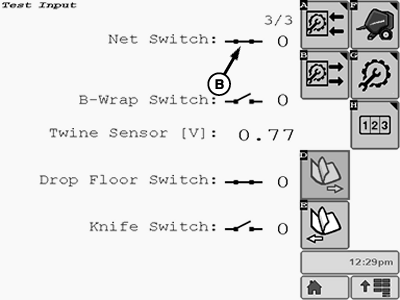
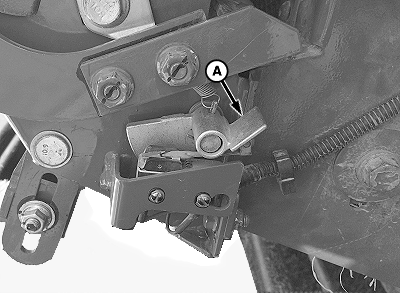
E85174-UN-25OCT17A - Lever
B - Switch Icon
Depress lever (A) to open the switch internally. Hold down the lever and check the switch icon on test input page 3 on the monitor. -
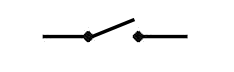
E66910-UN-27JUL12Open Switch Symbol
The switch icon (B) must display the Open Switch symbol. -
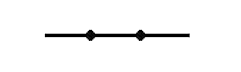
E66909-UN-27JUL12Closed Switch Symbol
Release the switch lever. The switch icon must change to display the Closed Switch symbol. -
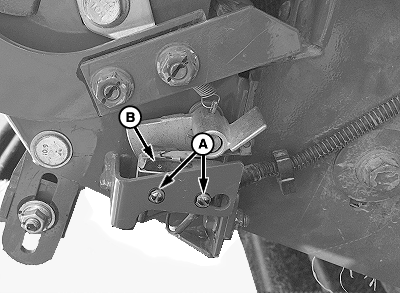
E83034-UN-24OCT17A - Screw (2 used)
B - Switch
If the switch icon does not appear as described, adjust the switch position as follows:-
Turn the tractor ignition key to the OFF position and remove key.
-
Loosen screws (A) and reposition the switch (B) as necessary.
-
Tighten the screws finger tight, then tighten an additional 1/4—1/2 turn.
-
Recheck switch operation.
-
-
If switch adjustment does not produce correct readings:
-
Check wire harness for cuts and breaks.
-
Check for correct wire connections.
-
Check that wires are not shorted to each other or to ground.
-
Check harness connectors for damaged (pushed in) terminals.
-
Disconnect one wire from the switch. Test switch operation using a multimeter. There must be continuity between the switch terminals when the switch actuator is in the up position. When the lever is depressed, continuity must be broken.
-
Replace the switch if necessary.
-
|
DP99999,0000D0C-19-20171024 |