Adjust Net Wrap Settings
-
From the baler application main page, select the Net Wrap Settings softkey.
E84878-UN-05OCT17 -
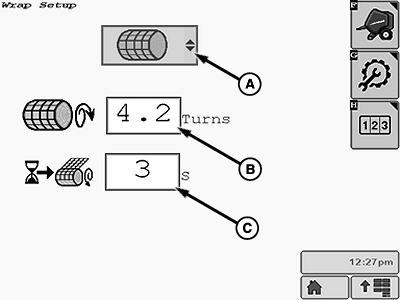
E84900-UN-16OCT17A - Net System Icon
B - Density Input Box
C - Delay Time Input Box
Ensure that the net system icon (A) is shown and selected on the wrap setup page. -
Set the number of wrap layers and the wrap delay time as follows:
-
Apply at least 2.2 layers of net on each bale. For high-density bales or dry crop conditions, apply at least 3.2 layers per bale.
Number of Layers of Net: Set the desired number of layers of net wrap in the density input box (B). The number can be set from 2 through 10.
Due to the actuator retraction time, the minimum number of layers to be applied depends on the bale diameter. Refer to the table to find the recommended minimum number of layers, corresponding to the bale diameter.
-
Net Wrap Delay Time: Set the net wrap delay time between 0—9 seconds in the input box (C). The initial factory setting is 2 seconds.
The net wrap delay is the time between the wrap start indication on the monitor and the activation of the net actuator. The delay provides time to stop the tractor forward travel and prevent crop from getting trapped between the layers of net.
-
-
To return to the baler application main page, select the Main Page softkey.
E84866-UN-05OCT17Table applies at rated PTO speed
Recommended Layers of Net Wrap Based on Bale Diameter
Bale Diameter
90 cm (2.95 ft)
100 cm (3.28 ft)
110 cm (3.60 ft)
120 cm (3.93 ft)
130 cm (4.26 ft)
140 cm (4.59 ft)
150 cm (4.92 ft)
160 cm (5.24 ft)
170 cm (5.57 ft)
180 cm (5.90 ft)
Minimum Layers of Net Wrap
2.9
2.6
2.4
2.2
2.0
1.9
1.8
1.7
1.6
1.5
|
DP99999,0000D61-19-20171010 |