Operate Drop Floor (MegaWide™ HC2 Feed System Only)
-
Always operate the baler with the drop floor in the raised position, unless unplugging.

E84859-UN-04OCT17Unplug Baler Softkey
A - Unplug Softkey
Select the Unplug Softkey (A) on the main page on the monitor. The unplug function screen appears on the monitor. -
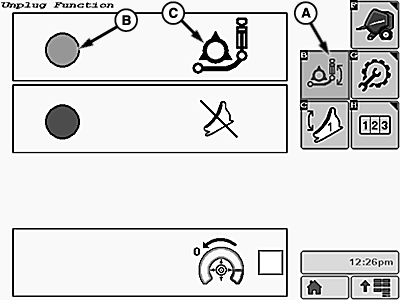
E84860-UN-04OCT17Unplug Function Screen
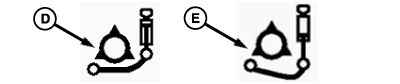
E84861-UN-04OCT17Drop Floor Position Icons
A - Drop Floor Softkey
B - Selection Indicator
C - Drop Floor Icon
D - UP Icon
E - DOWN Icon
Select the Drop Floor Softkey (A).The selection indicator circle (B) turns green. The drop floor icon (C) shows the current position of the drop floor. -
To raise or lower the drop floor, operate the pickup SCV lever. The drop floor icon changes to show whether the floor is in the UP position (D) or DOWN position (E). The floor position is also shown on the main page.
|
DP99999,0000D77-19-20171004 |