Operate Precutter Knives (If Equipped)
-

E84859-UN-04OCT17Unplug Softkey
A - Unplug Softkey
Raise the drop floor. (See Operate Drop Floor in this section.) -
Select the Unplug softkey (A) on the baler application main page.
-
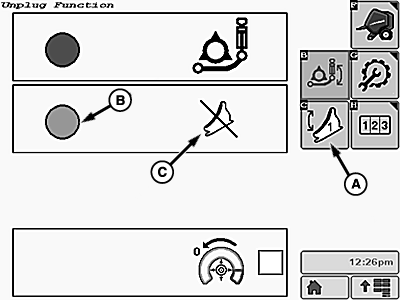
E84862-UN-07NOV17Unplug Function Screen
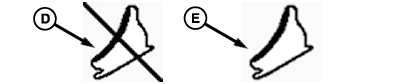
E84863-UN-04OCT17Knife Position Icons
A - Knife Set 1 Softkey
B - Selection Indicator
C - Knife Position Icon
D - DISENGAGED Position
E - ENGAGED Position
Select the Knife Set 1 softkey (A). The selection indicator circle (B) turns green. The knife position icon (C) shows the current position of the knives. -
To engage or disengage the knives, operate the pickup SCV lever. The knife position icon changes to show whether the knives are in the DISENGAGED position (D) or the ENGAGED position (E).
-
After raising the knives, the pickup can raise slightly. Check the pickup position frequently and lower it as necessary. To help follow the field terrain, place the pickup SCV in the float setting.
|
DP99999,0000E3C-19-20171115 |