Baler Main Page Display Description
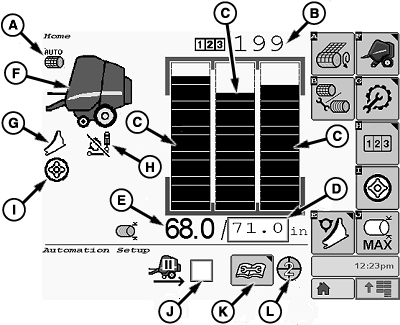
E84865-UN-04OCT17
A - Wrapping Mode
B - Current Field Bale Counter
C - Bale Shape Indicators
D - Bale Diameter (Target)
E - Bale Diameter (Actual)
F - Baler Status
G - Knives Status
H - Drop Floor Status
I - Soft Core Status
J - Automation Pause Mode Checkbox
K - Enable or Disable Automation Button
L - Automation State Pie
The main page allows the main baler functions to be controlled and monitored while operating in the field.
Symbol (A) indicates the selected wrapping mode. Symbol (A) is crossed out when the selected wrapping start mode is unavailable. (See Select Wrapping Mode in this section.)
Bale counter (B) indicates the total number of bales done for the selected field. (See Customer And Field Counters in this section.)
Bale shape indicators (C) allow the bale shape to be visualized on both sides and the center. (See Guideline To Form A Good Bale and Make A Bale With Bale Shape Indicators in this section.)
Input box (D) is used to adjust the bale diameter. (See Set Bale Diameter in this section.)
Actual bale diameter (E) indicates the bale diameter measured during bale formation (no value displayed below 50 cm [19.2 in])
Baler status (F) is used to monitor the bale size, the wrapping processes, and the rear gate position.
Knives status symbol (G) indicates whether the knives are engaged or disengaged. This symbol is displayed only if the baler is equipped with a precutter system. (See Operate Precutter Knives in Operating the Baler section.)
Symbol (H) shows the status of the drop floor. This symbol is used only on balers equipped with a precutter. When the drop floor is in the normal position (raised or disengaged) the symbol is crossed out on the display. (See Operate Drop Floor [MegaWide™ HC2 Feed System Only] in Operating the Baler section.)
Symbol (I) for the soft core system status is displayed only if the soft core function is enabled. (See Operate Soft Core System in this section.)
Checkbox (J) is used to enable or disable the automation pause mode. (See Operate Baler In Hilly Terrain - Automation Pause Function in Operating Baler in Automation Mode section.)
Button (K) allows the operator to enable or disable automation. (See Restart Or Resume Automation in Operating Baler in Automation Mode section.)
Symbol (L) indicates the current automation pie state. (See Automation State Pie in Operating Baler in Automation Mode section.)
|
MegaWide is a trademark of Deere & Company |
DP99999,0000E3E-19-20171127 |