Baler Application Softkey Designation
Main Page Softkey
This softkey is available on each page of the baler application.

E84866-UN-05OCT17
Soft Core Softkey

E64578-UN-10MAY12
Counters Softkey

E84867-UN-05OCT17
Total Counters Softkey

E84868-UN-05OCT17
This softkey allows the operator to switch from the Customer Fields page to the Total Bale Counts page.
Customer Fields Softkey

E84869-UN-05OCT17
This softkey allows the operator to switch from the Total Bale Counts page to the Customer Field Bale Count page.
Remove Bales and Add Bales Softkeys
E84870-UN-05OCT17
Clear Current Field Counter Softkey

E84871-UN-05OCT17
Clear Current Customer Counter Softkey

E84872-UN-05OCT17
Clear Season Counter Softkey

E84873-UN-05OCT17
Edit Customer Name Softkey

E84874-UN-05OCT17
This softkey allows customer names to be entered. The name is limited to ten characters.
Start Net, B-Wrap, or Twine Wrapping Cycle Softkey
The operator can start the wrapping process (Net, B-Wrap, or Twine) at any time before the bale reaches the selected diameter (which starts the automatic wrapping process). (See Automatic Start of Wrapping Cycle or Manual Start of Wrapping Cycle in this section.)

E84875-UN-05OCT17
Start Net Wrapping Softkey

E84876-UN-05OCT17
Start B-Wrap Wrapping Softkey

E84877-UN-05OCT17
Start Twine Wrapping Softkey
Stop Wrapping Cycle Softkey

E64632-UN-10MAY12
This softkey only appears on the baler application main page after a wrapping cycle has started.
The wrapping process is stopped any time this softkey is selected.
Maximum Bale Size Softkey

E66965-UN-09AUG12
Wrap Setup Softkey

E84878-UN-05OCT17
(See Adjust Net Wrap Settings, Adjust B-Wrap Settings, or Adjust Twine Wrap Settings in this section.)
Retract Actuator and Extend Actuator Softkeys

E64635-UN-10MAY12
Settings Softkey

E84879-UN-09OCT17
Next Page and Previous Page Softkeys
E84888-UN-09OCT17
Baler Diagnostic Softkey

E64643-UN-11MAY12
Test Inputs Softkey

E84889-UN-09OCT17
Test Outputs Softkey

E84890-UN-09OCT17
Baler Calibration Softkey

E64646-UN-11MAY12
Twine Actuator Calibration Softkey

E64647-UN-11MAY12
Bale Diameter Calibration Softkey

E64648-UN-11MAY12
Speed Compensation Program Checkbox

E66988-UN-08AUG12
Twine and Net Speed Compensation Checkbox
Enabling this program maintains the desired net and twine wrapping selections when operating the baler at less than rated PTO speed. It is also used for the slip clutch alert system. Check the box to activate the program (recommended setting).
Automatic Wrapping Not Available Icon

E66962-UN-08AUG12
Twine Wrapping Not Available

E76594-UN-25JUL14
Net Wrapping Not Available

E76595-UN-25JUL14
B-Wrap Wrapping Not Available
This icon shows on the screen when something prevents the selected wrapping mode from being available. This can include problems which are in the diagnostic trouble code list (for example, the gate is open or wrapping is already in progress).
Calibrate Gate Bale Shape Sensor (Left, Center, and Right)

E66966-UN-09AUG12
Left-Bale Shape Sensor

E66968-UN-09AUG12
Center Bale Shape Sensor

E66967-UN-09AUG12
Right Bale Shape Sensor
See Calibrate Bale Shape Sensors in Baler Application Service section.
Calibrate Gate Position Sensor

E84891-UN-09OCT17
Sensors provide information on the rear gate position to the automation program.
See Calibrate Gate Position Sensor in Baler Application Service section.
Unplug Function Softkey

E84892-UN-10OCT17
This softkey is used to navigate to the Unplug Function page to operate the drop floor and knives.
Drop Floor Softkey

E84893-UN-10OCT17
This softkey is used to raise and lower the drop floor from the Unplug Function page.
Knives Softkey

E84894-UN-10OCT17
This softkey is used to engage and disengage the precutter knives from the Unplug Function page.
Twine Program Icons
-
Twine Spacing
E66971-UN-09AUG12 -
Left-Hand Twine Wraps
E66972-UN-09AUG12 -
Right-Hand Twine Wraps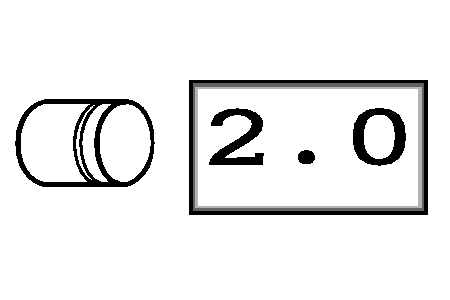
E66973-UN-09AUG12 -
Left-Hand End Distance of Wrap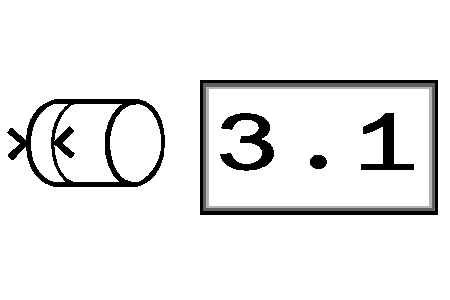
E66974-UN-09AUG12 -
Right-Hand End Distance of Wrap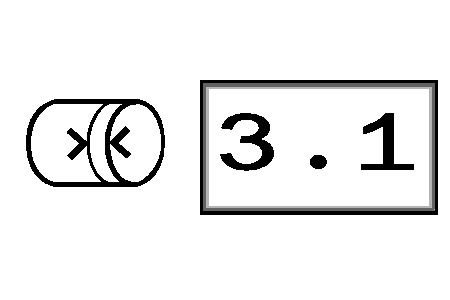
E66975-UN-09AUG12 -
Cinch Wrap
E66979-UN-09AUG12Required in slick crop conditions to prevent twine from sliding off the end of the bale.
-
Re-extension of Twine Arm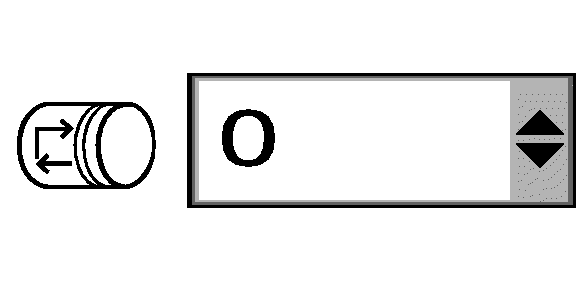
E66976-UN-09AUG12In certain conditions, twine arm re-extension prevents twine from unrolling when the bale is ejected.
-
Dry Straw Wrap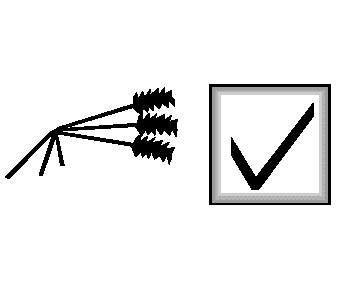
E66977-UN-09AUG12This program helps prevent straw from flaking off in the baler and causing plugging during the wrap cycle.
Automatic Wrapping of Twine or Net

E66980-UN-08AUG12
Twine Icon Shown

E66981-UN-08AUG12
Net Icon Shown

E76596-UN-25JUL14
B-Wrap Icon Shown
System automatically wraps bale when selected diameter is reached.
Home Page Button
E66984-UN-02AUG12
Home Page Button
This button returns the display to the GreenStar™ home page or the operator selected home page.
Display Menu Button
E66983-UN-02AUG12
Display Menu Button
Selecting this button displays a menu of all applications currently available.
|
GreenStar is a trademark of Deere & Company |
DP99999,0000E3F-19-20171120 |