Next VT Function
The Next VT Softkey is only shown if multiple ISOBUS monitors are detected on the bus.
The Next VT function can be used if multiple ISOBUS monitors are on the same CAN network as the baler. Selecting the Next VT softkey allows for the baler to load to the next display on the CAN bus network so that the operator can select which display the baler functions are viewed on.
The object pool must be loaded on each of the monitors, so the first-time switching between monitors can take some time (up to 5—10 minutes). Once the object pool has been loaded on the display, switching between VTs takes only a few seconds.
-
From the baler application main page, select the Settings softkey.
E84879-UN-09OCT17 -
Select the VT Function softkey.
E84895-UN-10OCT17 -
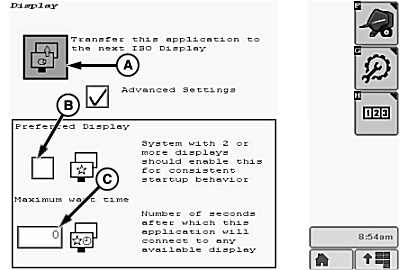
E85600-UN-15NOV17A - Transfer Button
B - Preferred Display Checkbox
C - Wait Time Setting
Select button (A) to transfer the baler application to the next ISO display. To use the same display at each power-up, check the preferred display box (B). When the preferred display box is checked, the application connects to any available display after the maximum wait time setting (C).
|
DP99999,0000E40-19-20171115 |