Select Wrapping Mode
-
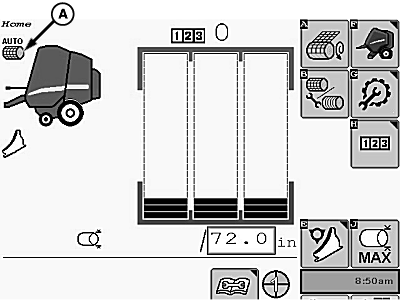
E84898-UN-16OCT17A - Wrapping Mode Symbol
The wrapping mode symbol (A) on the home page indicates the selected wrapping start mode (twine, net, or B-wrap).The wrapping cycle starts automatically when the target bale diameter is reached. (See Automatic Start Of Wrapping Cycle in this section.)
-
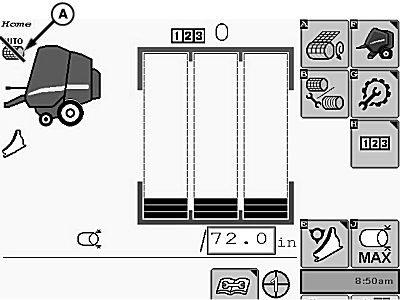
E84899-UN-16OCT17A - Wrapping Mode Symbol
The wrapping mode symbol (A) is crossed out when the selected automatic wrapping start mode is unavailable because one of the following conditions exist:- Automatic wrapping cycle is already running.
- Baler gate is not closed.
- Diagnostic trouble code relating to the gate or the selected wrapping system is active.
-

E84878-UN-05OCT17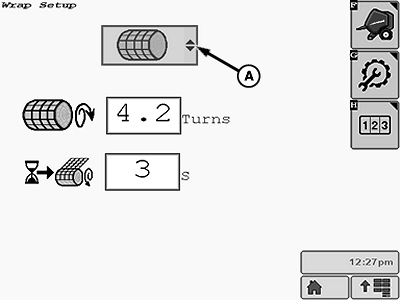
E84906-UN-16OCT17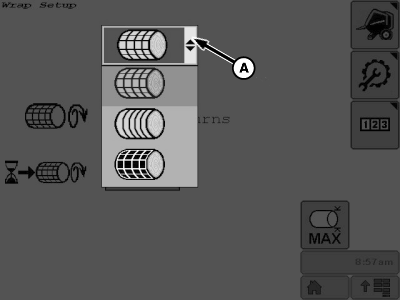
E84907-UN-19OCT17A - Wrapping Mode Menu
To change the selected wrapping mode:-
Select the Wrap Setup softkey on the main page. The wrap setup page for the currently selected mode appears on the display.
-
Select the wrapping mode menu (A) on the setup page. A drop-down menu of wrapping modes appears on the screen.
-
Select the desired wrapping mode icon. The setup page for the selected mode then appears on the screen.
-
Verify or change any of the settings as necessary.
-
Select the main page softkey to return to the baler application main page.
-
|
DP99999,0000E49-19-20171019 |