Adjust B-Wrap Settings
-
From baler application main page, select the Wrap Setup softkey.
E84878-UN-05OCT17 -
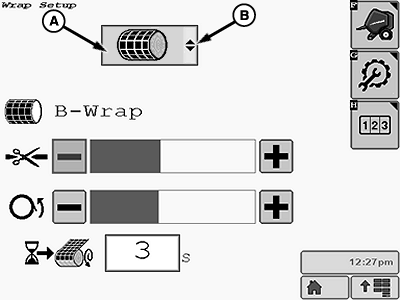
E84901-UN-16OCT17A - B-Wrap Icon
B - Drop-Down Arrows
Ensure that the B-wrap icon (A) is shown on the Wrap Setup page. If the B-wrap icon is not shown, select the drop-down arrows (B) and select the B-wrap icon from the drop-down menu that appears.
Adjust Cut Position
E84902-UN-16OCT17
E84903-UN-16OCT17
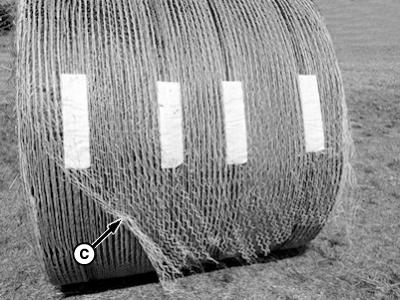
This Tail is Too Long
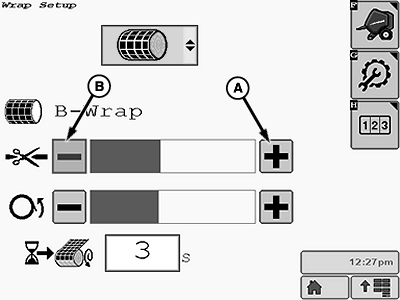
A - Plus (+) Softkey
B - Minus (-) Softkey
C - Tail
The B-wrap material must be cut off to leave a tail (C) between 50—305 mm (2—12 in) past the VELCRO® strips. A longer tail causes wrap material to pull off the bale during handling.
To lengthen the tail, press the plus (+) softkey (A). Each press of the plus softkey lengthens the tail approximately 25.4 mm (1 in).
To shorten the tail, press the minus (-) softkey (B). Each press of the minus softkey shortens the tail approximately 25.4 mm (1 in).
Adjust Bale Orientation
E84904-UN-16OCT17
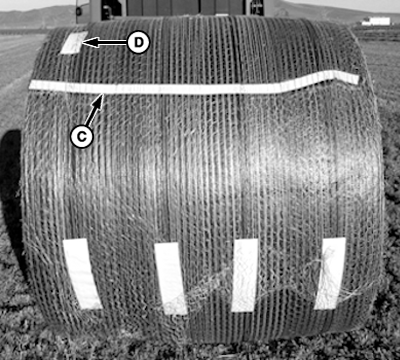
E84905-UN-16OCT17
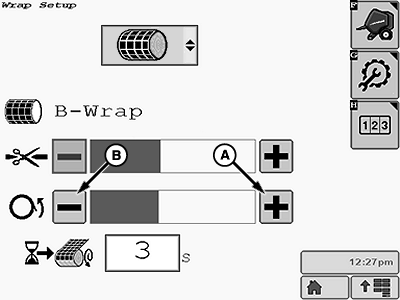
A - Plus Softkey
B - Minus Softkey
C - White Line
D - Aluminum Tape
After being ejected, the bale must be oriented with the B-wrap seam between the noon and 6 o’clock position, when looking at the left-hand side. The ideal position is with the seam at the 3 o’clock position .
To orientate the bale forward (rotate counterclockwise when looking at the left-hand side), press the plus (+) softkey (A).
To orientate the bale backward (rotate clockwise when looking at the left-hand side), press the minus (-) softkey (B).
- The white line (C) shows the position of the breathable material overlap.
- The seam must always overlap in a position to keep water from running into the bale.
- The aluminum tape (D) must be on the left-hand side of the bale when facing the rear of baler.
Lock out the bale push bar for B-wrap operation.
The bale push bar affects seam location upon bale ejection and damages B-wrap material.
|
VELCRO is a trademark of Velcro Industries B.V. |
DP99999,0000E4A-19-20171115 |