Operate Soft Core System
The soft (variable) core feature is used to lower the core density of the bale and can improve bale starting in certain types of crops. This feature uses a solenoid valve and a low pressure relief valve to reduce hydraulic pressure on the belt tension cylinders to allow a looser bale to form initially. The monitor-controller operates the solenoid valve based on the soft core diameter setting and the bale diameter sensor.
When the soft core system is enabled, the monitor-controller energizes the solenoid valve to reduce the belt tension while the core is being formed. When the bale size reached the preset core diameter, the monitor-controller de-energizes the solenoid valve. Bale formation is then completed at the normal higher pressure, forming tighter and denser outer layers.
Enable or Disable Soft Core System:
-
From the baler application main page, select the Soft Core softkey to enable the soft core system.
E64578-UN-10MAY12 -
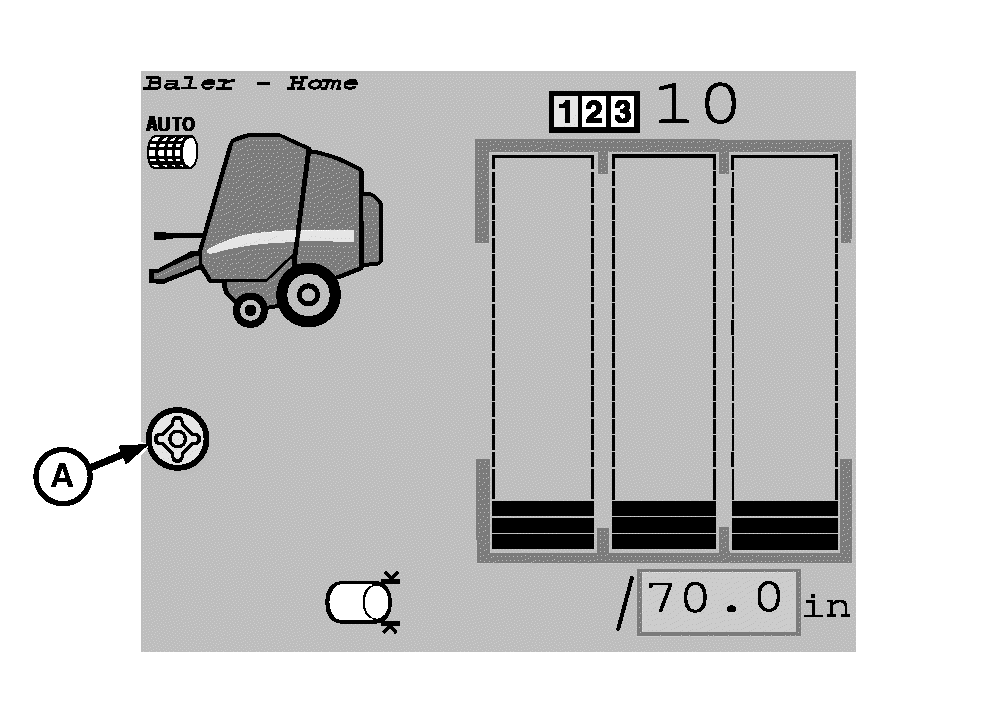
E67047-UN-06AUG12A - Soft Core Symbol
The soft core symbol (A) is displayed on the main page when the soft core system in enabled. -
To disable the soft core system, select the Soft Core softkey again. The soft core symbol disappears on the display.
Adjust Soft Core Diameter:
-
From the baler application main page, select the Settings softkey.
E84879-UN-09OCT17 -
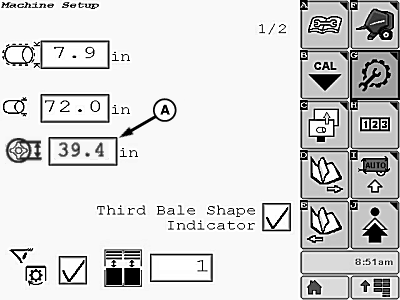
E84909-UN-16OCT17A - Input Box
Select input box (A) on the machine setup page and set the desired soft core diameter 81—142 cm (32—56 in). -
Select the Main Page softkey to return to the baler application main page.
E84866-UN-05OCT17
|
DP99999,0000E55-19-20171013 |