Customer and Field Counters
The counter function includes ten possible customers and a list of ten field counters per customer. These counters can be used to store daily number of bales or number of bales per field.
The bale must be tied and the rear gate must be opened and closed to add a bale to the current field counter.
Select Customer and Field Number:
-
From the baler application main page, select the Counters softkey.
E64579-UN-10MAY12 -
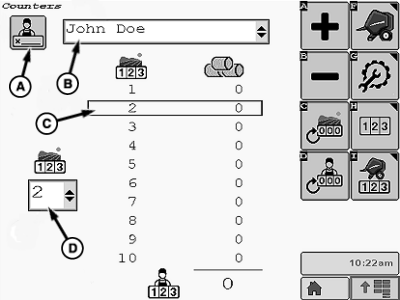
E84910-UN-16OCT17A - Customer Name Edit Softkey
B - Current Customer
C - Field Number
D - Current Field Indicator
Select a customer:-
Select current customer (B) and activate drop-down list.
-
Select the desired customer name from the drop-down list.
-
The display is refreshed to show the total number of bales for each of the ten fields for the selected customer.
-
-
To edit the customer name:
-
Select the Customer Name Edit softkey (A).
-
Edit the name of the current customer (B). The name is limited to ten characters.
-
-
Select the field number:
-
Select the current field indicator (D) to activate a drop-down list.
-
Select the desired field number 1—10.
-
The selected field is indicated by a box around the field number (C).
-
-
Select the Main Page softkey to return to the baler application main page.
E84866-UN-05OCT17
Add or Remove Bales in Current Field Counter
Changing the current field bale counter also changes the total number of bales for season.
Select the Add Bales softkey (A) or the Remove Bales softkey (B) on the counters page if necessary to change the total number of bales listed for the selected current field number (C).
To select a different field number, select the field indicator (D) and choose the desired field from the drop-down menu that appears.
Clear Current Field Counter

E84871-UN-05OCT17
Clear Current Field Counter Softkey
Select the Clear Current Field Counter softkey to reset the bale count for the selected field number to 0.
Clear Current Customer Counters

E84872-UN-05OCT17
Clear Customer Counters Softkey
Select the Clear Customer Counters softkey to clear the bale count for all fields listed for the selected customer.
|
DP99999,0000E58-19-20171013 |