Season Counter and Machine Total Counter
-
From the baler application main page, select the Counters softkey.
E84867-UN-05OCT17 -
Select the Total Counters softkey on the field counters page. The season and machine total counters page appears on the display.The following information is shown on the page:
E84868-UN-05OCT17-
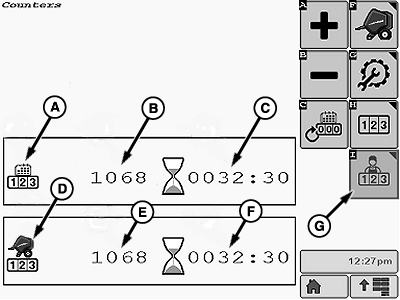
E84911-UN-16OCT17A - Season Counter
B - Number of Bales
C - Machine Time
D - Machine Total Counter
E - Total Number of Bales
F - Total Machine Operating Time
G - Customer Fields Softkey
Season counter (A):
The season counter shows the total number of bales (B) for the season and the total machine operating time (C) for the season in hours and minutes. -
Machine total counter (D):
The machine total counter shows the total number of bales (E) produced by the machine and the total machine operating time (F) in hours and minutes.Both counters (E and F) are permanent non-resettable counters.
Machine operating time (C and E) is counted only when the PTO is engaged.
-
To switch back to the Customer Fields Counters page, select the Customer Fields softkey (G).
-
-
Select the Main Page softkey to return to the baler application main page.
E64577-UN-14MAY12
Add or Remove Bales in Season Counter
-
Changing the total number of bales for the season (C) does not modify the current field bale counter.
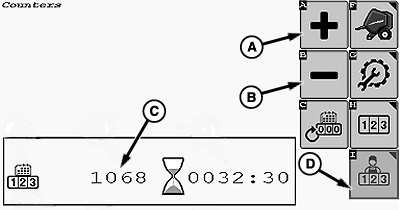
E84912-UN-16OCT17A - Add Bales Softkey
B - Remove Bales Softkey
C - Number of Bales Counter
Select the Add Bales softkey (A) or the Remove Bales softkey (B) on the counters page if necessary to change the total number of bales counter (C) for the season. -
To switch back to the Customer Fields Counters page, select the Customer Fields softkey (D).
Clear Season Counter
-
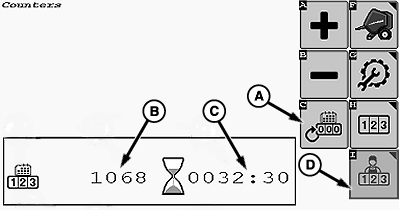
E84913-UN-16OCT17A - Clear Season Counter Softkey
B - Number of Bales Counter
C - Machine Time Counter
D - Customer Fields Softkey
Select the Clear Season Counter softkey (A) to clear the number of bales counter (B) and the machine operating time (C) in the season counter display. -
To switch back to the Customer Fields Counters page, select the Customer Fields softkey (D).
|
DP99999,0000E59-19-20171016 |