Select Automation Level
-
From the baler application main page, select the Settings softkey.
E84879-UN-09OCT17 -
From the machine settings page, select the Automation Settings softkey.
E84914-UN-16OCT17 -
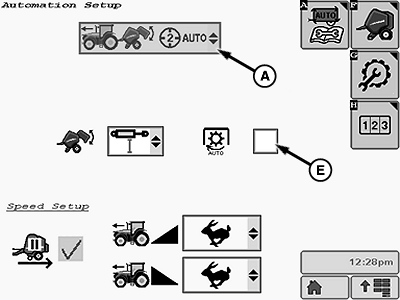
E85043-UN-18OCT17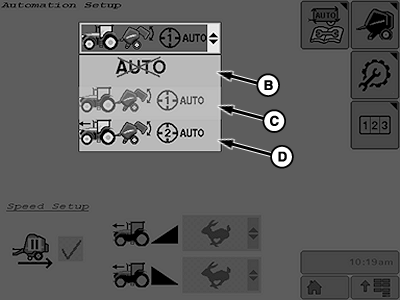
E85044-UN-18OCT17A - Automation Level
B - Automation OFF
C - Automation Level 1
D - Automation Level 2
E - Auto-PTO Check Box
Select the automation level drop-down list (A), then select the desired automation level:- Automation OFF (B) - Tractor does not receive commands from the baler.
-
Automation Level 1 (C) - Tractor receives
commands from the baler to actuate the SCV to unload the bale after
the wrapping cycle (requires tractor with E-SCV).
If the wrapping mode is B-Wrap, only Automation Level 1 can be selected. If Automation Level 2 was previously selected, the baler defaults to and remains in Level 1 Automation.
- Automation Level 2 (D) - Tractor receives commands from the baler to reduce speed until the tractor stops moving forward when the target bale diameter is reached (requires tractor with IVT). After the wrapping cycle, the tractor receives commands from the baler to actuate the SCV to unload the bale (requires tractor with E-SCV).
-
If automation level is being used to apply B-Wrap check box (E) must be selected to stop the PTO.
-
Select the Main Page softkey to return to the baler application main page.
E84866-UN-05OCT17
|
DP99999,0000E5A-19-20171017 |