Select Rear Gate Selective Control Valve
-
From the baler application main page, select the Settings softkey.
E84879-UN-09OCT17 -
From the machine settings page, select the Automation Settings softkey.
E84914-UN-16OCT17 -
E85045-UN-18OCT17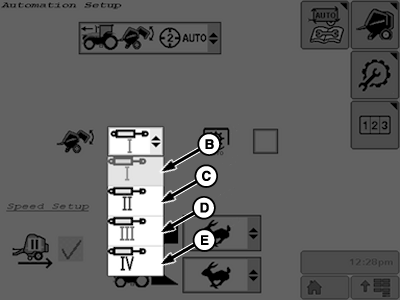
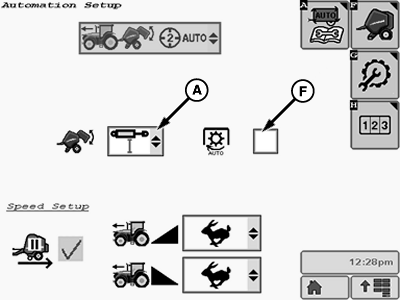
E85046-UN-18OCT17A - SCV Drop-Down Box
B - Tractor SCV 1
C - Tractor SCV 2
D - Tractor SCV 3
E - Tractor SCV 4
F - Auto-PTO Check Box
Select the rear gate SCV drop-down box (A). -
The number of SCVs available in the drop-down list depends on the tractor configuration.
Select the desired tractor SCV (B—E) to operate the baler rear gate.
-
If automation is being used to apply B-Wrap, check box (F) must be selected to stop the PTO.
-
Select the Main Page softkey to return to the baler application main page.
E84866-UN-05OCT17
|
DP99999,0000E5B-19-20171017 |