Adjust Tractor Behavior
(Automation Level 2 Only)
-
From the baler application main page, select the Settings softkey.
E84879-UN-09OCT17 -
From the automation setup page, select the Automation Settings softkey.
E84914-UN-16OCT17 -
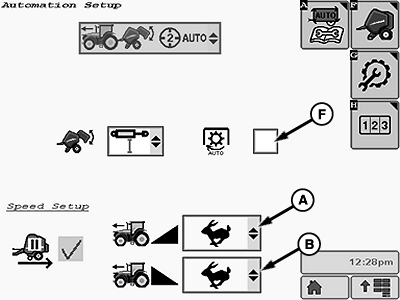
E85047-UN-18OCT17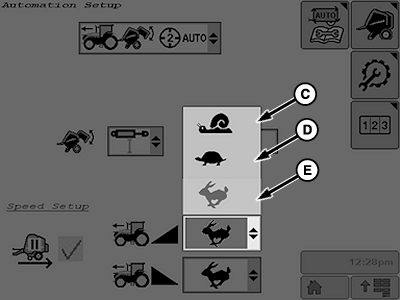
E85048-UN-18OCT17A - Tractor Acceleration
B - Tractor Deceleration
C - Minimum Rate
D - Normal Rate
E - Maximum Rate
F - Auto-PTO Check Box
When working in automation level 2, the tractor acceleration and deceleration rate can be adjusted. (See Select Automation Level in this section.-
Adjust tractor acceleration:
Select the acceleration drop-down list (A) and select the desired acceleration rate (C—E). This value is applied when the tractor reverser lever is moved to the center park position and then to the forward position after the bale unloading process.
-
Adjust tractor deceleration:
Select and activate the deceleration drop-down list (B) and select the desired tractor deceleration rate (C—E). This value is applied when the target bale diameter is reached and the tractor slows and stops moving forward.
-
Adjust tractor acceleration:
-
If automation is being used to apply B-Wrap, check box (F) must be selected to stop the PTO.
-
Select the Main Page softkey to return to the baler application main page.
E84866-UN-05OCT17
|
DP99999,0000E5C-19-20171017 |