Automation Diagnostics
-
From the baler application main page, select the Settings softkey.
E84879-UN-09OCT17 -
From the machine settings page, select the Automation Settings softkey.
E84914-UN-16OCT17 -
From the automation settings page, select the Automation Diagnostic softkey.
E64893-UN-21JUN12 -
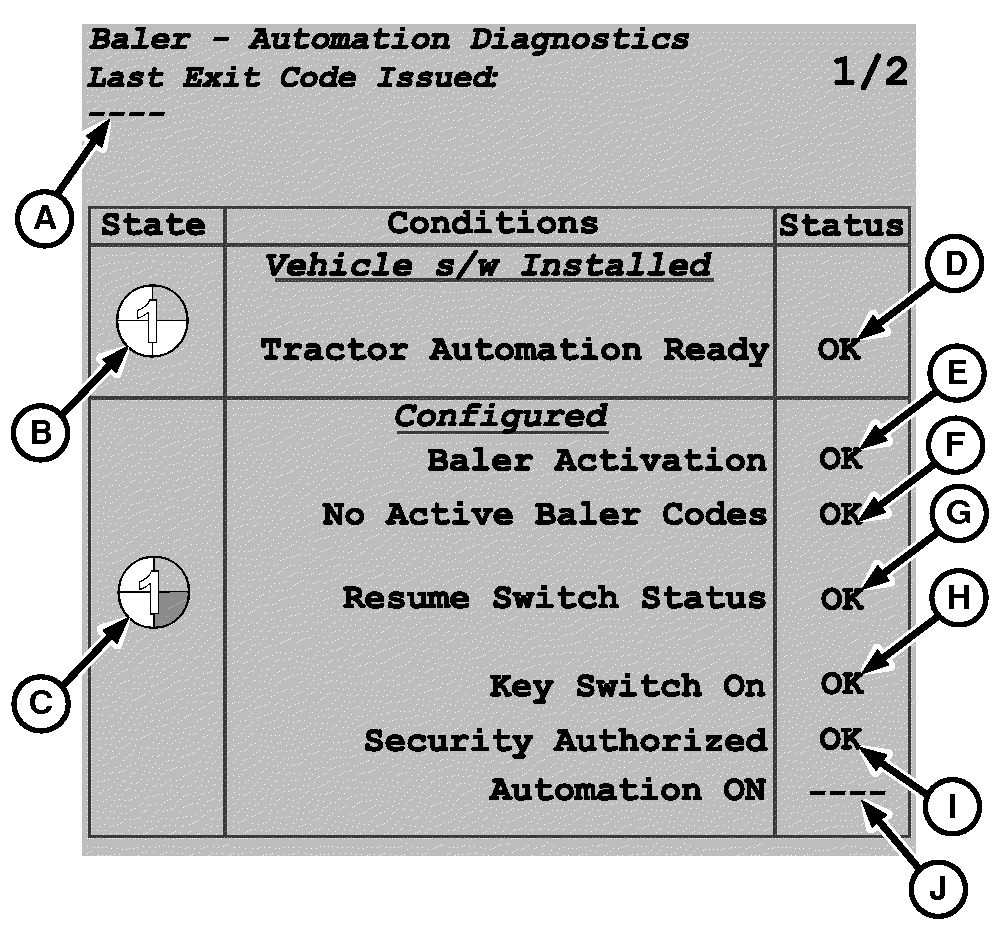
E67314-UN-14AUG12A - Message
B - Disabled State
C - Ready-to-Enable State
D - Tractor Automation Ready Status
E - Baler Activation Status
F - No Active Baler Codes Status
G - Resume Switch Status
H - Key Switch On Status
I - Security Authorized Status
J - Automation ON Status
Message (A) indicates why automation was last deactivated or could not be activated. (See Tractor—Baler Issues Resulting in Automation Deactivation in the Troubleshooting section.)On the baler application main page, message (A) is also displayed for 3 seconds then disappears if automation was deactivated or cannot be activated. (See Baler Automation Main Page Display Description in this section.)
Automation Diagnostics table page 1/2 shows information about the required conditions for automation and automation state: Disabled (B) (1/4 of pie) and Ready-to-Enable (C) (2/4 of pie). When a condition is met, the condition status (D—J) displayed is OK.
Disabled (B) (1/4 of pie):
- Status (D) is OK if the tractor can receive commands from the baler. If status (D) is not OK, see your John Deere dealer or qualified service provider.
Ready-to-Enable (C) (2/4 of pie):
- Status (E) is OK if the baler automation activation key is successfully saved. If status (E) is not OK, see Baler Automation Activation Key in this section.
- Status (F) is OK if there is no active diagnostic trouble code. If status (F) is not OK, see Recent Problems in the Baler Application Service section.
- Status (G) is OK if there is no error regarding the tractor-implement automation hot key (resume switch). If status (G) is not OK, confirm that the resume switch is properly configured on the tractor display. If the status is still not OK, see your John Deere dealer or qualified service provider.
- Status (H) is OK if the tractor ignition key is turned ON. If status (H) is not OK, see your tractor operator’s manual.
- Status (I) is OK if the tractor has a working Automation Activation code and secure communication has been established. If status (I) is not OK, see your John Deere dealer or qualified service provider.
- Status (J) is OK if the selected automation level is automation level 1 or automation level 2. If status (J) is not OK, see Select Automation Level in this section.
On the baler application main page, if automation state Ready-to-Enable (C) (2/4 of pie) cannot be obtained, check for a missing condition. See your John Deere dealer or qualified service provider.
-
To access page 2/2, select the Next Page or the Previous Page softkey.
E84888-UN-09OCT17 -
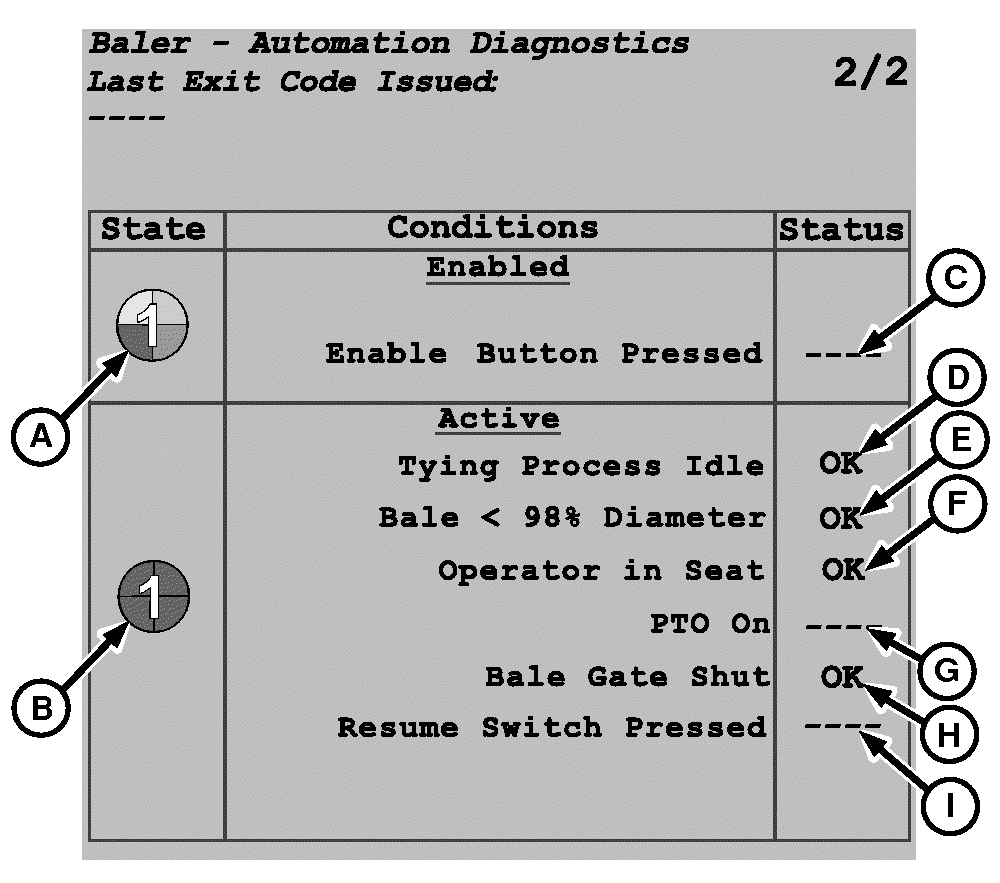
E67315-UN-14AUG12A - Enabled
B - Active
C - Enabled Button Pressed Status
D - Tying Process Idle Status
E - Bale Diameter Status
F - Operator in Seat Status
G - PTO On Status
H - Bale Gate Shut Status
I - Resume Switch Pressed Status
Automation table page 2/2 shows information about the required condition for automation and automation state: Enabled (A) (3/4 of pie) and Active (B) (4/4 of pie). When a condition is met, the condition status (C—I) displayed is OK.Enabled (A) (3/4 of pie):
- Status (C) is OK if the enable automation icon is pressed. If status (C) is not OK, see Operate Baler In Automation Mode in this section.
Active (B) (4/4 of pie):
- Status (D) is OK if the selected wrapping system is not already running. If status (D) is not OK, wait for the wrapping cycle to be completed. Open the gate, eject the bale, close the gate, and then recheck to see if it is OK now.
- Status (E) is OK if the current bale diameter is less than 98% of the target bale diameter. If status (E) is not OK, wrap the bale, open the gate, eject the bale, and close the gate. Activate automation at the start of the next bale.
- Status (F) is OK if operator is detected on the tractor seat. If status (F) is not OK, see your tractor operator’s manual.
- Status (G) is OK if the tractor PTO is engaged. If status (G) is not OK, engage PTO. See your tractor operator’s manual.
- Status (H) is OK if the baler gate is correctly closed. If status (H) is not OK, check gate latches for blockage or maladjustment. (See Adjust Gate Latch Proximity Switches in the Service-Baler section.)
- Status (I) is OK if the tractor-implement automation resume switch is pressed. If status (I) is not OK, see Tia—Tractor-Implement Automation section in your tractor operator’s manual.
-
To return to the baler application main page, select the Main Page softkey.
E84866-UN-05OCT17
|
DP99999,0000E5D-19-20171120 |