Adjust Twine Cutter Tension
-
Turn the tractor ignition key to the ON position. Do not start the tractor engine.
-
Select the Settings softkey on the baler application main page.
E84879-UN-09OCT17 -
Select the Baler Diagnostics softkey on the machine setup page.
E64643-UN-11MAY12 -
Select the Test Output softkey on the diagnostics page.
E84890-UN-09OCT17 -
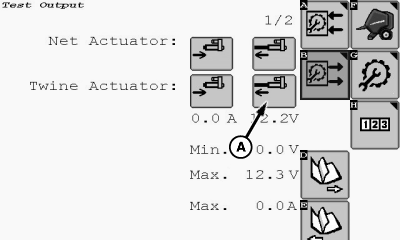
E85052-UN-23OCT17A - Actuator Extend Softkey
Select the twine Actuator Extend softkey (A) on the test output page and move the twine arms behind the twine cutter. -
Turn the tractor ignition key to the OFF position and remove key.

Twine arms can move unexpectedly. To avoid crushing, keep hands out of the twine arm path. Turn off power BEFORE servicing or adjusting twine arms or twine cutter mechanism.
E47598-UN-07JAN00Stay out of the path of twine arms at all times when power to twine arms is ON.
-
Twine knife has two sharp cutting edges. Be careful when working around the knife.
TS268-UN-23AUG88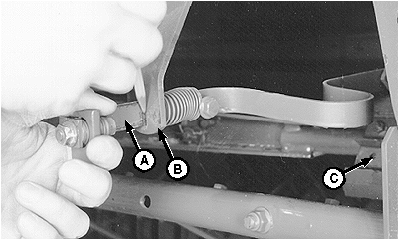
E39276-UN-19JUN96A - Cutter Strap
B - Support
C - Knife
Pull cutter strap (A) gently forward until knife (C) contacts hex anvil. Remove slack, but DO NOT deform the cutter strap. -
Mark the cutter strap along support (B), as shown.
-
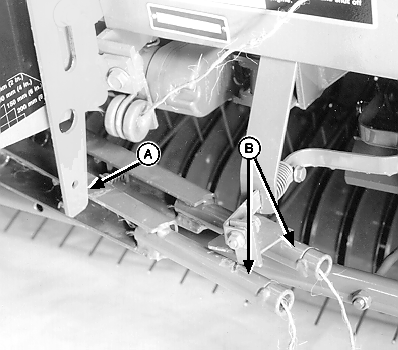
E39771-UN-21FEB96A - Twine Arm Stop
B - Twine Arm (2 each)
Make sure that the twine arm stop (A) is in the down position in relation to the twine arm (B). -
Turn the tractor ignition key to the ON position.
E84879-UN-09OCT17 -
Select the Settings softkey.
-
Select the Baler Diagnostics softkey on the machine settings page.
E64643-UN-11MAY12 -
Select the Test Output softkey on the diagnostics page.
E84890-UN-09OCT17 -
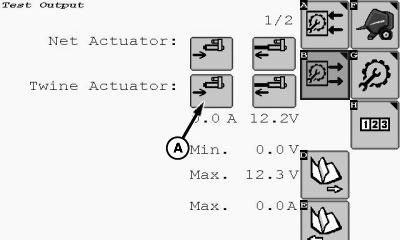
E85053-UN-23OCT17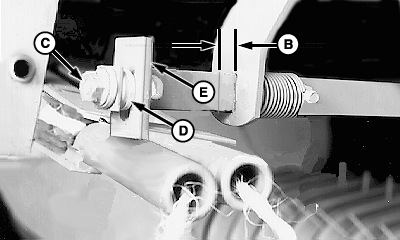
E85239-UN-26OCT17A - Actuator Retract Softkey
B - Distance
C - Nut
D - Washers
E - Tab
To move the twine arms to the home position, select the twine Actuator Retract softkey (A). -
Turn the tractor ignition key to the OFF position and remove key.
-
Check the distance (B) between the mark previously placed on the cutter strap and the strap support. The distance must be within specifications.
Mark on Cutter Strap to the Strap Support Distance 5—7 mm (0.19—0.28 in) (3/16—9/32 in) -
If distance (B) is not within specifications, adjust as follows:
- To decrease the distance, remove nut (C) and move washers (D) from the front side of the tab (E) to the rear of the tab.
- To increase the distance, move washers from the rear of the tab to the front of the tab.
If twine cutter adjustment cannot be made by moving washers on the cutter strap (see Adjust Electric Twine Actuator in this section).
-
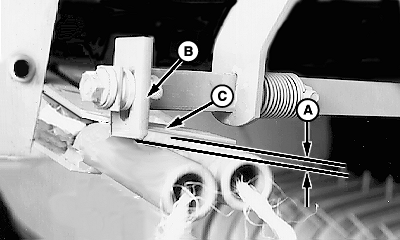
E85240-UN-26OCT17A - Dimension
B - Tab
C - Strap
If washers have been moved, check overlap dimension (A) between the bottom edge of tab (B) and the bottom edge of strap (C). Dimension (A) must be within specifications.Bottom Edge of Tab-to-Bottom Edge of Strap Overlap Distance 2—4 mm (0.08—0.16 in) (3/32—5/32 in)
To Check Overlap Dimension
-
Turn the tractor ignition key to the ON position.
-
Select the Settings softkey.
E84879-UN-09OCT17 -
Select the Baler Diagnostics softkey.
E64643-UN-11MAY12 -
Select the Test Output softkey.
E84890-UN-09OCT17 -
E85053-UN-23OCT17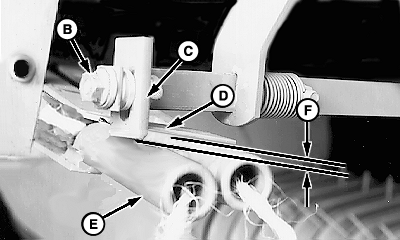
E85165-UN-23OCT17A - Actuator Retract Softkey
B - Nut
C - Tab
D - Strap
E - Twine Arm
F - Dimension
To move the twine arms until twine arm (E) lightly contacts the tab (C) and strap (D), select the twine arm actuator retract softkey (A). -
Turn the tractor ignition key to the OFF position and remove key.
-
To obtain the dimension (F) between the bottom edge of tab (C) and the bottom side of the contact strap (D), loosen nut (B) and adjust the tab (C). Keep tab (C) vertical and tighten nut (B).
-
Turn the tractor ignition key to the ON position.
-
To move the twine arms to the home position, select the twine Retract Actuator softkey.
-
Turn tractor key to OFF position. Remove key.
-
Check overlap dimension (E). The front twine arm (D) must pass under tab (B). If necessary, adjust the tab (B). Light contact between the tab and the front twine arm is acceptable.
-
Make sure that the distance between the mark on the cutter strap and the strap support is still within specification.
|
DP99999,0000E62-19-20171121 |