Test Switches Using Monitor
The operation of proximity switches and lever-actuated switches can be confirmed using the monitor.
-
Select the Settings softkey on the baler applications main page.
E84879-UN-09OCT17 -
Select the Baler Diagnostics softkey on the machine setup page.
E64643-UN-11MAY12 -
Select the Test Input softkey on the diagnostics page.
E84889-UN-09OCT17 -
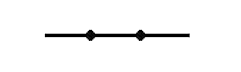
E66909-UN-27JUL12Closed Switch
A closed switch looks like this (see graphic). -
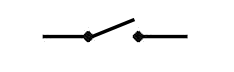
E66910-UN-27JUL12Open Switch
An open switch looks like this (see graphic). -
To test the operation of a switch, either cycle the machine and observe the switch icon on the test input page or simulate cycle by manually opening or closing the switch.
-
The oversize bale switch (roller and lever type microswitch) is normally open. When the actuator lever is moved toward the switch body, the switch clicks and closes if it is operating properly.
-
The gate proximity switches are closed when properly adjusted and the gate is properly closed. Switch operation can also be checked by holding a piece of metal within 3 mm (0.12 in) of the switch to simulate a closed gate.
Test Input - Page 1
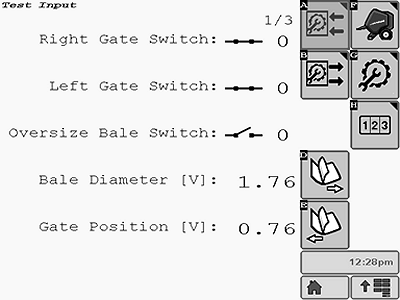
E85168-UN-25OCT17
The following components are shown on Test Input Page 1:
- Right Gate Switch
- Left Gate Switch
- Oversize Bale Switch
- Bale Diameter Sensor
- Gate Position Sensor
Test Input - Page 2
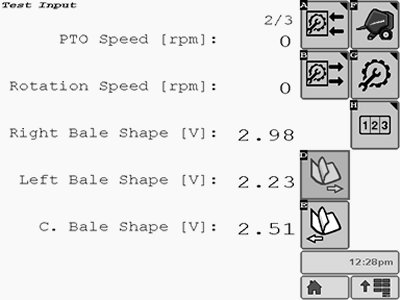
E85169-UN-25OCT17
The following components are shown on Test Input Page 2:
- PTO Speed (rpm)
- Pickup Speed (rpm)
- Right Bale Shape Sensor
- Left Bale Shape Sensor
- Center Bale Shape Sensor
Test Input - Page 3
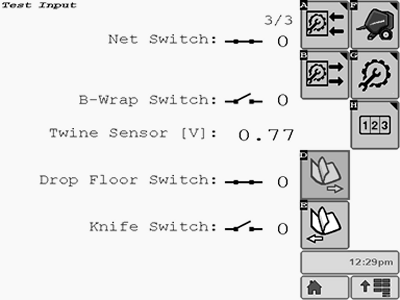
E85170-UN-25OCT17
The following components are shown on Test Input Page 3:
- Net Switch
- B-Wrap Switch
- Twine Position Sensor
- Drop Floor Switch
- Knife Switch
|
DP99999,0000E69-19-20171109 |