Check and Adjust Net Wrap Switch
-

Knife is sharp and net wrap cut-off arm can move without warning. Keep hands clear of the knife arm.
TS268-UN-23AUG88Turn the tractor ignition key to the ON position. Do not start the tractor engine.
-
Open the net wrap cover.
-
Clean the area around the switch.
-
Verify that the knife arm is down.
-
Verify proper operation of the switch using the monitor. (See Test Net Wrap Switch Using Monitor in this section.)
-
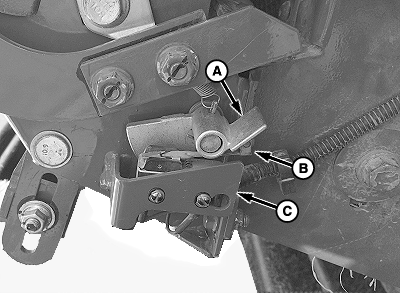
E83033-UN-24OCT17A - Screws (2 used)
B - Actuator
C - Bracket
If proper switch operation is not verified, adjust the switch position as follows:-
Turn the tractor ignition key to the OFF position and remove key.
-
Loosen screws (A) and reposition the switch (B) as necessary.
-
Tighten the screws finger tight, then tighten an additional 1/4—1/2 turn.
-
Recheck switch operation.
-
-
Close the net wrap cover.
-
Select the Settings softkey.
E84879-UN-09OCT17 -
Select the Baler Diagnostics softkey.
E64643-UN-11MAY12 -
Select the Test Output softkey.
E84890-UN-09OCT17 -
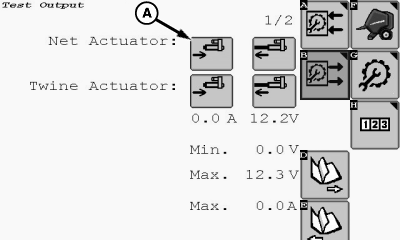
E85171-UN-25OCT17A - Actuator Retract Softkey
Select the Net Actuator Retract softkey (A) and move the wrap cut-off arm to the home (downward) position. -
If this procedure is not followed, net feeds continuously during the next bale.
Turn the tractor ignition key to the OFF position and remove key.
|
DP99999,0000E6F-19-20171024 |