Recent Problems
-
From the baler application main page, select the Settings softkey.
E84879-UN-09OCT17 -
Select the Baler Diagnostic softkey on the machine setup page.
E64643-UN-11MAY12 -
Diagnostics page 1 shows the machine serial number and other information. Trouble code information is shown on pages 2—4.
Select the Next Page softkey to access diagnostic pages 2—4.
E85173-UN-25OCT17 -
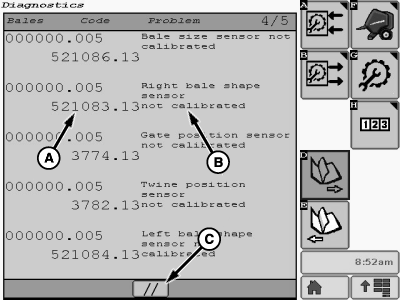
E85346-UN-02NOV17A - Diagnostic Trouble Code (DTC)
B - Problem Description
C - Clear Icon
Diagnostic pages 2—4 show a historical list of recent diagnostic trouble codes (DTCs). Each time the baler generates a new DTC, the list is updated. The diagnostic page shows the DTC (A) and a brief description of the problem (B). The DTC format (SPN.FMI) provides a Suspect Parameter Number and a Failure Mode Indicator. This information provides an index to additional information that can be used for troubleshooting.Up to 15 DTCs (five per page) can be stored at one time. The DTCs are displayed in the order in which they occurred. If more than 15 DTCs occur, a first-in first-out system is used with the earliest code being deleted.
-
To clear the recent problems list, select the clear icon (C) on page 4
-
Select the Main Page softkey to return to the baler application main page.
E84866-UN-05OCT17
|
DP99999,0000E75-19-20171102 |