Test Switches Using Monitor
The proper operation of proximity switches and lever-actuated switches can be confirmed using the monitor.
-
From the baler application main page, select the Settings softkey.
E84879-UN-09OCT17 -
Select the Baler Diagnostics softkey.
E64643-UN-11MAY12 -
Select the Test Input softkey.
E84889-UN-09OCT17 -
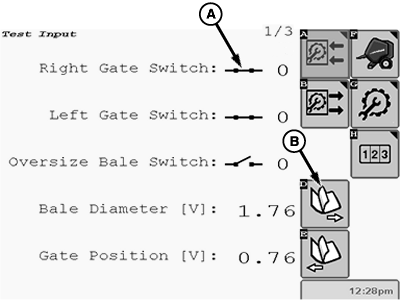
Switch status information is shown on test input pages 1 and 3.
E85241-UN-26OCT17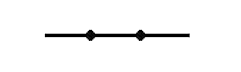
E66909-UN-27JUL12Closed Switch Symbol
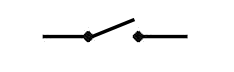
E66910-UN-27JUL12Open Switch Symbol
A - Switch Symbol
B - Next Page Softkey
To test switch operation, either cycle the machine or simulate a cycle by manually opening or closing the switch. Observe the applicable switch symbol (A) on the test input pages to verify proper operation. To advance to another page, select the Next Page softkey (B). -
The oversize bale switch is normally open. When the actuator is moved toward the switch body, the switch clicks and closes if it is working properly.
-
The gate proximity switches must be closed when properly adjusted and the gate is closed. The proximity switches can also be checked by holding a piece of metal within 3 mm (1/8 in) of the switch to simulate a closed gate.
-
The net switch is normally closed.
|
DP99999,0000E78-19-20171109 |