Test Actuator Electrical Consumption
-
From the baler application main page, select the Settings softkey.
E84879-UN-09OCT17 -
Select the Baler Diagnostics softkey.
E64643-UN-11MAY12 -
Select the Test Output softkey.
E84890-UN-09OCT17 -
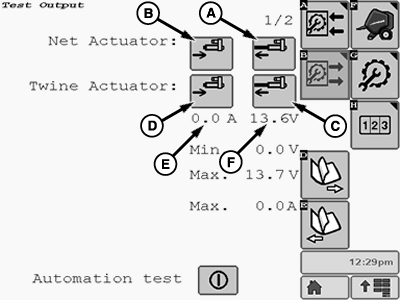
E85244-UN-01NOV17A - Net Actuator Extend Icon
B - Net Actuator Retract Icon
C - Twine Actuator Extend Icon
D - Twine Actuator Retract Icon
E - Actuator Current
F - Voltage
Select icon (A) to extend or icon (B) to retract the net wrap actuator.Select icon (C) to extend or icon (D) to retract the twine wrap actuator.
The actuator current draw (E) and the system voltage (F) are indicated on the display.
Test the actuator through the entire range of operation as follows:
-
Use the Actuator Extend icon and the Actuator Retract icon to operate the actuator in both directions. The actuator current reading (E) shown on the display must be between 1.0—8.0 A while the actuator motor is operating during mid stroke.
-
Continue to operate the actuator to the full extended or fully retracted position. The current reading on the display must be between 22.0—30.0 A when stalled.
- Readings below normal indicate low tractor voltage, or poor or corroded harness connections.
- Readings above normal indicate mechanical linkage problems, a faulty harness, or a faulty actuator motor.
- Current spikes indicate mechanical obstruction in the linkage.
-
-
Select the Main Page softkey to return to baler application main page.
E84866-UN-05OCT17
|
DP99999,0000E7A-19-20171027 |