Calibrate Bale Diameter Sensor—Precise Calibration (Without Baling)
-
Select the Main Page softkey.
E84866-UN-05OCT17 -
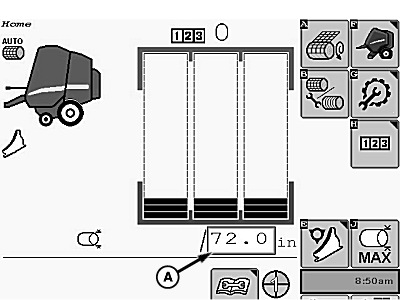
E85304-UN-01NOV17A - Target Bale Diameter Box
Select the target bale diameter box (A) and enter 72.0 for bale diameter. -
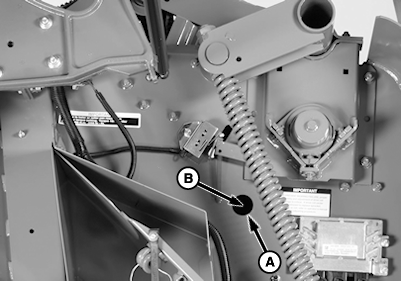
E67472-UN-24AUG12A - Access Hole
B - Calibration Hole
Lock the gate in the closed position. -
Start the tractor engine.
-
Calibration hole is an open hole, not one with a cap screw.
Stand on a ladder when observing calibration so that your eyes are at the same height as the hole in the baler side sheet.
If the calibration hole in the tension arm goes past the baler access hole while raising the tension arm, lower the tension arm and repeat as necessary.
Using the tractor SCV, raise the belt tension arm until the calibration hole in the tension arm (B) is centered in the baler access hole (A).
-
Engage the tractor park brake and place the transmission in Park.
-
Shut off the tractor engine.
-
Turn the tractor ignition key to the ON position. Do not start the tractor engine.
-
Select the Main Page softkey.
E84866-UN-05OCT17 -
Select the Settings softkey.
E84879-UN-09OCT17 -
Select Baler Calibration softkey.
E64646-UN-11MAY12 -
Select Bale Diameter Calibration softkey.
E64648-UN-11MAY12 -
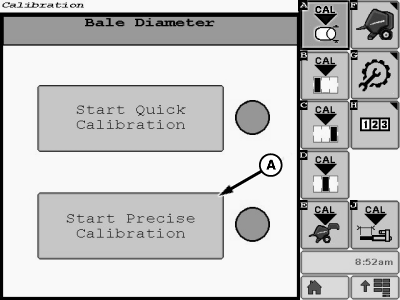
E85305-UN-01NOV17A - Start Precise Calibration Button
Select the Start Precise Calibration button (A) on the calibration page.The Start Precise Calibration button is displayed only if the Quick Calibration process was completed previously. If Quick Calibration was not completed, see Calibrate Bale Diameter Sensor—Quick Calibration in this section.
-
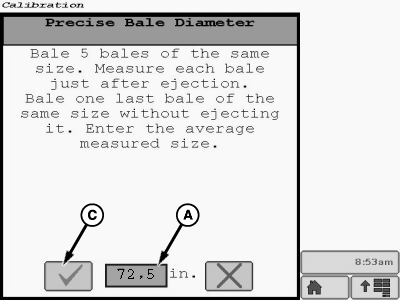
E85375-UN-02NOV17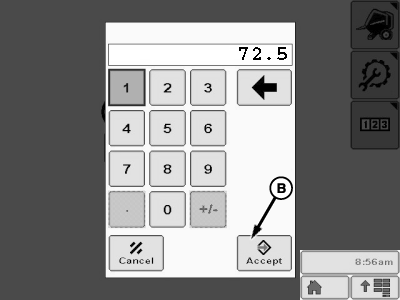
E85376-UN-02NOV17A - Bale Diameter Input Box
B - Accept Button
C - Task Completion Box
Select the bale diameter input box (A) on the calibration screen. A numerical keypad pops up on the screen. Using the keypad, enter 72.5 and select the accept button (B). This setting then appears in the bale diameter input box on the calibration screen. -
Select the task completion box (C).
-
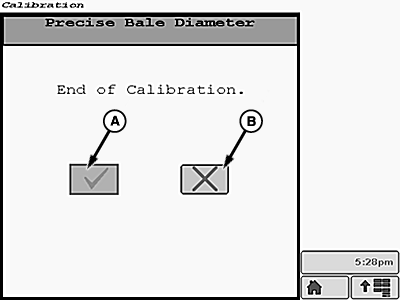
E85343-UN-01NOV17A - Task Completion Box
B - Cancel Calibration Box
When the End of Calibration page appears on the monitor, select the task completion box (A). If necessary, select the cancel calibration box (B). -
After the task completion box is selected, the Calibration Successful screen is displayed.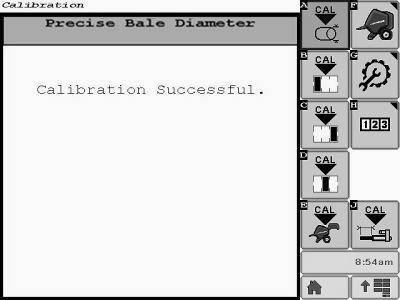
E85344-UN-01NOV17 -
If additional calibrations are necessary, the desired calibration softkey can be selected from the main menu on the current display screen.
Select the Main Page softkey to return to the baler application main page.
E84866-UN-05OCT17
|
DP99999,0000E7C-19-20171102 |