Calibrate Bale Diameter Sensor—Precise Calibration (Field Method)
If the diameter of actual bales is different from the bale diameter shown on the monitor, the monitor can be fine-tuned in the field to match actual bale sizes.
Bale diameter variations can happen in short or slick crops like straw or fine grasses which cause the bale to expand when discharged from the baler. Additional twine or net wraps can be applied to reduce the tendency for the bale to expand after being discharged from the baler.
-
From the baler application main page, select the Settings softkey.
E84879-UN-09OCT17 -
Select the Bale Diameter Calibration softkey.
E64648-UN-11MAY12 -
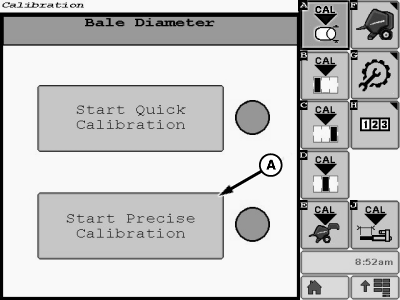
E85305-UN-01NOV17A - Start Precise Calibration Button
Select the Start Precise Calibration button (A). -
To get an actual bale diameter for each bale, measure the diameter horizontally and vertically on both ends of the bale. Then, add these four dimensions together and divide by 4 to get the average diameter for each bale.
To calculate the average diameter of the sample of five bales, add the average diameter of each bale together. Then, divide by the number of bales measured.
Bale five bales of the same size. Measure the average diameter of each bale. Then, calculate the average diameter of the five bales.
-
Make one more bale of the same size. Wrap the bale and disengage the PTO. Do not eject the bale.
-
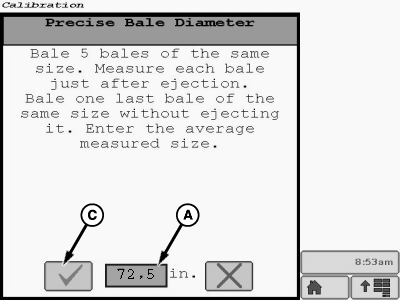
E85375-UN-02NOV17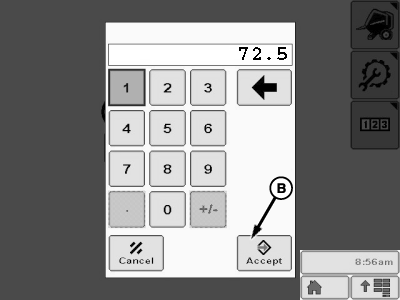
E85376-UN-02NOV17A - Average Bale Diameter Input Box
B - Accept Button
C - Task Completion Box
Select the average bale diameter input box (A) on the calibration page. A numerical keypad appears on the screen. -
Using the keypad, enter the measured average bale diameter for the sample group of bales into the keypad display. Select the accept button (B) to enter the value in the calibration.
The program in the baler monitor compares the actual average measured diameter for the group to the displayed diameter of the last bale. The program then adjusts the displayed bale size to the actual size.
-
Select the task completion box (C).
-
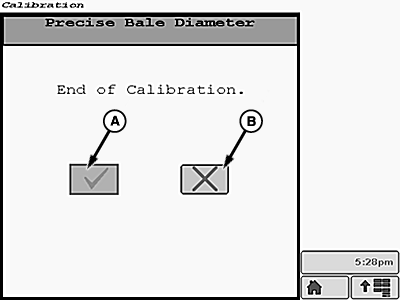
E85343-UN-01NOV17A - Task Completion Box
B - Cancel Calibration Box
When the End of Calibration screen is displayed, select the task completion box (A). If necessary, select the cancel calibration box (B). -
After the task completion box is selected, the Calibration Successful screen is displayed.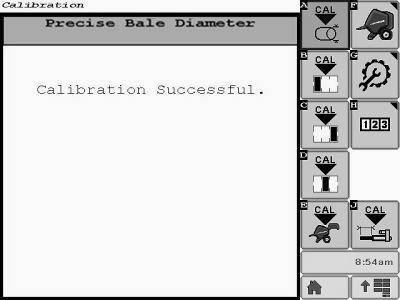
E85344-UN-01NOV17 -
Select the Main Page softkey to return to the baler application main page.
E84866-UN-05OCT17
|
DP99999,0000E7D-19-20171102 |